Flutter Cyclomatic Complexity Guide

Every Flutter developer (most likely) has opened that one screen, the one with the giant build method stuffed with feature flags, platform checks, theme conditionals, and inline onPressed handlers nobody dares to touch. You scroll through 200 lines of nested if/else, thinking "this should be two widgets… three widgets… a dozen widgets," but there's never time to refactor, and adding one more condition feels safer than rewriting the whole thing.
The result? A maintenance nightmare where every small feature spawns a dozen edge-case bugs.
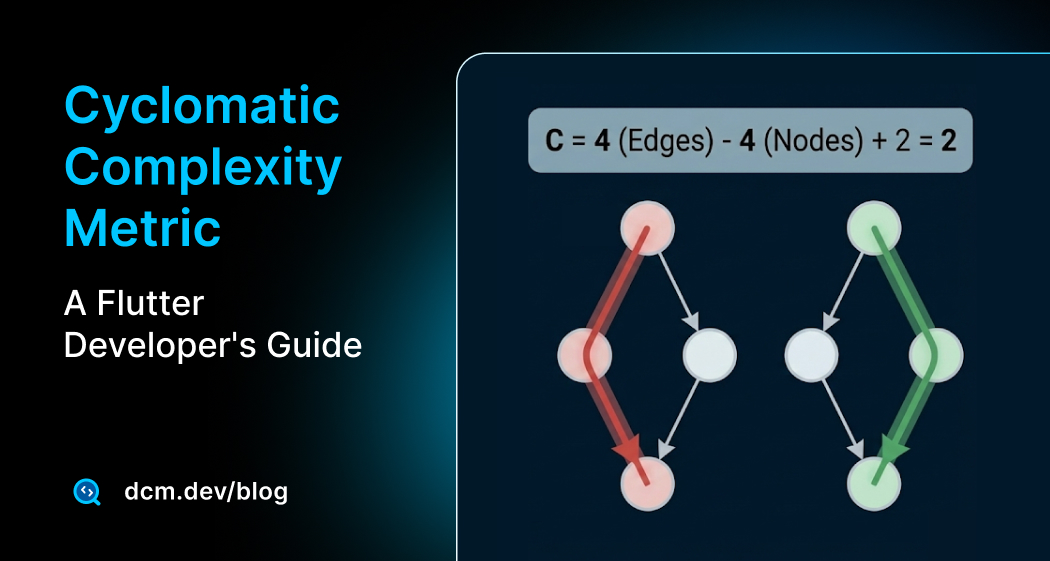
That gut feeling of "too many branches" has a name: Cyclomatic Complexity. It's a metric that counts the independent paths through a function. The higher the number, the more execution routes your tests (and your brain) need to cover.
In this post, we'll measure and tackle complexity in Flutter projects and you'll learn best practices around this topic.
Let's get started!
What Cyclomatic Complexity Actually Measures
Cyclomatic Complexity was introduced by Thomas McCabe in 1976 in his paper, "A Complexity Measure".
The idea is simple:
count every decision point in a function and add one.
Each decision is a fork in the road that execution might take.
McCabe’s original idea was that every new path is another test case you should care about. When paths explode, the mental model collapses, regressions sneak in, and reviewers struggle to reason about side effects. Even in pure math terms, you can think of complexity as the number of linearly independent paths through a control-flow graph, more edges, more chances to miss a corner case.

The Formula Behind Cyclomatic Complexity
If you model a function as a control-flow graph (nodes are blocks of code, edges are possible jumps), cyclomatic complexity can be computed directly from that graph:
- E: number of edges in the graph
- N: number of nodes in the graph
- P: number of connected components (for a single function, usually P = 1)
For most single methods, this simplifies to C = E - N + 2.
Why Cyclomatic Complexity Is Important
You can usually feel when a method is getting out of hand, but that feeling is subjective. One reviewer says, "this is too complex," another says, "it's fine." Metrics make that conversation objective. Instead of debating that can happen between you and team members, you can point to a cyclomatic complexity score of 15 and compare it to your team's agreed threshold of 10. In this case, all will have an objective goal for this metric and will have common understanding and agreement.
DCM, in Flutter and Dart world, ships with built-in metrics to surface this problem early.
How DCM Counts Cyclomatic Complexity in Dart
In DCM's implementation of Cyclomatic Complexity for Flutter and Dart, a function starts with a base complexity of 1 (the "happy path"), then adds one for each of the following:
| Construct | Example |
|---|---|
| Control-flow statements & expressions | if, for, while, do, catch (both statement and expression forms, e.g. collection if / for) |
| Conditional expressions | condition ? a : b |
case clauses | each case in a switch statement or expression |
| Logical operators (expressions) | a && b, a || b |
| Logical patterns | >= 0 && <= 10, 1 || 2 (in pattern-matching contexts like switch or if-case) |
| Null-aware operators | ?[], ?., ?.., ...?, {?key: value}, {key: ?value} |
| Coalescing operators | ??, ??= |
Note that else, finally, and default or last case don't add to the count — they're the fallback path, not a new decision.
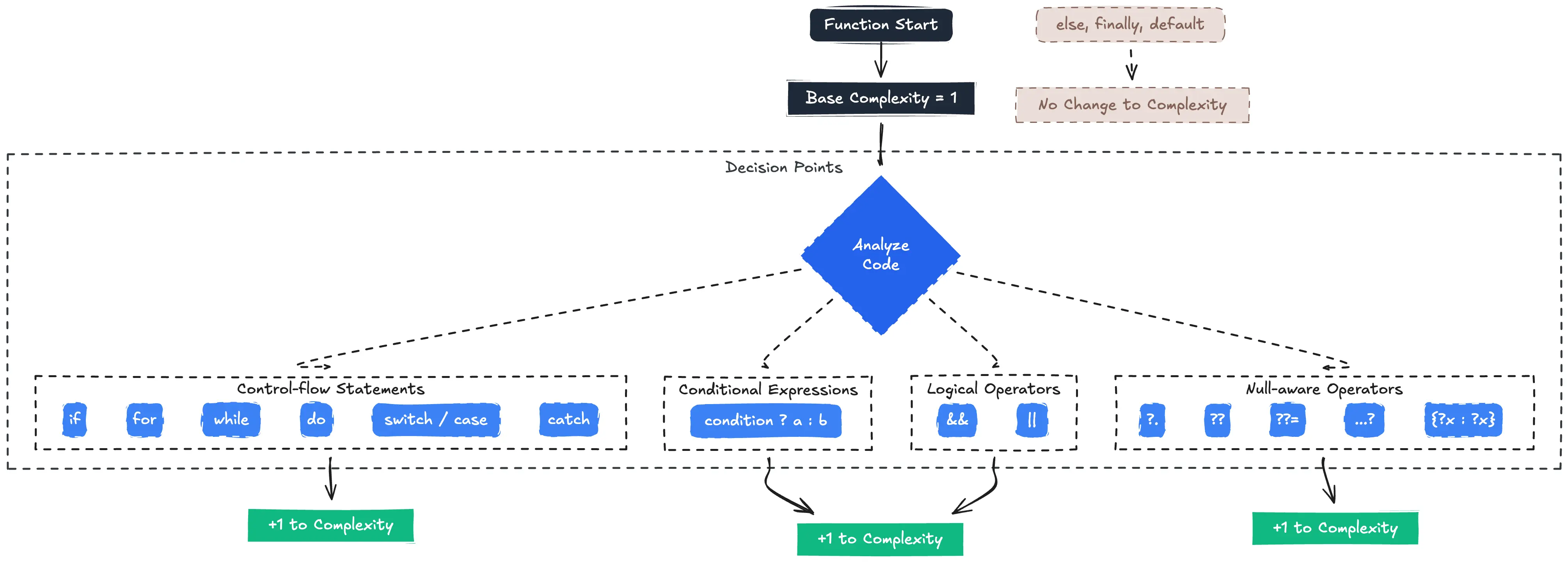
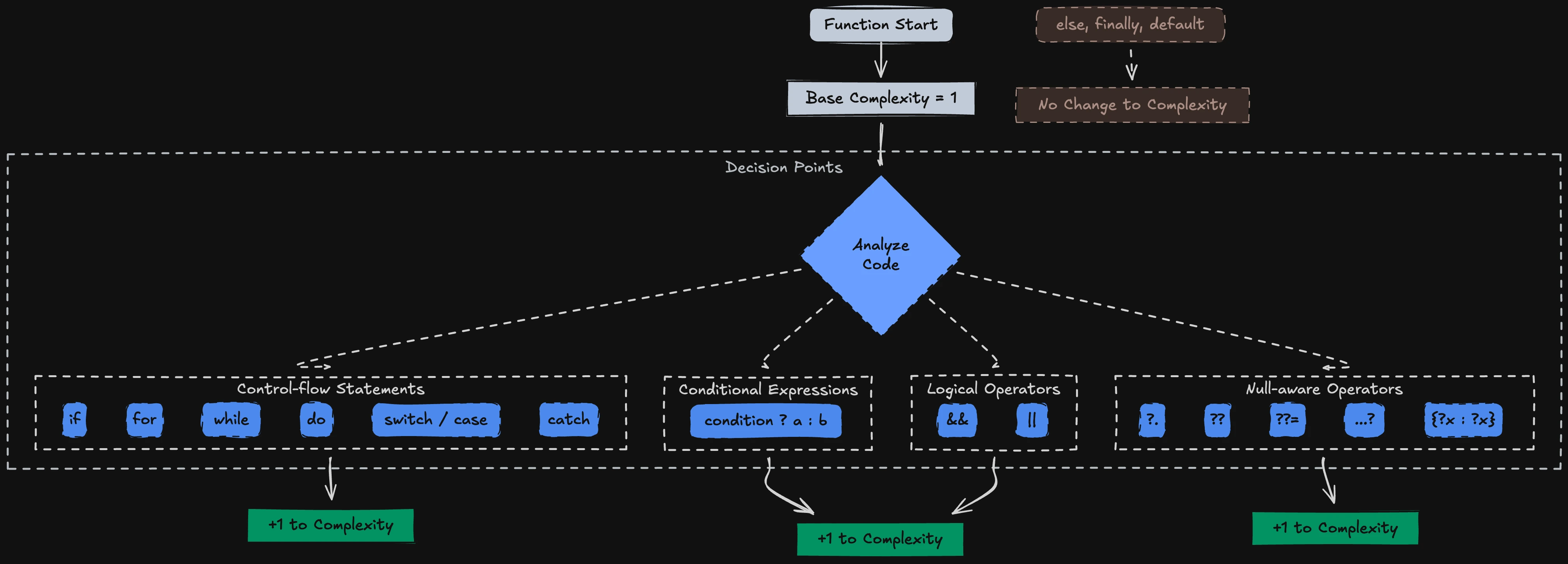
Think of it like a road map. A straight highway has complexity 1. Add a traffic circle with two exits, you're at 2.
Throw in conditional toll lanes based on time of day? Complexity climbs fast. The more intersections, the harder it is to mentally trace all possible routes and the harder it is to write tests that cover them.
In the HTML report, DCM shows which lines contribute to the cyclomatic complexity score, so you can see where the complexity is coming from. The video below shows what that looks like:
But only theory is not enough, let's get into more practical details in Flutter to see how you can address and tackle these issues.
Where Flutter Code Gets Too Complex
Flutter's declarative UI style pushes developers toward composing small widgets, but tight deadlines and evolving requirements often produce these complexity hotspots:
1. Giant build Methods
The most common offender. A single build method accumulates feature flags, A/B tests, theme checks, and conditional children until it becomes a wall of nested ternaries.
Widget build(BuildContext context) {
final theme = Theme.of(context);
final isDark = theme.brightness == Brightness.dark;
final platform = theme.platform;
final isPremium = user.subscription.isActive && !user.isBanned;
final canShare = featureFlags.shareEnabled && platform == TargetPlatform.iOS;
final canDownload = featureFlags.downloadEnabled && platform == TargetPlatform.android;
return Scaffold(
appBar: AppBar(
title: Text(isPremium ? 'Pro Dashboard' : 'Dashboard'),
),
body: Padding(
padding: const EdgeInsets.all(16),
child: Column(
children: [
if (isPremium)
PremiumBanner(user: user)
else
UpgradeBanner(),
if (canShare && !isDark)
ShareTile(onTap: () => _share(user))
else if (canDownload && isDark)
DownloadTile(onTap: () => _download(user))
else
const SizedBox.shrink(),
if (isPremium && canDownload && canShare)
const Text('Unlock all features!'),
OrderList(
orders: orders,
onTap: (order) {
if (order.isRefunded) {
_showRefund(order);
} else if (order.isPending && isPremium) {
_expedite(order);
} else if (order.isGift && canShare) {
_shareGift(order);
} else {
_openDetails(order);
}
},
),
],
),
),
);
}
Just to understand how many branches this method has, let's just look at control-flow-graph of this method:
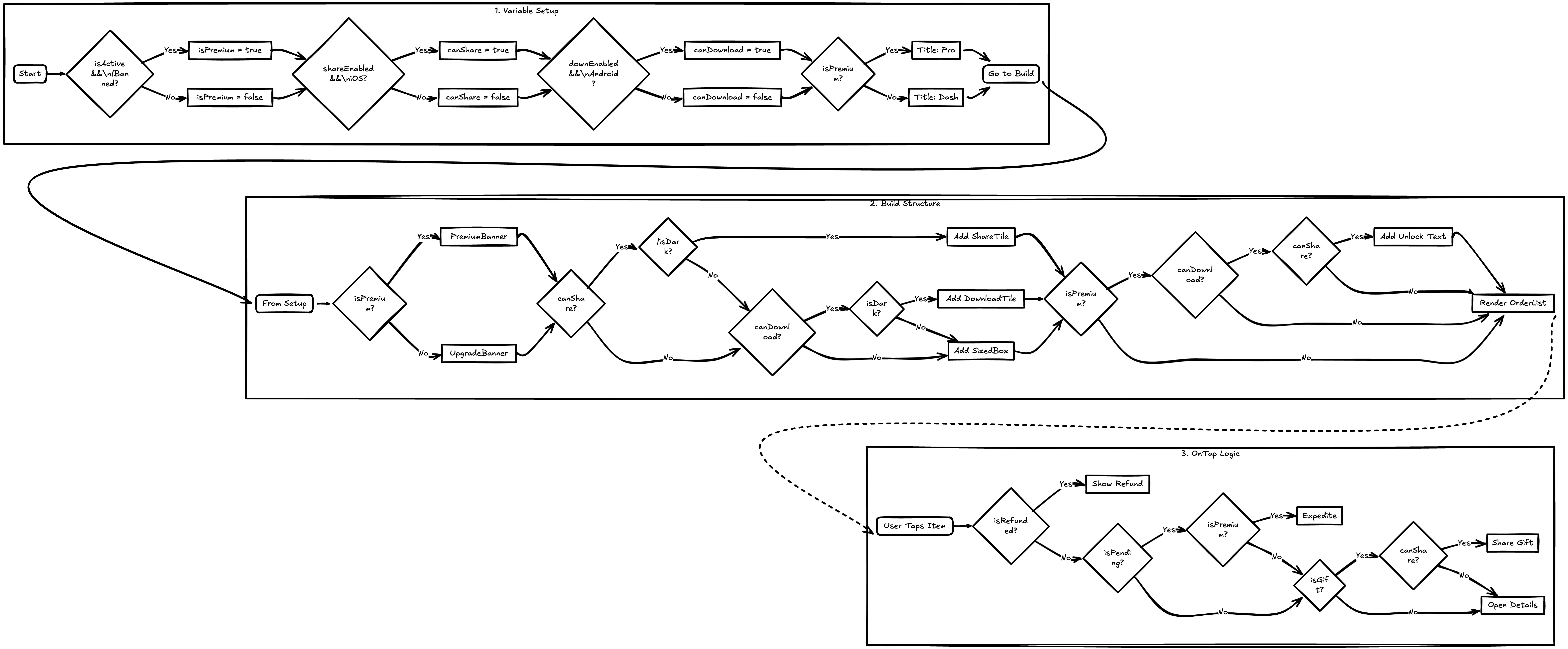
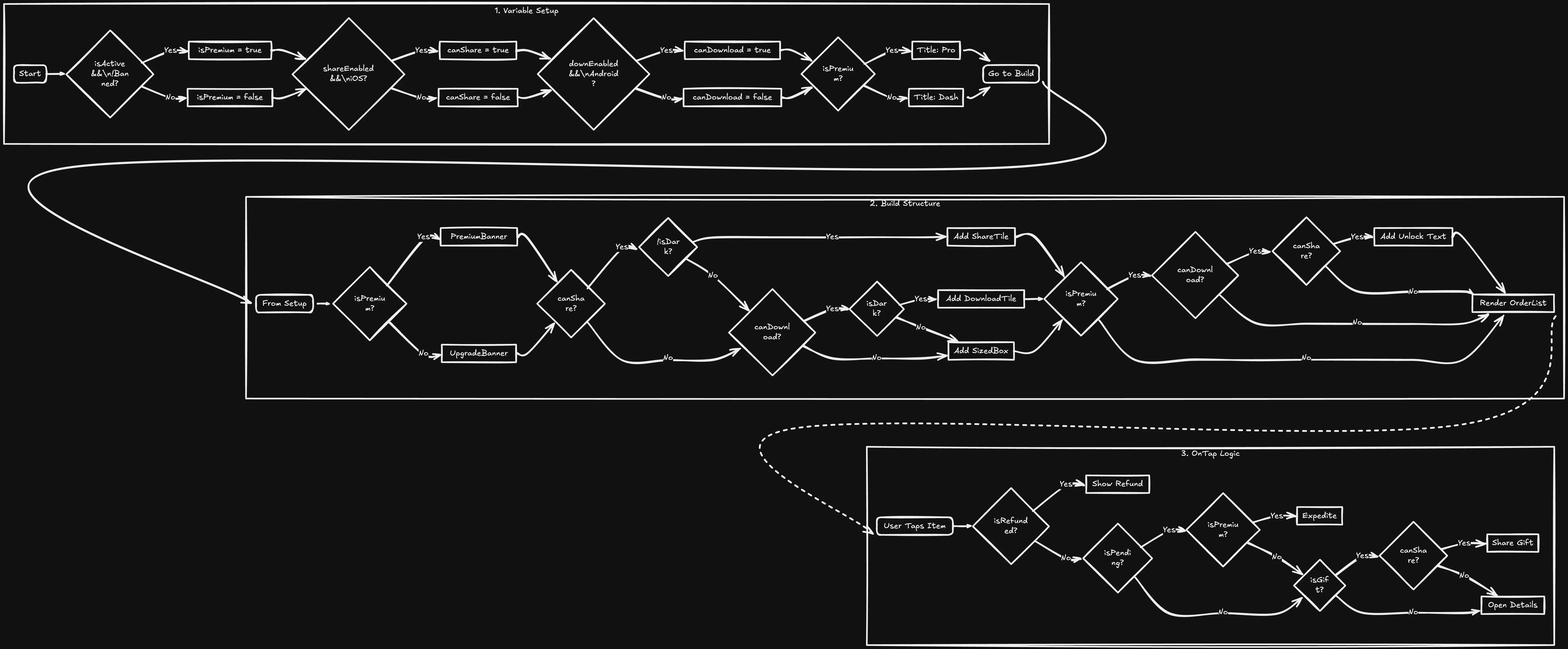
You see how complex and confusing it is! Even its not readable and even if you try to make it readable still you will loose the context after some branches.
Cyclomatic complexity for the example above is 18. If your team uses a threshold of 10, this method is clearly over it.
Let's now see how to fix it.
-
Step 1: Extract conditional UI into helpers/child widgets:
Widget get _actionTile {
  if (_canShare && !_isDark) return ShareTile(onTap: () => _share(user));
  if (_canDownload && _isDark) return DownloadTile(onTap: () => _download(user));
  return const SizedBox.shrink();
}
I personally recommend extracting that into a dedicated widget:
class ActionTile extends StatelessWidget {
final bool canShare;
final bool canDownload;
final bool isDark;
final VoidCallback onShare;
final VoidCallback onDownload;
const ActionTile({
super.key,
required this.canShare,
required this.canDownload,
required this.isDark,
required this.onShare,
required this.onDownload,
});
Widget build(BuildContext context) {
if (canShare && !isDark) return ShareTile(onTap: onShare);
if (canDownload && isDark) return DownloadTile(onTap: onDownload);
return const SizedBox.shrink();
}
}
// Usage inside build
Widget get _actionTile => ActionTile(
canShare: _canShare,
canDownload: _canDownload,
isDark: _isDark,
onShare: () => _share(user),
onDownload: () => _download(user),
); -
Step 2: Move
onTaplogic into a named method with guard clauses:void _handleOrderTap(Order o) {
if (o.isRefunded) return _showRefund(o);
if (o.isPending && _isPremium) return _expedite(o);
if (o.isGift && _canShare) return _shareGift(o);
_openDetails(o);
}
After these refactors, the build typically drops to ~1–3, and each helper stays under ~3–6.
// A complete refactored build using the extracted helpers
Widget build(BuildContext context) {
return Scaffold(
appBar: AppBar(title: Text(_isPremium ? 'Pro Dashboard' : 'Dashboard')),
body: Padding(
padding: const EdgeInsets.all(16),
child: Column(
children: [
_banner,
_actionTile,
_unlockLabel,
OrderList(orders: orders, onTap: _handleOrderTap),
],
),
),
);
}
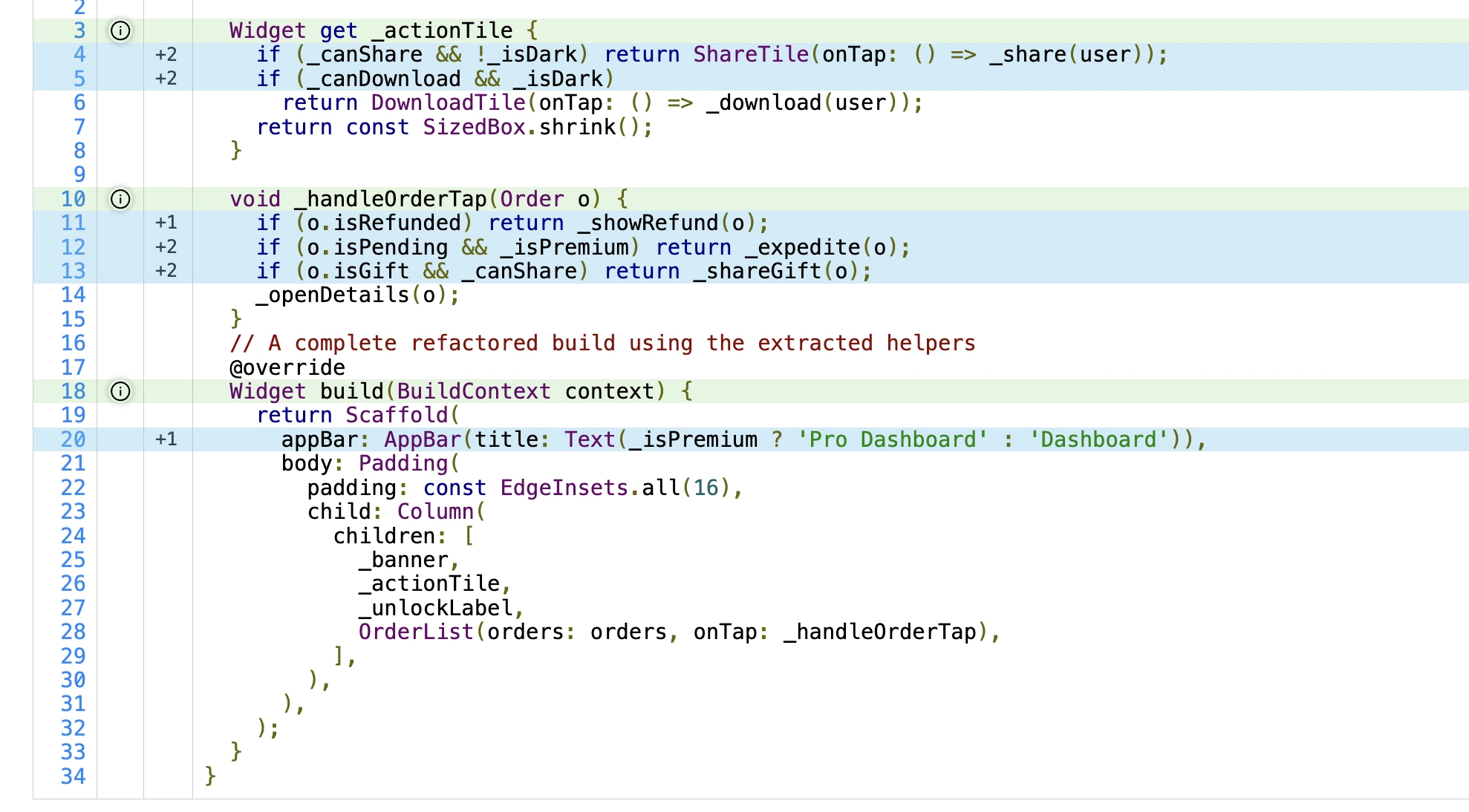
Let me repeat one of my notes above again as it's important. Extracting UI into function getters is a good stepping stone, but the stronger approach is to extract into dedicated widgets. Widgets encapsulate state, enable focused tests, and keep build focused on composition.
2. Inline onPressed Handlers
It's generally not a good idea to put business-logics in callbacks! Yet it's tempting to toss validation, network calls, and error handling right into the button:
ElevatedButton(
  onPressed: () {
    if (!_formKey.currentState!.validate()) {
      _showSnackBar('Please fix the errors');
      return;
    }
    if (quota.remaining <= 0) {
      _showSnackBar('Daily limit reached');
      return;
    }
    if (connectivity.isOffline && featureFlags.offlineMode) {
      _queueForLater();
    } else {
      _submitNow();
    }
  },
  child: const Text('Submit'),
)
Three decision points hiding inside a widget tree. This makes the UI file harder to scan and the logic harder to test.
Here are few points to refactor the callback above:
- Extract to a named method: Keep widget trees easy to scan and move branching into a private method.
- Use guard clauses: Return early on invalid states to keep nesting flat.
- Separate concerns: Push side effects (network, storage) into a service so the handler orchestrates only.
- Keep callbacks small: The example above already scores 5 (three
ifs + one&&), and that is enough branching to make an inline handler harder to scan. - Leverage DCM rules: Enable
prefer-extracting-callbacksto flag long inline handlers in PRs.
// In your widget class
Future<void> _handleSubmit() async {
if (!_formKey.currentState!.validate()) {
return _showSnackBar('Please fix the errors');
}
if (quota.remaining <= 0) {
return _showSnackBar('Daily limit reached');
}
if (connectivity.isOffline && featureFlags.offlineMode) {
return _queueForLater();
}
try {
await _submitService.submit(formData);
_showSnackBar('Submitted');
} catch (e) {
_showSnackBar('Something went wrong');
}
}
Widget build(BuildContext context) {
return ElevatedButton(
onPressed: _handleSubmit,
child: const Text('Submit'),
);
}
If the handler grows, split responsibilities further:
class SubmitService {
  final Connectivity connectivity;
  final FeatureFlags featureFlags;
  SubmitService(this.connectivity, this.featureFlags);

  Future<void> routeSubmit({required FormData data, required int quota}) async {
    if (quota <= 0) throw QuotaExceeded();
    if (connectivity.isOffline && featureFlags.offlineMode) {
      return queueForLater(data);
    }
    await submitNow(data);
  }
}

Future<void> _handleSubmit() async {
  if (!_formKey.currentState!.validate()) {
    return _showSnackBar('Please fix the errors');
  }
  try {
    await _service.routeSubmit(data: formData, quota: quota.remaining);
    _showSnackBar('Submitted');
  } on QuotaExceeded {
    _showSnackBar('Daily limit reached');
  } catch (_) {
    _showSnackBar('Something went wrong');
  }
}
Callbacks should read like a checklist, "validate → route → submit", with one or two decision points at most.
Let dedicated services own the complex paths.
3. Feature Flags and Platform Branches
Cross-platform apps and gradual rollouts inevitably introduce conditions: "show this button on iOS only," "enable dark mode experiment for 10% of users." Each flag is another fork in the road.
Generally, I may recall two patterns for refactoring here:
- Centralize flag logic: Resolve feature/platform conditions in one place.
- Widgetize branches: Return small widgets from a map instead of
if/elsepyramids.
Let's see an example below extracted from one of my projects:
class FeatureResolver {
final TargetPlatform platform;
final bool isDark;
final FeatureFlags flags;
FeatureResolver(this.platform, this.isDark, this.flags);
bool get canShare => flags.shareEnabled && platform == TargetPlatform.iOS && !isDark;
bool get canDownload => flags.downloadEnabled && platform == TargetPlatform.android && isDark;
}
class ActionTile extends StatelessWidget {
final FeatureResolver r;
final User user;
const ActionTile({super.key, required this.r, required this.user});
Widget build(BuildContext context) {
final builders = <String, WidgetBuilder>{
'ios-light-share': (_) => ShareTile(onTap: () => _share(user)),
'android-dark-download': (_) => DownloadTile(onTap: () => _download(user)),
};
final key = r.canShare
? 'ios-light-share'
: (r.canDownload ? 'android-dark-download' : 'none');
return builders[key]?.call(context) ?? const SizedBox.shrink();
}
void _share(User u) {/* ... */}
void _download(User u) {/* ... */}
}
// Usage inside build
Widget get _actionTile => ActionTile(
r: FeatureResolver(Theme.of(context).platform, _isDark, featureFlags),
user: user,
);
This collapses multiple branches into a single decision key, making build easier to scan and maintain.
4. Ad-hoc setState Flows
Manual state management often leads to guard clauses checking mounted, current state, and async completion:
Future<void> _loadData() async {
  if (_isLoading) return;
  setState(() => _isLoading = true);

  try {
    final data = await repository.fetch();
    if (!mounted) return;
    if (data.isEmpty && _retryCount < 3) {
      _retryCount++;
      return _loadData();
    }
    setState(() {
      _items = data;
      _isLoading = false;
    });
  } catch (e) {
    if (!mounted) return;
    setState(() => _error = e.toString());
  }
}
Six or more branches in a single async method, easy to misread and easy to break.
To refactor such scenario, you can:
- Extract a loader method: Keep
buildclean; move branching to a private method. - Guard clauses over nesting: Return early on busy, unmounted, empty, or error states.
- Introduce a simple state enum: Replace multiple booleans with
LoadingStateto reduce condition combos. - Avoid recursive retries: Use a loop or counter + early returns for clarity.
enum LoadingState { idle, loading, loaded, error }

class _ViewModel {
  int retryCount = 0;
  LoadingState state = LoadingState.idle;
  List<Item> items = const [];
  String? error;
}

final _vm = _ViewModel();

Future<void> _loadData() async {
  if (!mounted) return; // guard mounted first
  if (_vm.state == LoadingState.loading) return; // avoid duplicate loads

  setState(() => _vm.state = LoadingState.loading);

  try {
    final data = await repository.fetch();
    if (!mounted) return; // guard after await

    if (data.isEmpty && _vm.retryCount < 3) {
      _vm.retryCount++;
      setState(() => _vm.state = LoadingState.idle);
      return; // let caller decide when to call again
    }

    setState(() {
      _vm.items = data;
      _vm.state = LoadingState.loaded;
    });
  } catch (e) {
    if (!mounted) return;
    setState(() {
      _vm.error = e.toString();
      _vm.state = LoadingState.error;
    });
  }
}

Widget get _body => switch (_vm.state) {
  LoadingState.loading => const Center(child: CircularProgressIndicator()),
  LoadingState.error => ErrorView(message: _vm.error ?? 'Unknown error'),
  LoadingState.loaded => ItemsList(items: _vm.items, onRefresh: _loadData),
  _ => EmptyView(onRefresh: _loadData),
};
This flattens control flow, avoids recursion, and funnels UI rendering through a single state. In practice, the method’s cyclomatic complexity drops to ~4–6.
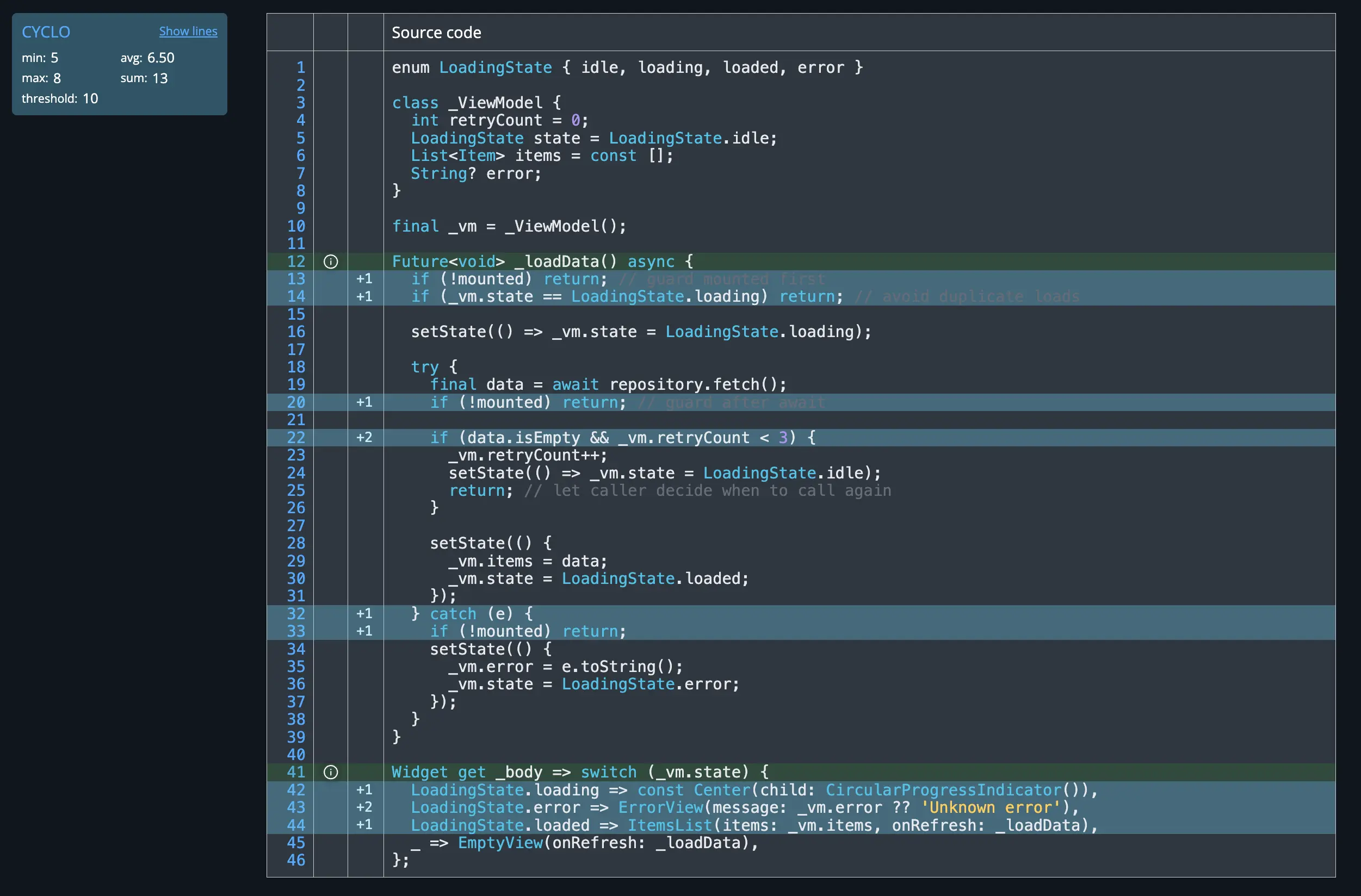
All of these can definitely be flag by DCM and let's see how you can leverage that!
Measuring Complexity with DCM
Here's how to set it up.
1. Add DCM to Your Project
If you haven't already, install DCM following the getting-started guide.
2. Configure the Threshold
Open (or create) analysis_options.yaml and add a metrics block:
dcm:
  metrics:
    cyclomatic-complexity:
      threshold: 10
The threshold key tells DCM: "warn me when any function exceeds this number."
The default is 15. In this post, we use 10 as a stricter threshold.
3. Run the Analysis
dcm calculate-metrics lib
DCM outputs a per-function report. Functions exceeding the threshold appear in the results, along with their exact complexity score.
Here is an example output:
~/.../flutter_test_cases on main ✗  > dcm calculate-metrics lib/metrics/cyclomatic.dart
✔ Calculation is completed. Preparing the results: 29ms

lib/metrics/cyclomatic.dart:
    • function build (1 entry):
      HIGH      This function has cyclomatic complexity of 18, which exceeds the threshold of 10.
                cyclomatic-complexity : https://dcm.dev/docs/metrics/function/cyclomatic-complexity

Scanned folders: 1
Scanned files: 1
Scanned classes: 0

Name                       Min   Max   Avg   Sum
cyclomatic-complexity  1  18.0  18.0  18.0  18.0

To view all metric values, pass the "--report-all" flag
To get a more detailed report, pass the "--reporter=html" option
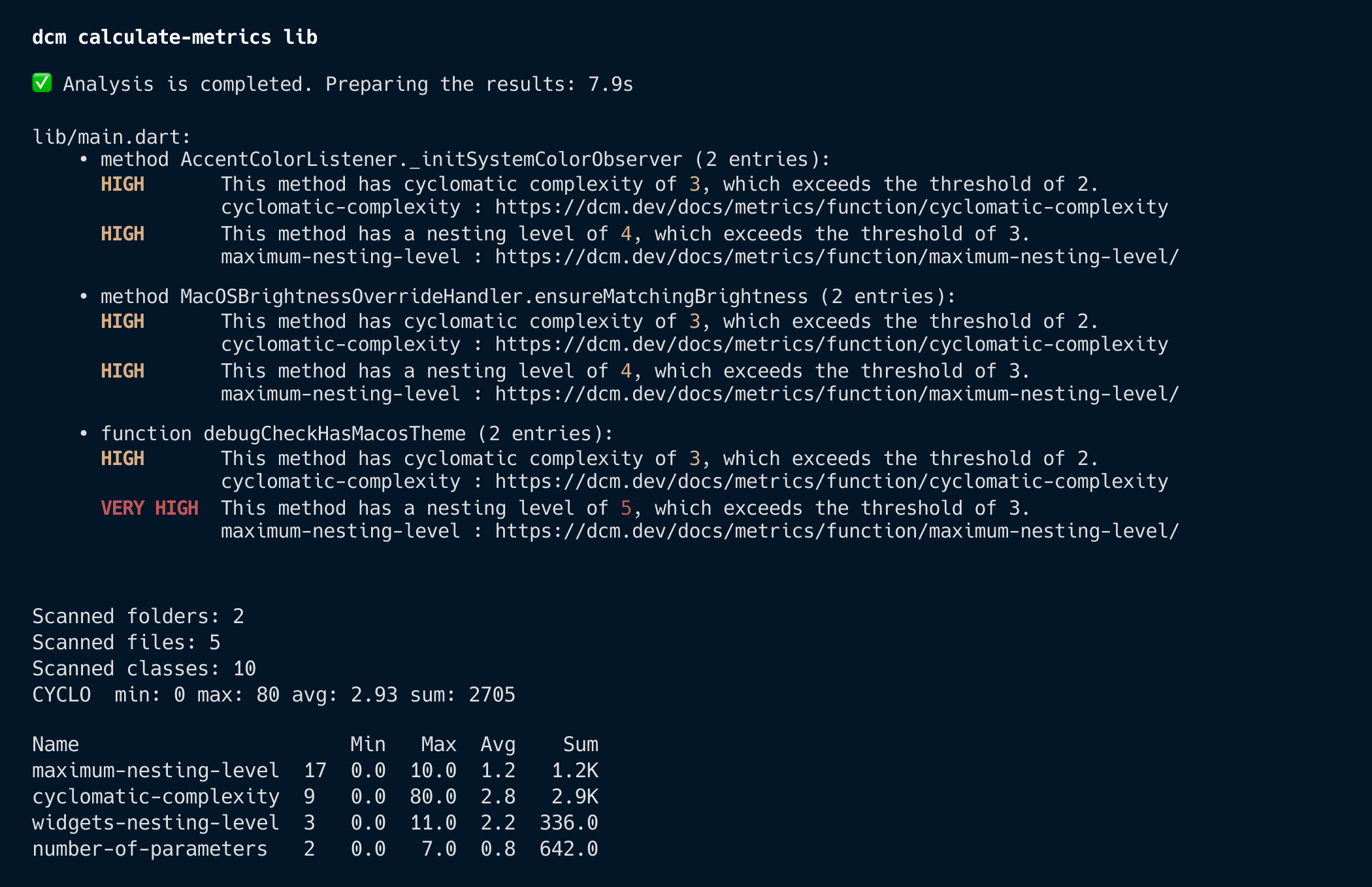
Here is a screenshot to show the full report when combined with other metrics and more files to be scanned:
Interpreting the Numbers
The exact number is a team decision and please consult with each other to land on a proper score. If you use 10 as the threshold which we did in this blog post, a practical way to read the numbers is:
| Range | Guidance |
|---|---|
| 1–5 | Simple, easy to test |
| 6–10 | Still manageable, but watch it |
| 11–15 | Over the threshold, refactor |
| 16+ | High complexity, split or simplify |
A single-digit score usually means the function does one thing well. Once a function moves past 10, it is already a refactoring target for teams using that stricter threshold.
Note, the default value from DCM is 15 so you can adjust this interpretation based on your score.
Refactoring Checklist
The earlier sections already show the detailed examples. Here is the short version:
-
Keep
buildsmall. Push branching into helper getters (I do not recommend this but it's one way of doing it) or child widgets. If yourbuildkeeps growing, split it. -
Extract callbacks. Name the intent (
_handleSubmit,_onItemTap) and move branching out of inline handlers. -
Favor guard clauses.
if (bad) return;keeps control flow flatter than longelseladders. -
Centralize repeated conditions. Move feature-flag, platform, or state checks into small helpers or resolver objects when it improves readability.
-
Measure again after refactoring. Re-run
dcm calculate-metrics liband confirm the score actually dropped.
Pair with Related Rules
Complexity often correlates with other smells. Enable complementary DCM rules:
-
avoid-high-cyclomatic-complexity: warns when a function or method exceeds the configured cyclomatic complexity threshold.dcm:
rules:
- avoid-high-cyclomatic-complexity:
threshold: 10 -
prefer-extracting-callbacks: flags inline handlers longer than N lines.dcm:
rules:
- prefer-extracting-callbacks:
allowed-line-count: 3
ignored-named-arguments:
- onPressedHere is a good example:
class MyWidget extends StatelessWidget {
Widget build(BuildContext context) {
return TextButton(
style: ...,
onPressed: () => handlePressed(context),
child: ...
);
}
void handlePressed(BuildContext context) {
...
}
}
class MyWidget extends StatelessWidget {
Widget build(BuildContext context) {
return TextButton(
style: ...,
onPressed: handlePressed,
child: ...
);
}
void handlePressed() {
...
}
} -
prefer-single-widget-per-file: encourages small, focused widget files. You can also configure this rule!dcm:
rules:
- prefer-single-widget-per-file:
ignore-visible-for-testing: false
ignore-private-widgets: trueThen for this configuration with private widget being ignored, the good example would be:
class SomeWidget extends StatelessWidget {
Widget build(BuildContext context) {
...
}
}
// Correct, private widgets are ignored
class _SomeOtherWidget extends StatelessWidget {
Widget build(BuildContext context) {
...
}
} -
Nesting-level metrics like
maximum-nesting-level: catches deepifpyramids even if raw complexity is moderate.dcm:
...
metrics:
...
maximum-nesting-level:
threshold: 5
...
Conclusion
Cyclomatic Complexity is a leading indicator of maintenance pain. High-complexity functions hide bugs, resist testing, and slow down code reviews.
Start measuring it. Configure a threshold in DCM, run the analysis, and work through the worst offenders first.
This matters even more as the codebase grows or when the team has a wider range of experience levels. More code means more places for complex methods to accumulate, and less experienced developers will have a harder time reviewing and changing them safely.
Happy coding!
Enjoying this article?
Subscribe to get our latest articles and product updates by email.
 Dmitry Zhifarsky