DCM 2025: Year in Review


2025 was an exciting year for DCM. From 1.26.0 (January) to 1.34.0 (December), we shipped 8 releases packed with most-requested and practical features and continued our mission to help Dart and Flutter teams write better and higher quality code.
Here's a quick snapshot of what we accomplished:
- 93 new rules added (now 478 total)
- Common: +64
- Flutter: +12
- Riverpod: +7
- Pub: +6
- Provider: +2
- Equatable: +1
- Easy Localization: +1
- 200+ fixes and rules improved with better accuracy, new cases and new fixes including over 50 fixes for existing rules that have been added and 146 unique rules improved.
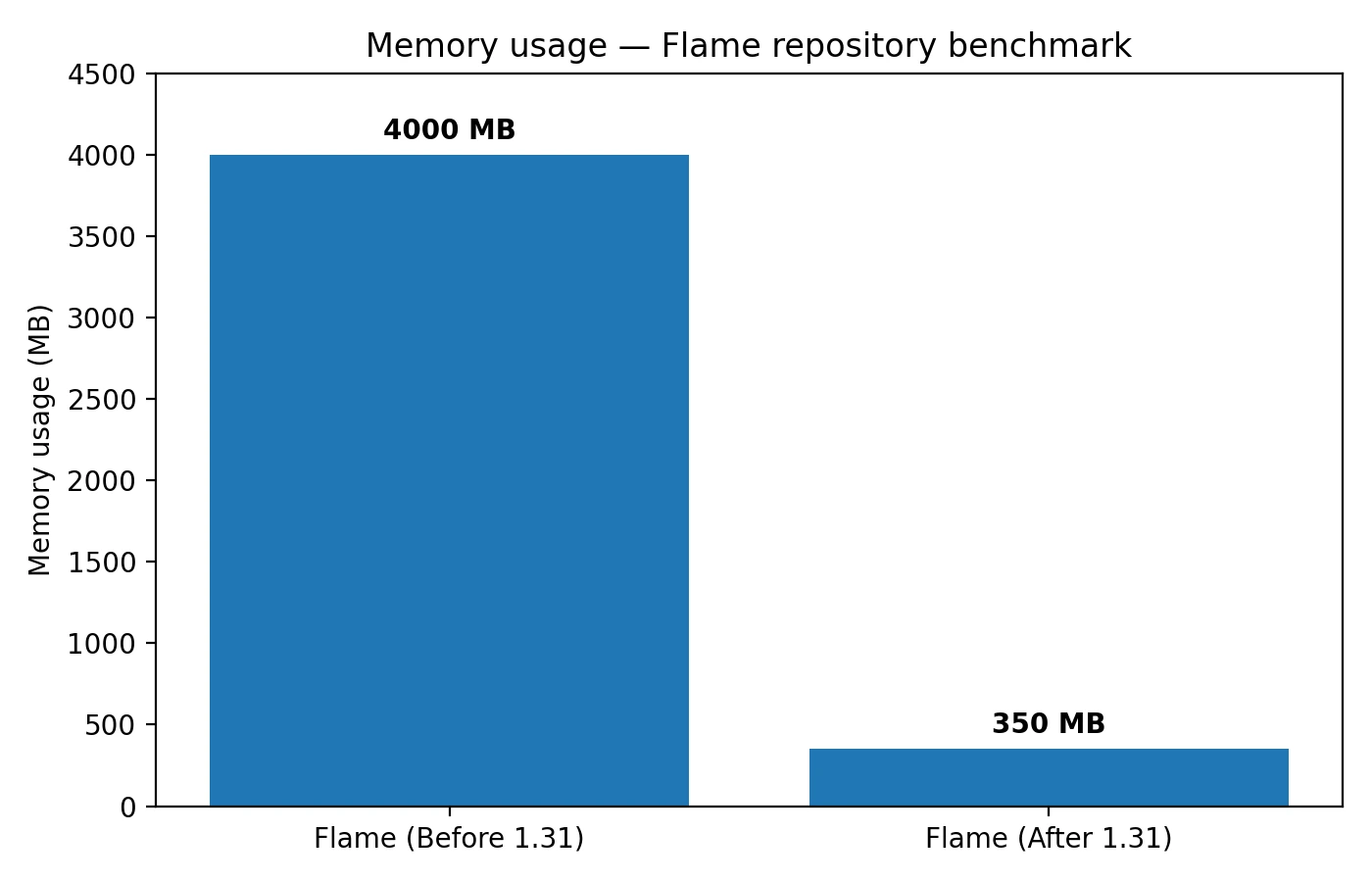
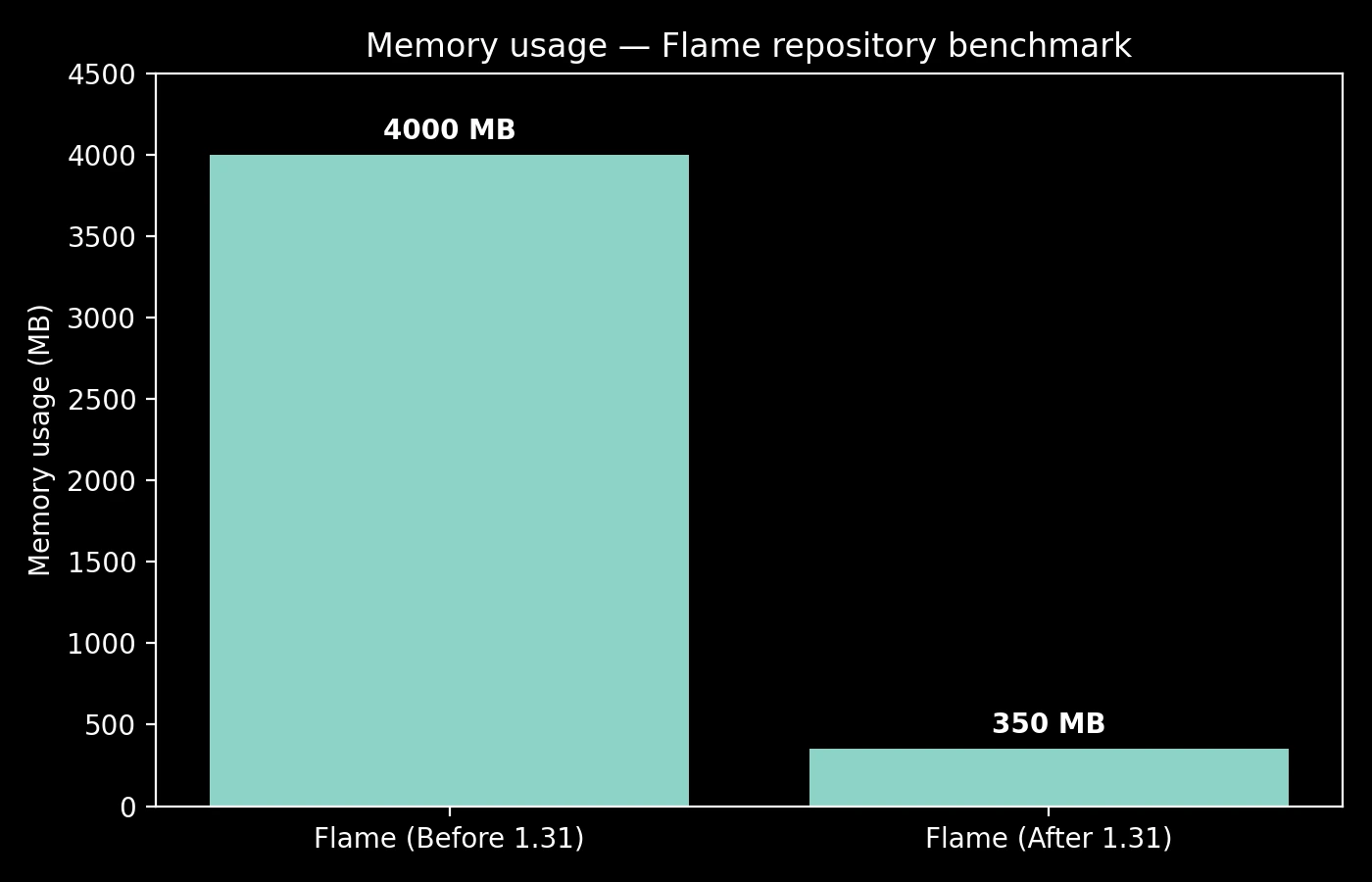
- Up to 91% memory reduction when running CLI commands on large repos (4GB → 350MB)
- 44 new rules added to the recommended preset which makes it in total 181 rules
- Metrics improved with now show line-level attribution in HTML reports, support advanced configuration per path, include a new
dcm init metrics-previewcommand and many improvements along. - 43+ rules added to the Free tier (now has 100 rules)
- Dot shorthands support added within a short time of releasing that feature in Dart. A comprehensive blog was released as well.
- DCM Dashboards went from closed beta to GA
- MCP Server integration for IDE-agnostic tooling and tighter integration with AI assisted tooling
- Baseline support expanded to all code quality commands
This year, our enterprise-grade linting tool helps you focus on building your apps with high standards, quality and less-friction.
Let's take a look back at the highlights!
1. DCM Dashboards
One of our biggest launches this year was DCM Dashboards, a new part of our product that helps you get a clear view of all open issues and metrics, and how the numbers change over time.
We started with a closed beta in February (1.27.0) and made it generally available in April (1.28.0) to all Teams and Enterprise users.
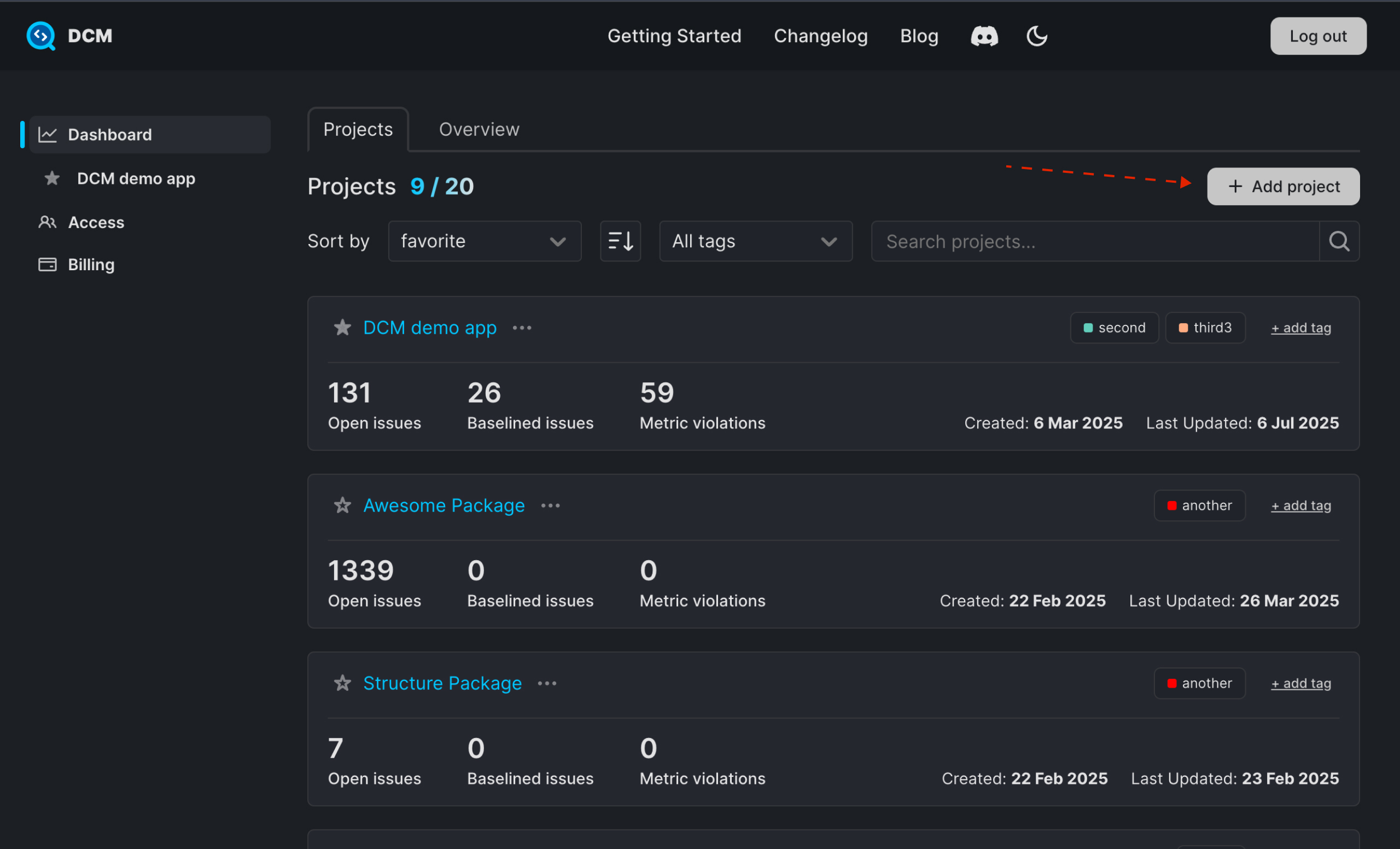
The key Dashboard features include:
- Projects Overview: High-level summary of all active projects, whether single packages or full monorepos
- Issues Overview: Breakdown of issues grouped by categories with estimated time to fix
- Open Issues Over Time: A chart showing how open issues change over time for different intervals (e.g. 7 days, 30 days, etc)
- Metrics: Summary view of all enabled metrics
- Printable Reports: Export dashboards as PDF for sharing with stakeholders
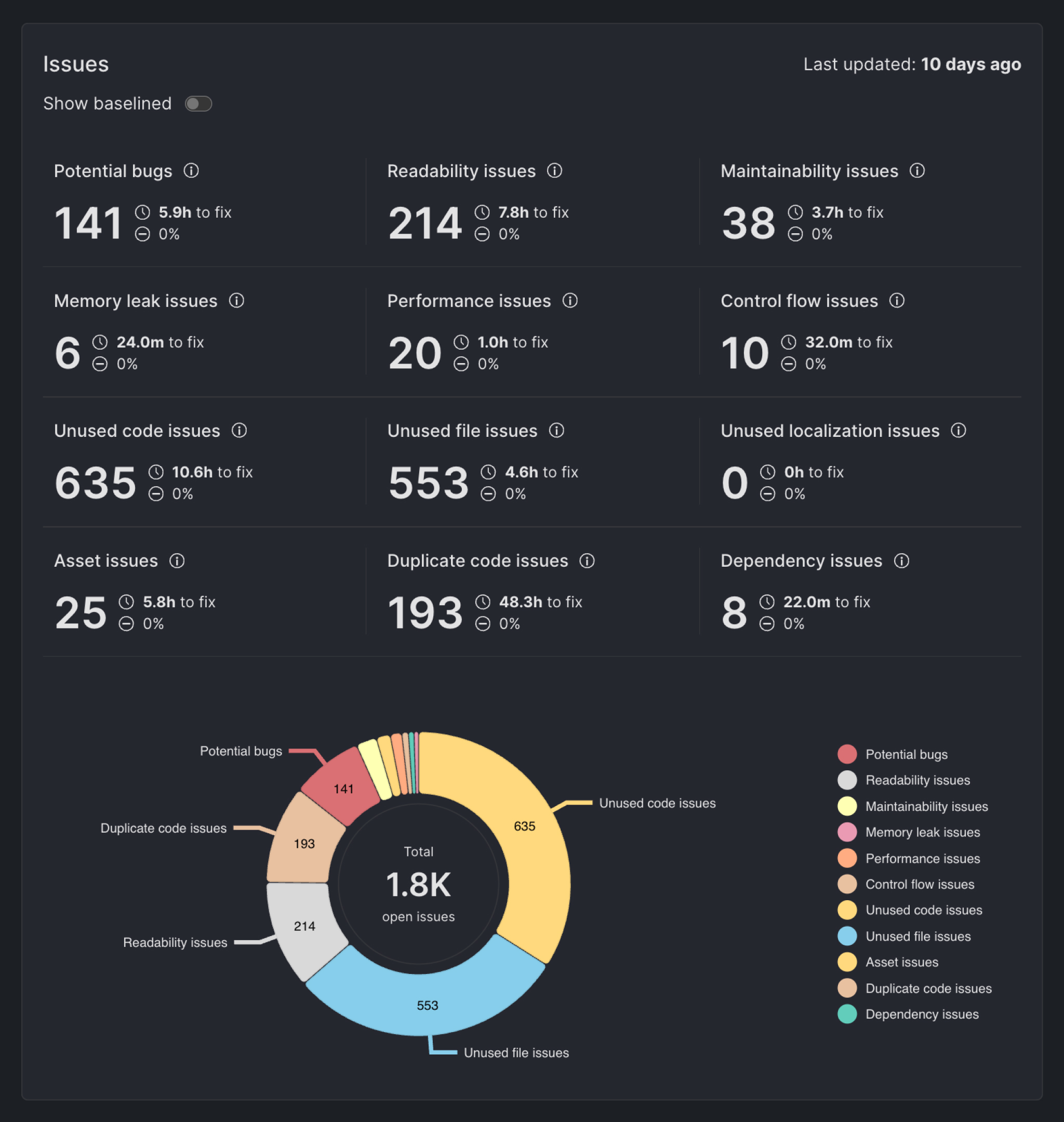
Throughout the year, we continued to enhance Dashboards:
- New summary views replacing detailed views for better usability (1.30.0)
- Issues/metric violations change display Added support for displaying how the number of issues/metric violations changed compared to the previous interval. For the issues overview section, the default interval is 7 days (1.31.0)
- "View Selected" role for granular project access control (1.32.0)
- Updated billing page with better seat selection UX (1.32.0)
- Automatic project creation based on monorepo structure via
--scaffold(1.33.0) - Project tagging system for better organization (1.33.0)
- External user invites with "View Selected" role (1.33.0)
- Redesigned Dashboards page (1.33.0)
These improvements made the dashboard a powerful companion for teams who want more control and observability, especially important in this era of AI-generated code.
For setup and day-to-day usage, these docs are a great starting point:
Want to dive deeper? Read the dedicated posts: Announcing DCM Dashboards (Closed Beta) and DCM Dashboards GA.
2. Rules
This year we added 93 new rules and improved 50+ existing rules with better accuracy and new cases. Here's the breakdown by category:
| Category | New Rules |
|---|---|
| Common | 67 |
| Flutter | 12 |
| Riverpod | 7 |
| Pub | 6 |
| Provider | 2 |
| Equatable | 1 |
| Easy Localization | 1 |
In addition to new rules, we shipped 206 individual improvements in which 54 new fixes, 32 bundled with the new rules and 22 added to existing rules and also improved 146 unique rules with better accuracy, fewer false positives and support for new cases.
Among these rules, we also brought to you a support to latest Dart and Flutter features.
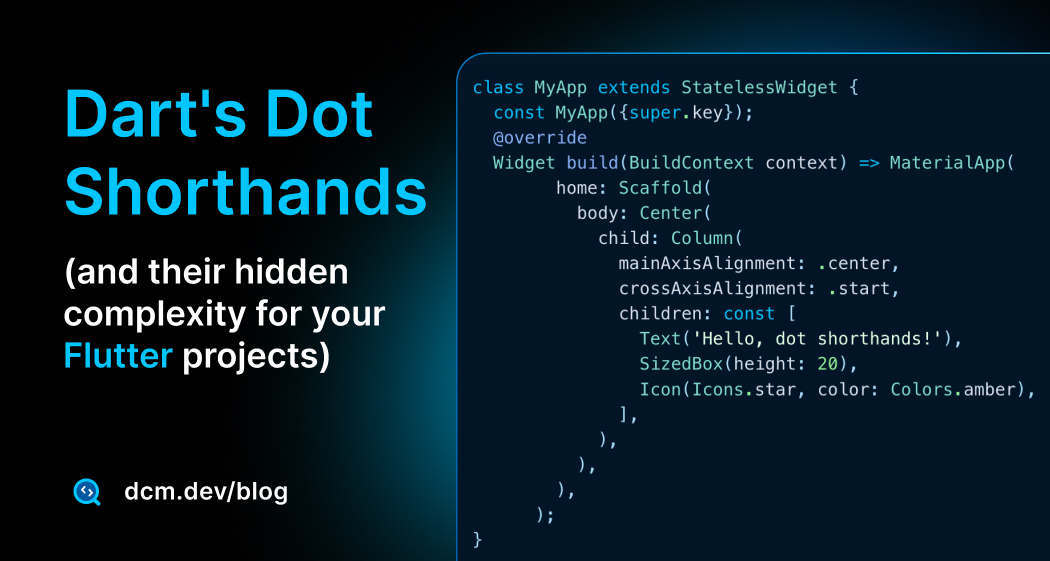
Dot Shorthands Rules (1.33.0)
One of our rule updates was comprehensive Dot Shorthands support, which was released right after Dart 3.10 Dot Shorthands feature release in Nov 2025.
We added 5 dedicated rules:
- prefer-returning-shorthands
- prefer-shorthands-with-static-fields
- prefer-shorthands-with-enums
- avoid-nested-shorthands
- prefer-shorthands-with-constructors
Plus, we updated 50+ existing rules to properly handle dot shorthands, from arguments-ordering to prefer-specifying-future-value-type.
In addition to these rules we also have published a comprehensive blog post A Deeper Look at Dart's Dot Shorthands (and Their Hidden Complexity For Your Flutter Projects)
Rule Tags & Discovery
In 1.26.0, we introduced new rule tags to help you discover relevant rules faster:
collections,async,conditions,control-flow,testing,naming,nullability,error-handling,abstractions, and more
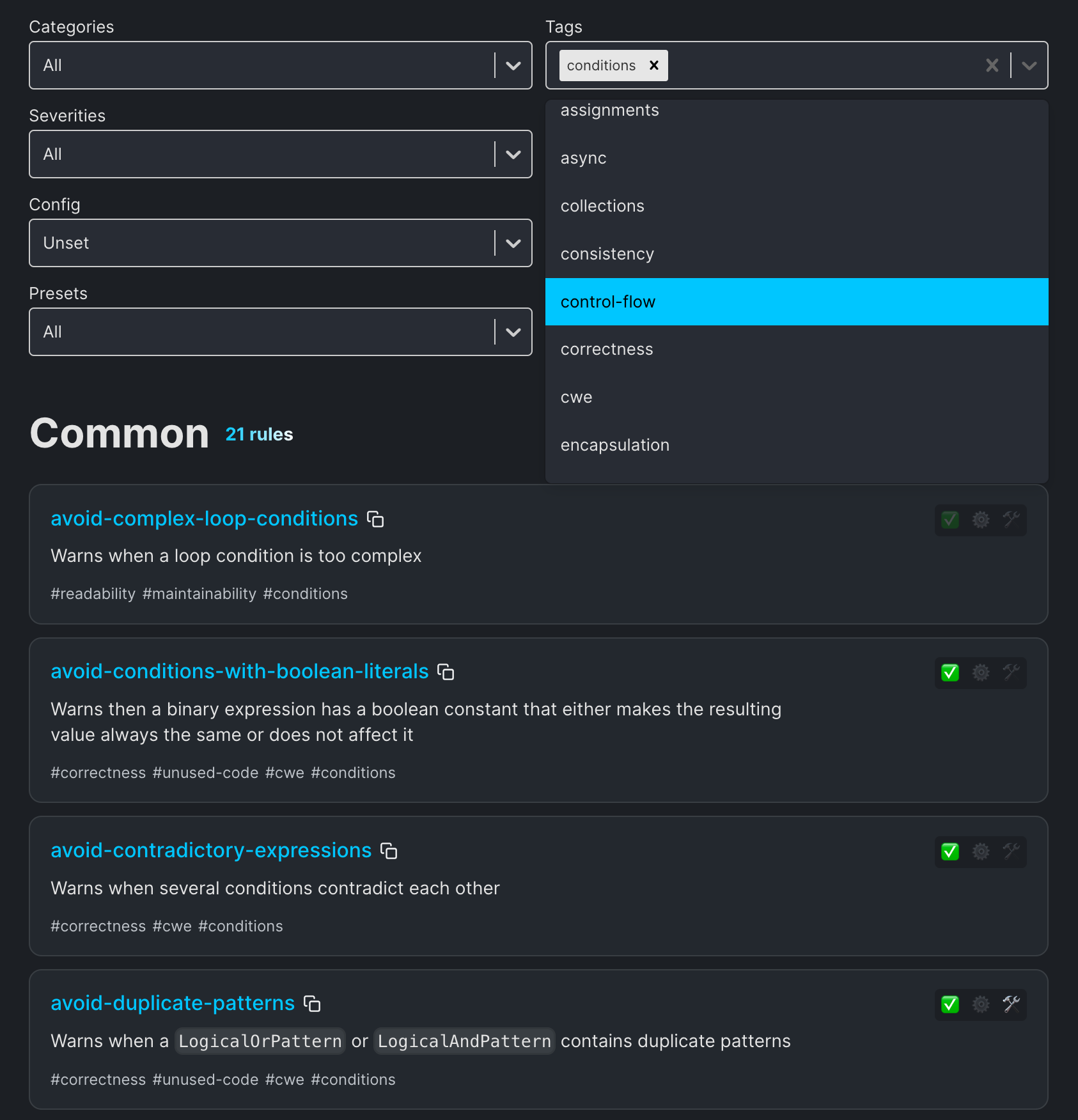
All rule tags are also available as built-in presets (1.27.0):
dcm:
  extends:
    - async
    - collections
Read more about this feature in our 1.27.0 release blog post
Free & Starter Plans Expansion
We significantly expanded access to rules throughout the year:
- Free plan: +43 additional rules which makes a total of 100 rules for Free plan.
- Starter plan: +53 additional rules + dot shorthand rules which makes a total of 243 rules for Starter plan.
3. Memory Optimization: 4GB → 350MB
In 1.31.0, we shipped one of our most impactful performance improvements ever, dramatically reducing memory consumption for code quality commands.
Our measurements on the Flame repository showed a reduction from ~4GB to ~350MB when running from the repo root, a 91% improvement!
Optimized Commands
In addition to general optimization, we also optimized quality checks commands:
dcm check-unused-codedcm check-unused-filesdcm check-exports-completenessdcm check-code-duplicationdcm check-unused-l10ndcm analyze-widgets(1.32.0)dcm check-parameters(1.32.0)
This optimization affects both individual commands and dcm run, making DCM viable for even the largest monorepos.
To learn more (including the original benchmark context and details), see the 1.31.0 release notes: Memory Usage Improvements.
--all Flag
Run all DCM commands at once became possible with --all flag as of 1.28.0 release:
dcm run --all lib
In addition to --all, there are several new flags:
Usage: dcm run [arguments] <directories>

    --all                                          Run all dcm commands.
    --analyze                                      Run dcm analyze.
    --metrics                                      Run dcm calculate-metrics.
    --analyze-widgets                              Run dcm analyze-widgets.
    --analyze-assets                               Run dcm analyze-assets.
    --code-duplication                             Run dcm check-code-duplication.
    --unused-code                                  Run dcm check-unused-code.
    --unused-files                                 Run dcm check-unused-files.
    --unused-l10n                                  Run dcm check-unused-l10n.
    --dependencies                                 Run dcm check-dependencies.
    --parameters                                   Run dcm check-parameters.
    --exports-completeness                         Run dcm check-exports-completeness.


Upload:
    --upload                                       Upload the output to DCM Dashboards.
    --preview-upload                               Preview the uploaded result.
    --project                                      The project key.
    --upload-date="year-month-day"                 Override upload date to any previous date (for example, 2025-01-30).
    --with-details                                 Include detailed reports into the uploaded result.
4. Metrics Improvement
Metrics received significant attention this year with new commands, better reports, and powerful configuration options.
New Command: dcm init metrics-preview (1.30.0)
Similar to dcm init lints-preview, we added a new command to preview metric values across your codebase before enabling them:
dcm init metrics-preview lib
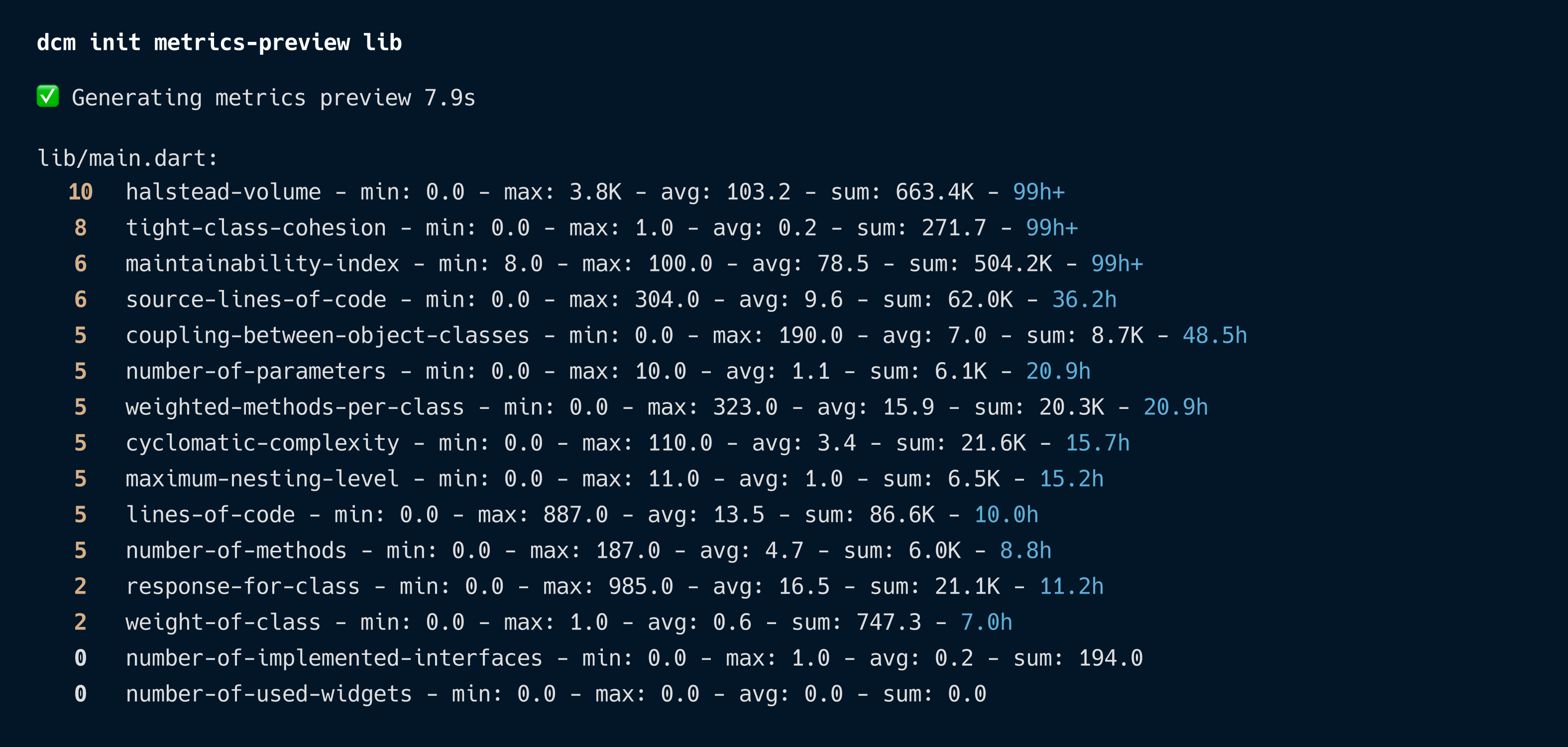
This command supports:
- JSON and CSV export (1.31.0)
- Filter by metric types
- Show only violations or all metrics
To learn more, see the 1.30.0 release notes: New Command for Previewing Metric Values.
Line-Level Attribution (1.34.0)
One of the most requested features, the HTML report now shows which lines contribute to a particular metric:
"HTML report now shows which lines contribute to a particular metric (can be toggled for each metric separately)"
This transforms metrics from abstract numbers into actionable insights.
To learn more, see the 1.34.0 release notes: Understanding What Contributes to the Metric Value.
Updated Metrics (1.34.0)
In addition to line-level attribution, 1.34.0 brought full Dart feature support (including dot shorthands), improved HTML report UX, and accuracy fixes and calculate improvements across 9 individual metrics including number-of-used-widgets, widgets-nesting-level, number-of-overridden-methods, number-of-parameters, maximum-nesting-level, number-of-added-methods, number-of-external-imports, number-of-implemented-interfaces, cyclomatic-complexity and coupling-between-object-classes.
To learn more, see the 1.34.0 release notes: Metric Improvements.
Multi-Threshold Configuration (1.32.0)
Each metric now supports configuring multiple thresholds for different paths:
dcm:
  metrics:
    cyclomatic-complexity:
      threshold: 20
      entries:
        - threshold: 10
          paths:
            - '.*some_folder.*'
            - '.*some_file.dart'
        - threshold: 15
          paths:
            - '.*another_folder'
For the example above, all files and folders that match .*some_folder.* or .*some_file.dart will have the cyclomatic complexity threshold equal to 10, the ones that match .*another_folder will have it equal to 15, and for all other files the threshold will be 20.
Plus, we added the unset threshold option for collecting values without violations.
dcm:
  metrics:
    cyclomatic-complexity:
      threshold: 20
      entries:
        - threshold: 10
          paths:
            - '.*some_folder.*'
            - '.*some_file.dart'
        - threshold: unset
          paths:
            - '.*another_folder'
To learn more, see the 1.32.0 release notes: Multiple Threshold and "unset" Threshold.
Reworked Console Reporter (1.27.0)
The metrics console reporter was completely redesigned to show each violation separately with its threshold:
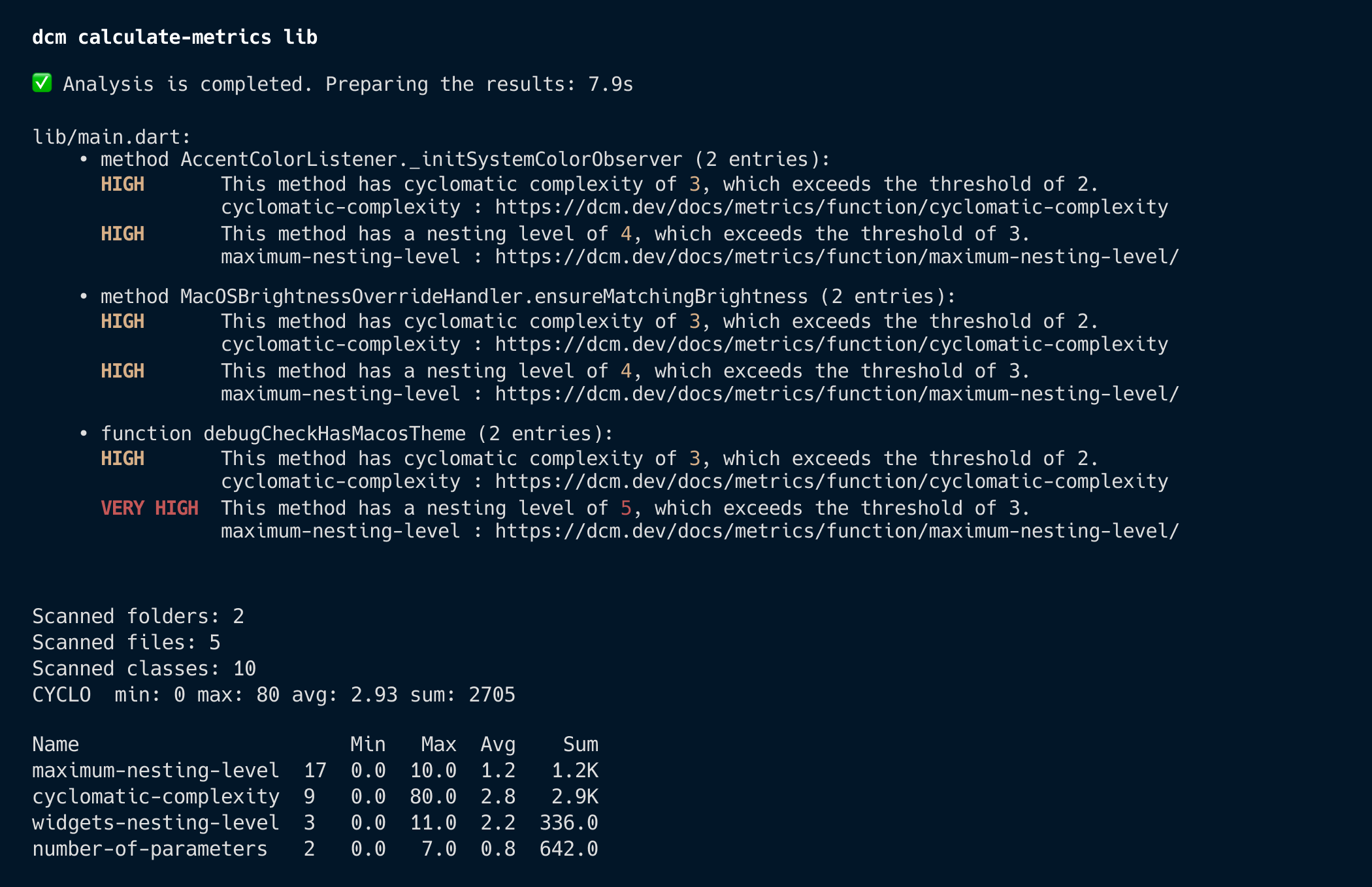
This makes it much easier to understand why a particular file was flagged and what threshold was applied.
To learn more, see the 1.27.0 release notes: Reworked Metrics Console Reporter.
HTML Report Improvements
The metrics HTML report also improved throughout the year, turning "numbers" into something you can act on:
- Link to open files in VS Code (1.32.0)
- Thresholds displayed per folder/file (1.32.0)
- Metric summary on all pages (1.32.0)
- Tooltip with full metric names (1.34.0)
- Support for latest Dart features including dot shorthands (1.34.0)
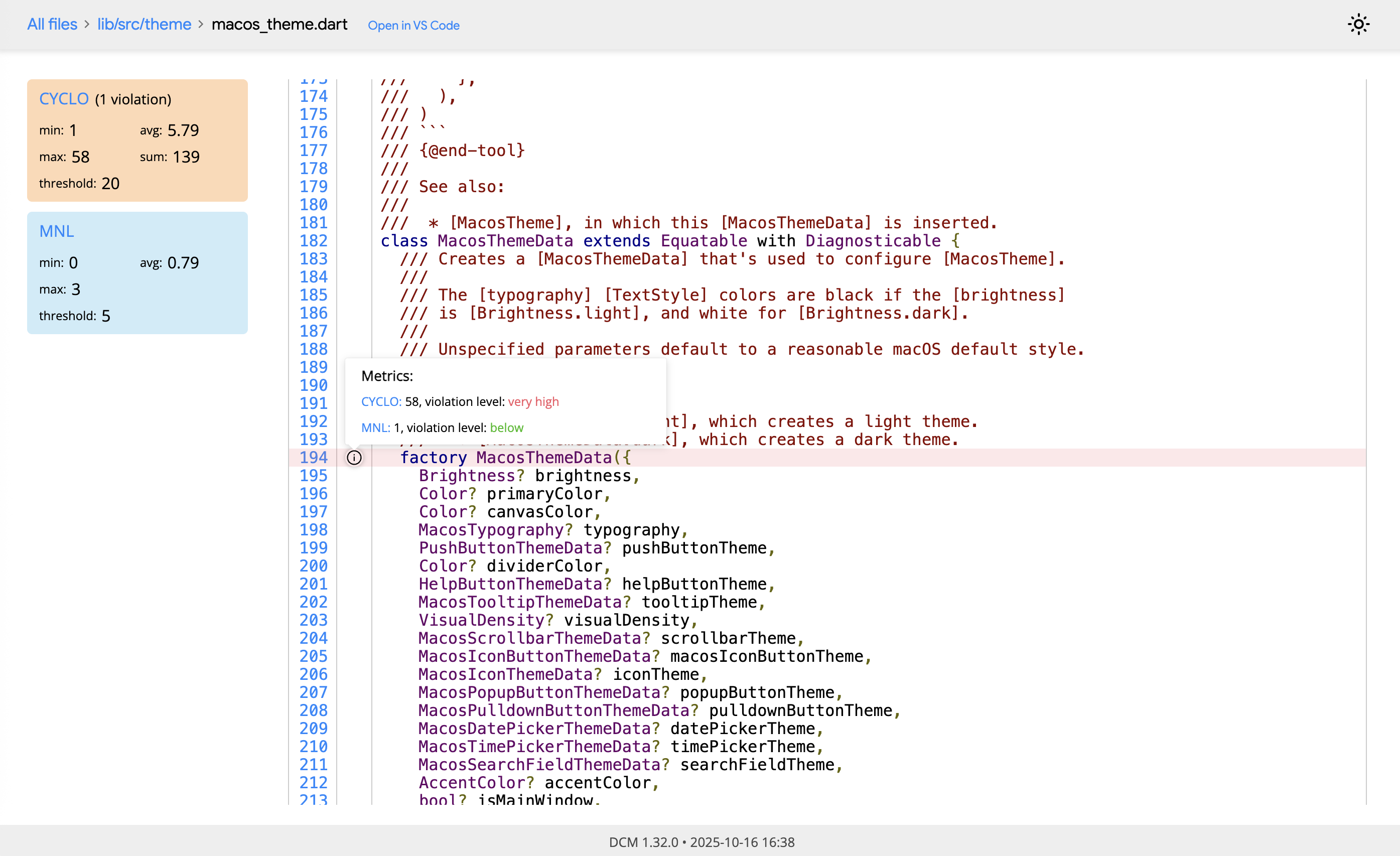
To learn more, see the 1.32.0 release notes: Improved HTML Reports and the 1.34.0 release notes: Metric Improvements.
5. MCP Server & Tooling Integration
We introduced DCM MCP Server integration in 1.31.0 release for all clients that support MCP (Model Context Protocol):
dcm start-mcp-server
This enables IDE-agnostic tooling and opens up DCM to new integrations. We also added --force-roots-fallback for IDEs like Cursor that don't correctly update the list of roots.
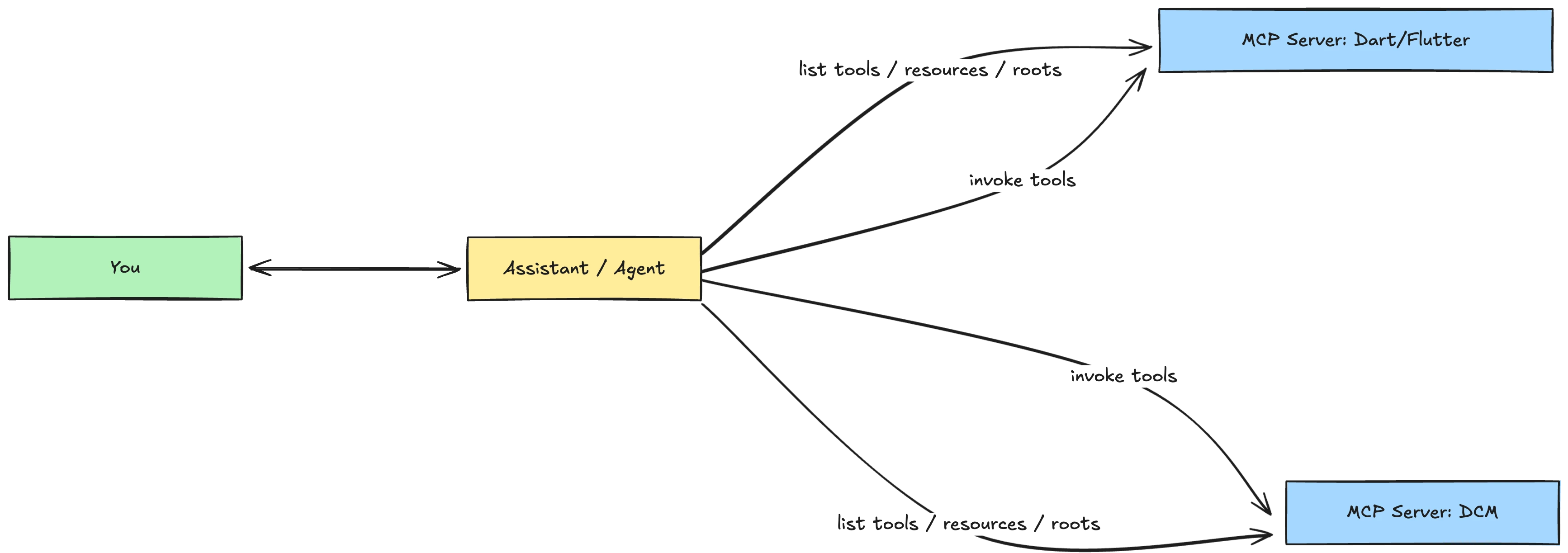
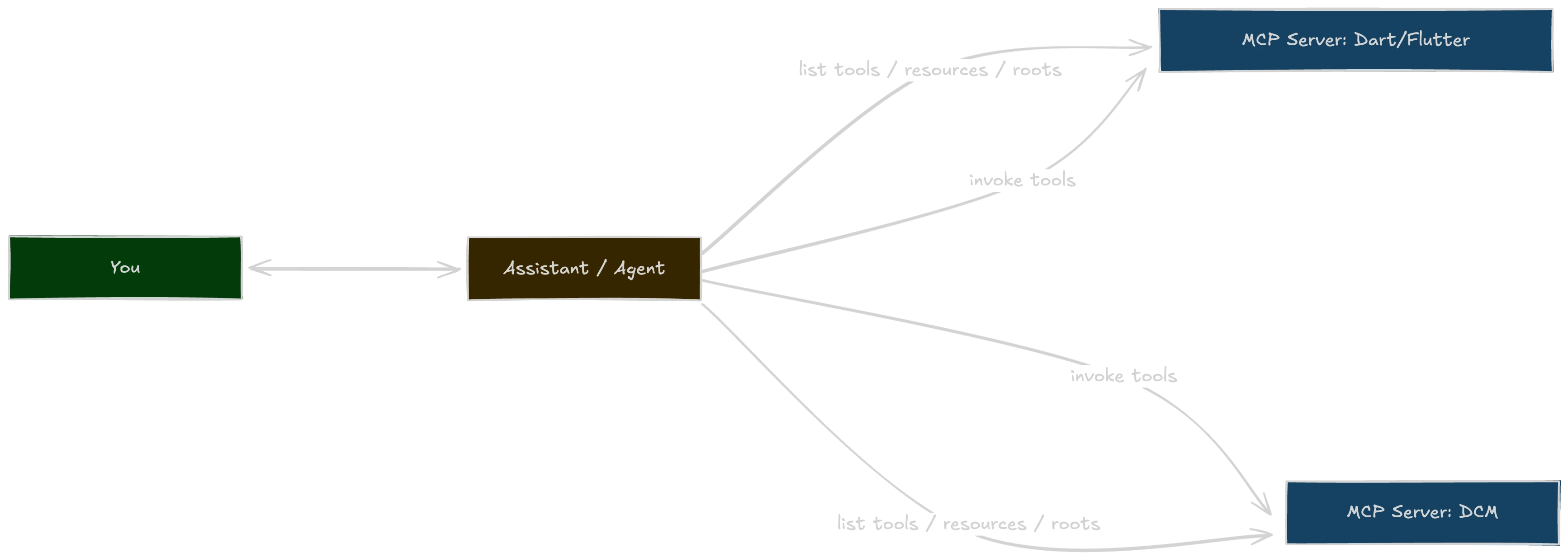
If you're building (or adopting) an agentic workflow for Dart/Flutter, see the deep dive on Let Your AI Assistant Tame Your Tech Debt (with Dart, Flutter and DCM MCP Servers) and the full documentation for DCM MCP Server.
IDEs Improvement
In 1.26.0, we added configuration autocompletion for IntelliJ/Android Studio:
VS Code already had this, and we also added metrics configuration autocompletion in 1.28.0.
CD/CI
DCM GitHub Actions now supports running dcm run with all DCM commands as of 1.26.0 release:
To learn more, see the 1.26.0 release notes: Support for "dcm run" in GitHub Actions.
- name: Run DCM
  uses: CQLabs/dcm-action@v2
  with:
    github-token: ${{ secrets.GITHUB_TOKEN }}
    ci-key: ${{ secrets.DCM_CI_KEY }}
    email: ${{ secrets.DCM_EMAIL }}
    analyze: true
    analyze-assets: true
    check-unused-code: true
    folders: lib
To learn more, see the 1.28.0 release notes: Run.
6. Baseline Improvements
Baseline received major upgrades throughout 2025, making gradual DCM adoption easier than ever.
Sensitivity Levels (1.30.0)
Choose how strict your baseline matching should be:
dcm init baseline --type=exact lib   # Match exact location
dcm init baseline --type=line lib    # Match by line number
dcm init baseline --type=file lib    # Match by file only
To learn more, see the 1.30.0 release notes: Flag to Configure Baseline Sensitivity.
Universal Command Support (1.30.0)
Baseline now works with all code quality commands:
check-unused-codecheck-unused-filescheck-code-duplicationcheck-unused-l10ncheck-dependenciesanalyze-assetscheck-exports-completenesscheck-parameters(1.31.0)
To learn more, see the 1.30.0 release notes: Support for Additional Commands and the 1.31.0 release notes: Baseline Support.
Merge Mode (1.34.0)
The new --merge flag allows updating only a section of the existing baseline:
dcm init baseline --merge --only-rules=avoid-unused-parameters lib
This adds issues from the specified rules to the "analyze" section while keeping other sections intact, perfect for incremental rule adoption.
To learn more, see the 1.34.0 release notes: Flag to Update Only a Particular Section.
7. Other Improvements
- Support for disabling ignore comments per rule (1.27.0) — release notes
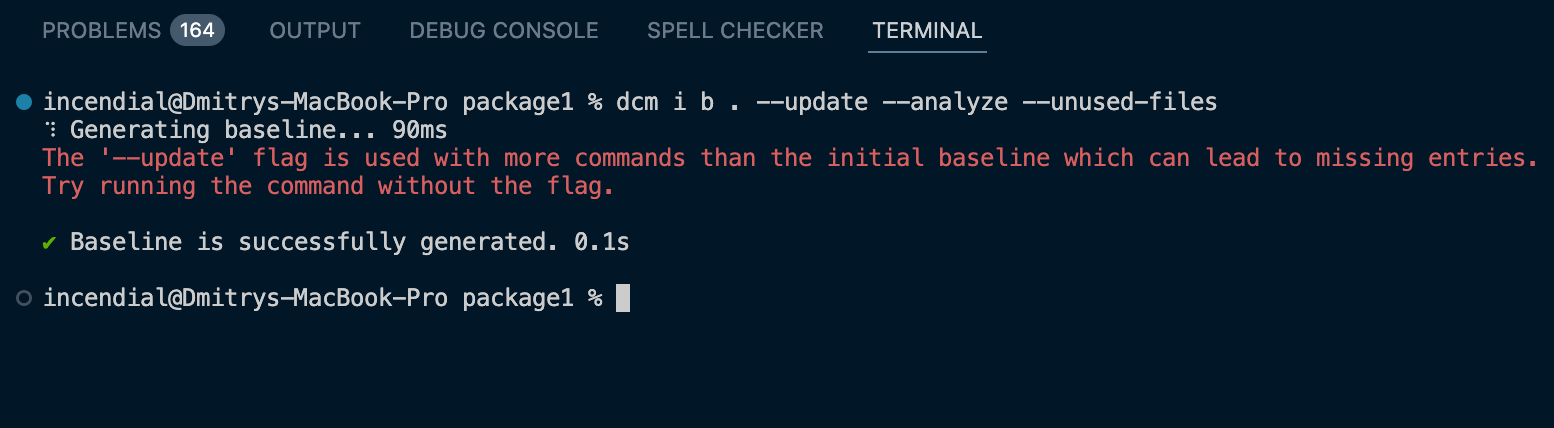
- Hint when
--updateis used with more commands than initial baseline (1.34.0) — release notes - Windows line endings support (1.30.0) — release notes
Documentation Improvements
Last but not least, big improvements and updates to our documentation including:
- Completely reworked Getting Started section (1.33.0)
- New badges for IDE and CLI fixes (1.32.0)
- Last updated date on all documentation pages (1.26.0)
8. What's Coming in 2026
Security-oriented Rules and a New Command
While the tool already has a lot of lint rules (almost 500!), the main focus of those rules is in detecting bugs and style issues which can be detected by other developers or tests (though with greater effort).
However, when it comes to security rules, most developers don't think about security at all and typically lack the necessary skills to quickly detect such issues. Therefore, in 2026, we plan to add a new type of rules that will help identify security issues.
On top of that, we will introduce a new command for detecting inline secrets in your code.
New Command for Building a Complete Code Quality Report of Your Codebase
Although the tool contains a variety of commands and checks to identify code quality issues, it currently lacks the ability to generate a comprehensive report on the overall state of the codebase.
One of the upcoming commands will offer a way to generate such a report.
New Metrics
We've put a lot of effort in improving metrics in the past releases and plan to add more useful metrics in 2026.
Improved Dashboards
There are still a lot of feature we'd like to see in the Dashboards (for example, a way to view the quality of Flutter widget for each project, advisory on which rules are missing or can be automatically fixed, upload history with ability to switch between different uploads, self-hosting and more). Stay tuned for further announcements!
Performance Improvements
Regarding performance, while we significantly improved the tool in 2025, there's still room for improvement, particularly in terms of IDE integration. We plan to address these issues in 2026.
Support for Background Agents
While you can have a local agent that is running the tool's commands, there is currently no way for a remote background agent to run the tool. One of the upcoming releases will add support for such scenarios.
Thank You!
2025 was an incredible year, and none of it would have been possible without our amazing community. Thank you for your feedback, bug reports, feature requests, and continued support.
Here's to an even better 2026! 🎉
Sharing Your Feedback
If there is something you miss from DCM right now, want us to make something better, or have any general feedback, join our Discord server! We'd love to hear from you.
And to stay updated on our latest releases and tips, subscribe to our YouTube Channel.
All 2025 Releases
Here are links to all our 2025 release notes and the full changelog:
| Version | Release Date | Blog Post |
|---|---|---|
| 1.34.0 | December 11, 2025 | What's new in DCM 1.34.0 |
| 1.33.0 | November 17, 2025 | What's new in DCM 1.33.0 |
| 1.32.0 | October 7, 2025 | What's new in DCM 1.32.0 |
| 1.31.0 | August 18, 2025 | What's new in DCM 1.31.0 |
| 1.30.0 | July 7, 2025 | What's new in DCM 1.30.0 |
| 1.29.0 | May 30, 2025 | - |
| 1.28.0 | April 15, 2025 | What's new in DCM 1.28.0 |
| 1.27.0 | February 17, 2025 | What's new in DCM 1.27.0 |
| 1.26.0 | January 8, 2025 | What's new in DCM 1.26.0 |
📋 Full Changelog: dcm.dev/changelog
🗺️ Public Roadmap: dcm.featurebase.app/roadmap