What’s new in DCM 1.37.0


Today we’re excited to announce the release of DCM 1.37.0!
This release includes 11 new rules; 34 new CLI and IDE fixes; HTML report for "dcm analyze"; deprecated and removed assists; multiple new hints to increase awareness of existing CLI flags and options (for example, unsafe fixes, different fix types, how baseline works on so on); and more! 🚀
Let’s go through the highlights of this release (and the full list of changes is in our changelog)!
HTML Report for "dcm analyze"
With this release we are introducing the HTML report output for the analyze command.
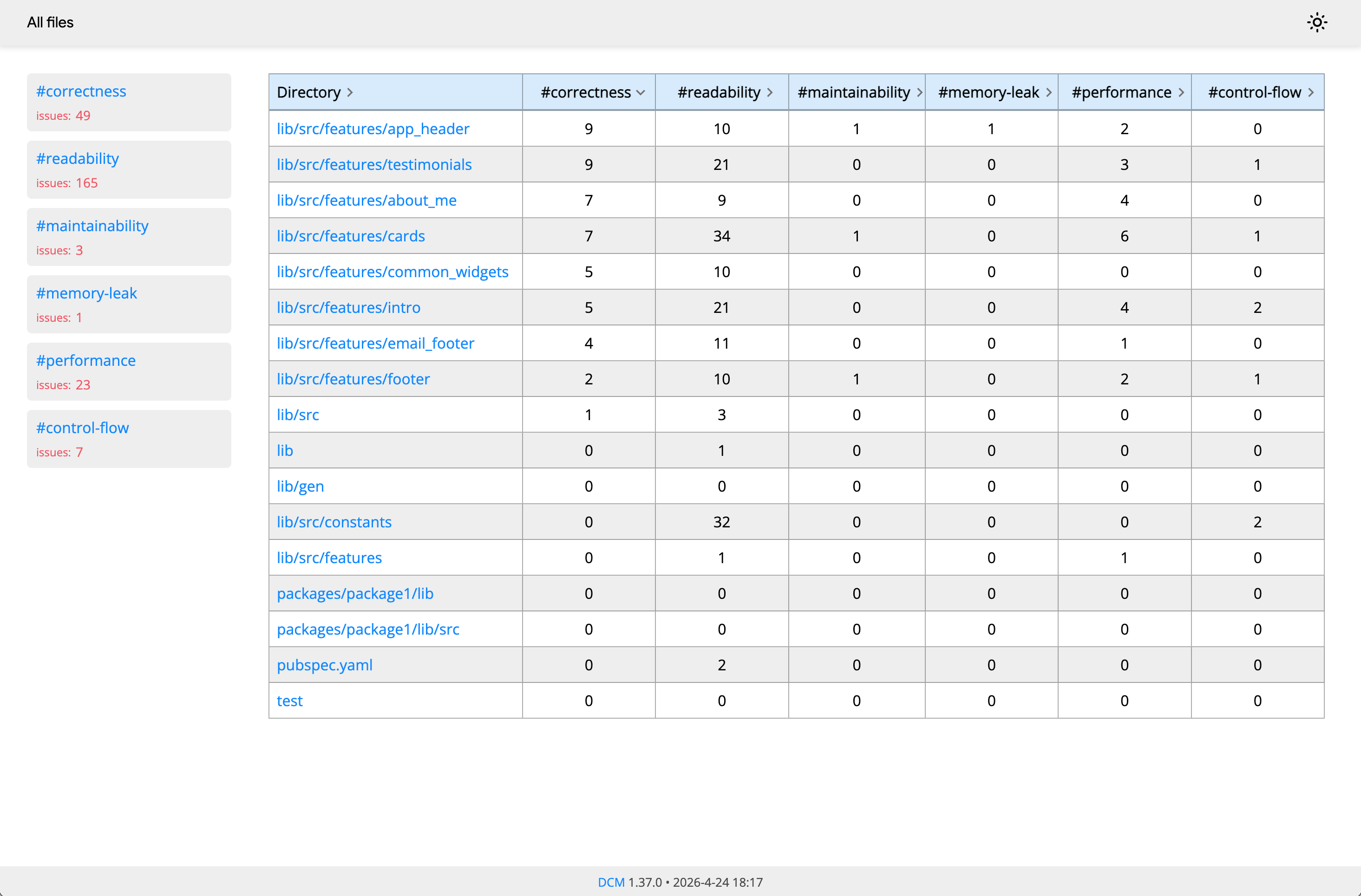
The issues are grouped the same way as for the DCM Dashboards: each issue is counted only once and is placed into one of the 6 groups (Correctness, Readability, Maintainability, Memory Leak, Performance and Control Flow).
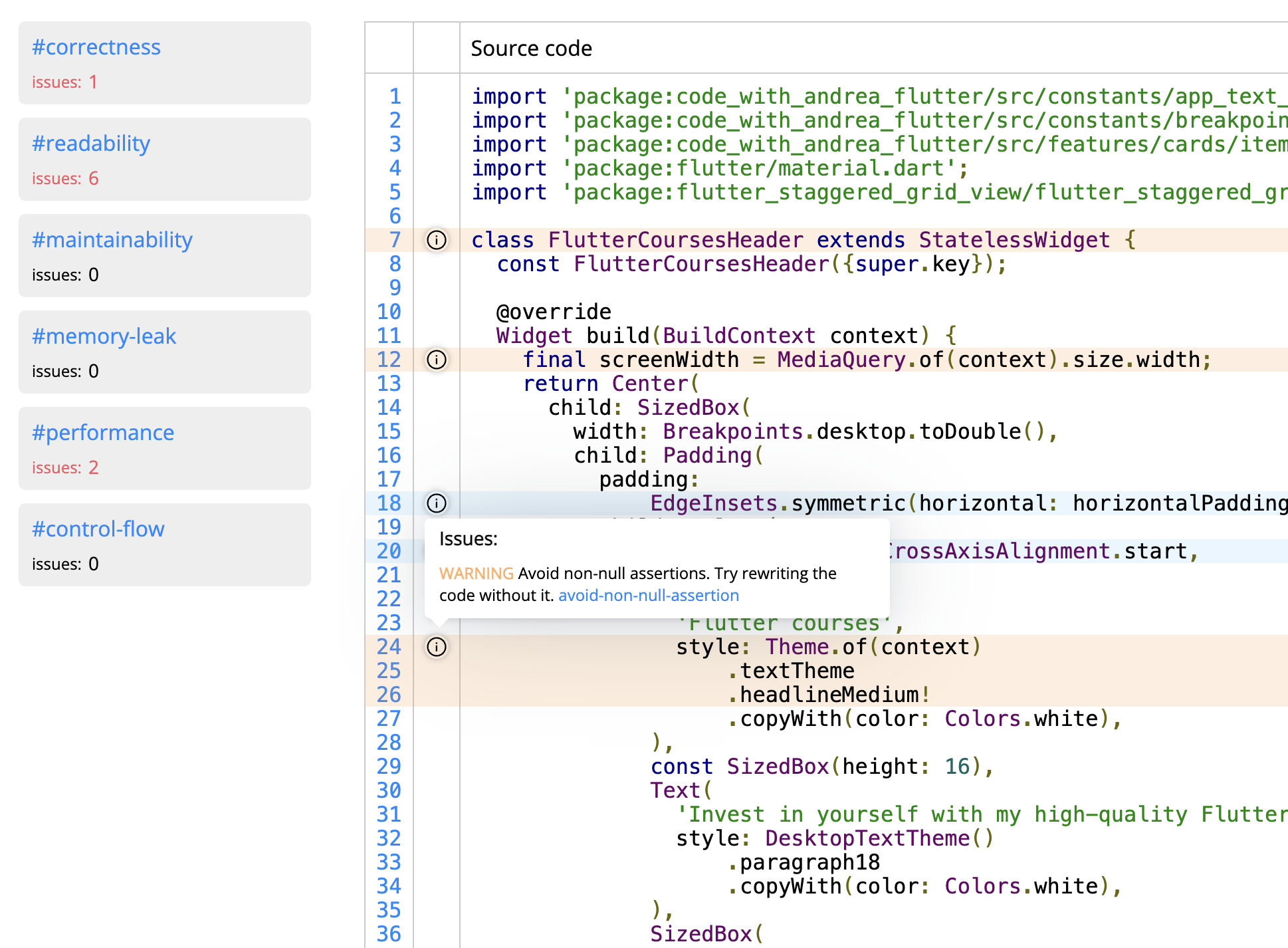
Additionally, opening a particular file and hovering over the info icon will show each issue detailed information:
Removed Assists
With this release we are removing 2 (all) existing assists: "Extract to a File" and "Wrap with ...".
The first one was introduced back when the Dart extension didn't provide an alternative (which has changed) and the second one can be replaced with a custom snippet (at least in VS Code).
However, even just 2 assists were sitting on their own visitor which was adding unnecessary background calculations even if you never used them. So we decided to remove them and focus on other features.
New Hints
To improve the onboarding experience (and help discover features even if you've been using the tool for a while), we are adding several new hints:
-
The "dcm activate" command will now show next steps and useful links:
✔ License key successfully activated. 0.3s

To get a preview of all lint issues, run 'dcm lints-preview .'

To quickly get started with the tool, check out these guides:
- https://dcm.dev/docs/guides/choosing-first-dcm-rules/
- https://dcm.dev/docs/guides/integrating-into-existing-project/
- https://dcm.dev/docs/guides/uploading-data-to-dashboards/

And if you actively use LLMs (Claude, Codex, Copilot, etc.), check out these guides:
- https://dcm.dev/docs/ide-integrations/mcp-server/
- https://dcm.dev/docs/ide-integrations/ai-cli-tools/

Don't forget to restart your IDE if you have it open. -
The "dcm fix" command will now show other available types of fixes when used with the default
--type=lints. Additionally, if you have any enabled rules that support only unsafe fixes, you will get a corresponding hint:✔ Calculation is completed. Applying the results. 0.7s
Some of the enabled rules:
- avoid-conditions-with-boolean-literals
- avoid-constant-assert-conditions
- avoid-suspicious-super-overrides
- avoid-unnecessary-gesture-detector
- avoid-unnecessary-if
- avoid-unnecessary-nullable-parameters
- avoid-unnecessary-nullable-return-type
- avoid-unnecessary-super
- avoid-unsafe-collection-methods
- avoid-unused-assignment
- avoid-unused-parameters
- match-base-class-default-value
- use-closest-build-context
can only be fixed with the "--unsafe" flag
To fix unused code, unused files, dependencies, or unnecessarily public code, try passing the "--type" option -
The "dcm init baseline" will now show a hint that explains what the baseline is (to avoid cases when the baseline is generated first and then all command show 0 issues):
This command adds ALL existing issues to the baseline, resulting in other commands showing 0 issues.
If that is NOT the expected behavior, remove the generated baseline file.

You can read more about the command here: https://dcm.dev/docs/cli/init/#baseline
New Rules
Discovering and Adding Rules from New Releases
Each DCM release introduces new rules. To explore all available rules and filter by version, use the dcm init lints-preview command:
dcm init lints-preview lib --rule-version=1.37.0 # Show rules added in 1.37.0
This command displays:
- Rule names and their violations in your codebase
- Estimated effort to fix all violations of each rule
- Whether a rule supports automatic fixes
You can also generate the output in different formats.
require-atomic-async-updates
Warns when an assignment can lead to a race condition due to await.
An assignment is reported when the rule detects the following execution flow in an async function:
- The variable is read.
- An
awaitpauses the function. - After the function is resumed, a value is assigned to the variable from step 1.
The assignment in step 3 is reported because it may be incorrectly resolved because the value of the variable from step 1 may have changed between steps 2 and 3. In particular, if the variable can be accessed from other execution contexts (for example, if it is not a local variable and therefore other functions can change it), the value of the variable may have changed elsewhere while the function was paused in step 2.
int foo = 0;

Future<void> fn(Future<int> amount) async {
  // LINT: This reassignment might use an outdated value due to a race condition.
  //  Consider moving the await expression to its own local variable.
  foo += await amount;
  // LINT: This reassignment might use an outdated value due to a race condition.
  //  Consider moving the await expression to its own local variable.
  foo = foo + await amount;
}

void main() {
  Future.wait([fn(...), fn(...)]); // "fn" is called more than once
}
To fix the issue, consider introducing a local variable:
int foo = 0;

Future<void> fn(Future<int> amount) async {
  final local = await amount;
  foo += local;
}
keep-state-below-its-widget
Suggests placing the widget state right after the widget declaration.
For example,
// LINT: Prefer keeping the widget state right after the widget declaration.
class MyWidget4State extends State<MyWidget4> {
Widget build(BuildContext context) {
return Container();
}
}
class MyWidget4 extends StatefulWidget {
const MyWidget4({super.key});
State<MyWidget4> createState() => MyWidget4State();
}
should be rewritten to
class MyWidget4 extends StatefulWidget {
const MyWidget4({super.key});
State<MyWidget4> createState() => MyWidget4State();
}
class MyWidget4State extends State<MyWidget4> {
Widget build(BuildContext context) {
return Container();
}
}
This rule also comes with auto-fix.
always-pass-global-key
Warns when a global key field is not passed to any widget.
For example,
class _AnotherState extends State<_Example> {
// LINT: This global key is not passed to any widget.
final GlobalKey<String> _formKey = GlobalKey<String>();
void _submitForm() {
if (_formKey.currentState!.validate()) {
_formKey.currentState!.save();
}
}
Widget build(BuildContext context) {
return Form();
}
}
here, even though the _formKey field is used in the _submitForm method (so the field itself is not highlighted as unused), the key is not passed to any widget.
To fix the issue, pass the key to a widget:
class _AnotherState extends State<_Example> {
final GlobalKey<String> _formKey = GlobalKey<String>();
void _submitForm() {
if (_formKey.currentState!.validate()) {
_formKey.currentState!.save();
}
}
Widget build(BuildContext context) {
return Form(key: _formKey);
}
}
avoid-labels
Warns when a labeled statement is used.
While convenient in some cases, labels tend to be used only rarely and are frowned upon by some as a remedial form of flow control that is more error prone and harder to understand.
For example,
// LINT: Avoid labels. Try rewriting the code without them.
label:
while (true) {
  break label;
}
should be rewritten to
while (true) {
  break;
}
prefer-assert-initializers-first
Suggests placing assert initializers at the beginning of the initializer list.
For example,
class SomeClass {
  final String value;
  final int another;

  SomeClass(int val, int some)
    : value = '123',
      // LINT: Prefer placing assert initializers at the beginning of the initializer list.
      assert(val > 0),
      another = 123,
      // LINT: Prefer placing assert initializers at the beginning of the initializer list.
      assert(some > 2);
}
should be rewritten to
class SomeClass {
  final String value;
  final int another;

  SomeClass(int val, int some)
    : assert(val > 0),
      assert(some > 2),
      value = '123',
      another = 123;
}
This rule also comes with auto-fix.
initializers-ordering
Ensures that the order of constructor initializers matches the order of the class fields.
For example,
class Some {
  final String value;
  final int another;

  // LINT: Constructor initializers do not match the fields order. Try sorting them.
  const Some() : another = 1, value = 'some';
}
should be rewritten to
class Some {
  final String value;
  final int another;

  const Some() : value = 'some', another = 1;
}
This rule also comes with auto-fix.
newline-before-throw
Enforces a blank line before a throw expression in a block.
For example,
void fn() {
  if (...) {
    ...
    throw Exception(); // LINT: Missing a blank line before 'throw'.
  }
}
should be rewritten to
void fn() {
  if (...) {
    ...

    throw Exception();
  }

  throw Exception();
}
This rule also comes with auto-fix.
newline-before-break
Enforces a blank line before a break statement in a block.
For example,
for (final value in values) {
  print(value);
  break; // LINT: Missing a blank line before 'break'.
}
should be rewritten to
for (final value in values) {
  print(value);

  break;
}
This rule also comes with auto-fix.
newline-before-continue
Enforces a blank line before a continue statement in a block.
For example,
for (final value in values) {
  print(value);
  continue; // LINT: Missing a blank line before 'continue'.
}
should be rewritten to
for (final value in values) {
  print(value);

  continue;
}
This rule also comes with auto-fix.
max-statements
Warns when the number of statements in a function exceeds the configured threshold.
For example,
// LINT: This function has too many statements (25). Maximum allowed is 20.
//  Try reducing the number of statements.
void fn() {
  ... // 25 statements
}
should be rewritten to
void fn() {
  ... // 15 statements
}
avoid-dot-shorthands
Warns against using dot shorthands.
Use this rule only if you would like to not use dot shorthands in your codebase and keep it consistent.
This rule is incompatible with rules that suggest using dot shorthands in various cases.
For example,
void fn(SomeClass? e) {
  switch (e) {
    // LINT: Avoid dot shorthands as they reduce readability. Try adding explicit types.
    case .first:
      print(e);
  }

  final v = switch (e) {
    // LINT: Avoid dot shorthands as they reduce readability. Try adding explicit types.
    .first => 1,
    _ => 2,
  };

  // LINT: Avoid dot shorthands as they reduce readability. Try adding explicit types.
  final SomeClass another = .first;

  // LINT: Avoid dot shorthands as they reduce readability. Try adding explicit types.
  if (e == .first) {}
}
should be rewritten to
void fn(SomeClass? e) {
  switch (e) {
    case SomeClass.first:
      print(e);
  }

  final v = switch (e) {
    SomeClass.first => 1,
    _ => 2,
  };

  final another = SomeClass.first;

  if (e == SomeClass.first) {}
}
What’s next
To learn more about upcoming features, keep an eye on our public roadmap.
And to learn more about our upcoming videos and "Rules of the Week" content, subscribe to our Youtube Channel.
Sharing your feedback
If there is something you miss from DCM right now, want us to make something better, or have any general feedback — join our Discord server! We’d love to hear from you.



 Majid Hajian