Calculate Metrics
Reports code metrics.
You need to configure metrics entry in the analysis_options.yaml before running this command.
To execute the command, run:
$ dcm calculate-metrics lib # or dcm cm lib
Full command description:
Usage: dcm calculate-metrics [arguments] <directories>
-h, --help                                         Print this usage information.


-r, --reporter="console" (--output-format)         Analysis output format.
                                                   [console (default), html, json, codeclimate, gitlab, checkstyle, sonar]
-c, --concise                                      A single-line per-violation format for console reporter output.
-o, --output-dir="OUTPUT"                          Write HTML output to OUTPUT.
                                                   (defaults to "dcm_metrics_report")
    --open                                         Automatically open generated HTML report.
    --flat                                         Show only a flat list of files (HTML report only).
    --output-to="path/to/file"                     Path to the file with the analysis output.
    --report-all                                   Report all metric results (default is to report only high or very high metric levels).


-c, --print-config                                 Print resolved config.


    --root-folder="./"                             Root folder.
                                                   (defaults to the current directory)
-s, --sdk-path="directory-path"                    Dart SDK directory path.
                                                   If the project has a `.fvm/flutter_sdk` symlink, it will be used if the SDK is not found.
-e, --exclude="{**/*.g.dart,**/*.freezed.dart}"    Files to exclude (in Glob syntax).
                                                   (defaults to "{**/*.g.dart,**/*.freezed.dart}")
    --root-exclude                                 Files to exclude, relative to the root folder (in Glob syntax).


    --[no-]congratulate                            Show output even when there are no issues.


    --verbose                                      Show verbose logs.


    --ci-key                                       The license key to run on CI server. Can be provided via DCM_CI_KEY env variable.
    --email                                        The email used to purchase the license. Can be provided via DCM_EMAIL env variable.


    --no-analytics                                 Disable sending anonymous usage statistics.


    --fatal-level="unset"                          Treat found equal or higher metric level as fatal (unset by default).
                                                   [near, high, very-high]
Understanding Metric Thresholds
To understand how metric thresholds work (and the available violation levels), refer to this page.
Understanding What Contributes to the Metric Value
To understand which lines affect the metric value, use the HTML output format and navigate to the specific file page. There, use the "Show lines" button.
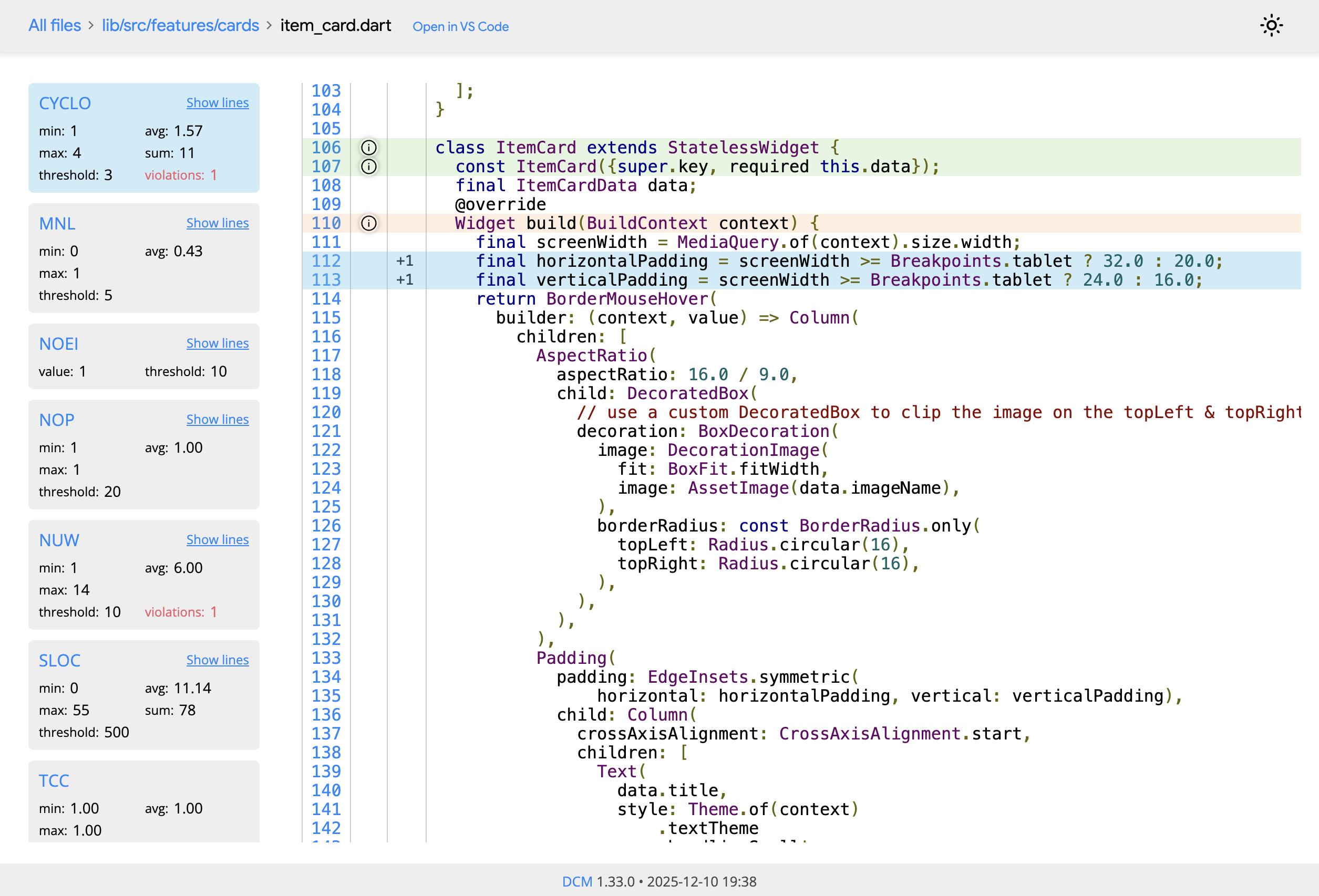
Reporting All Metric Values
By default only the HTML reporter shows all metric values (below and above) the configured thresholds.
To enable the same output for other reporters, pass the --report-all CLI flag.
Output Example
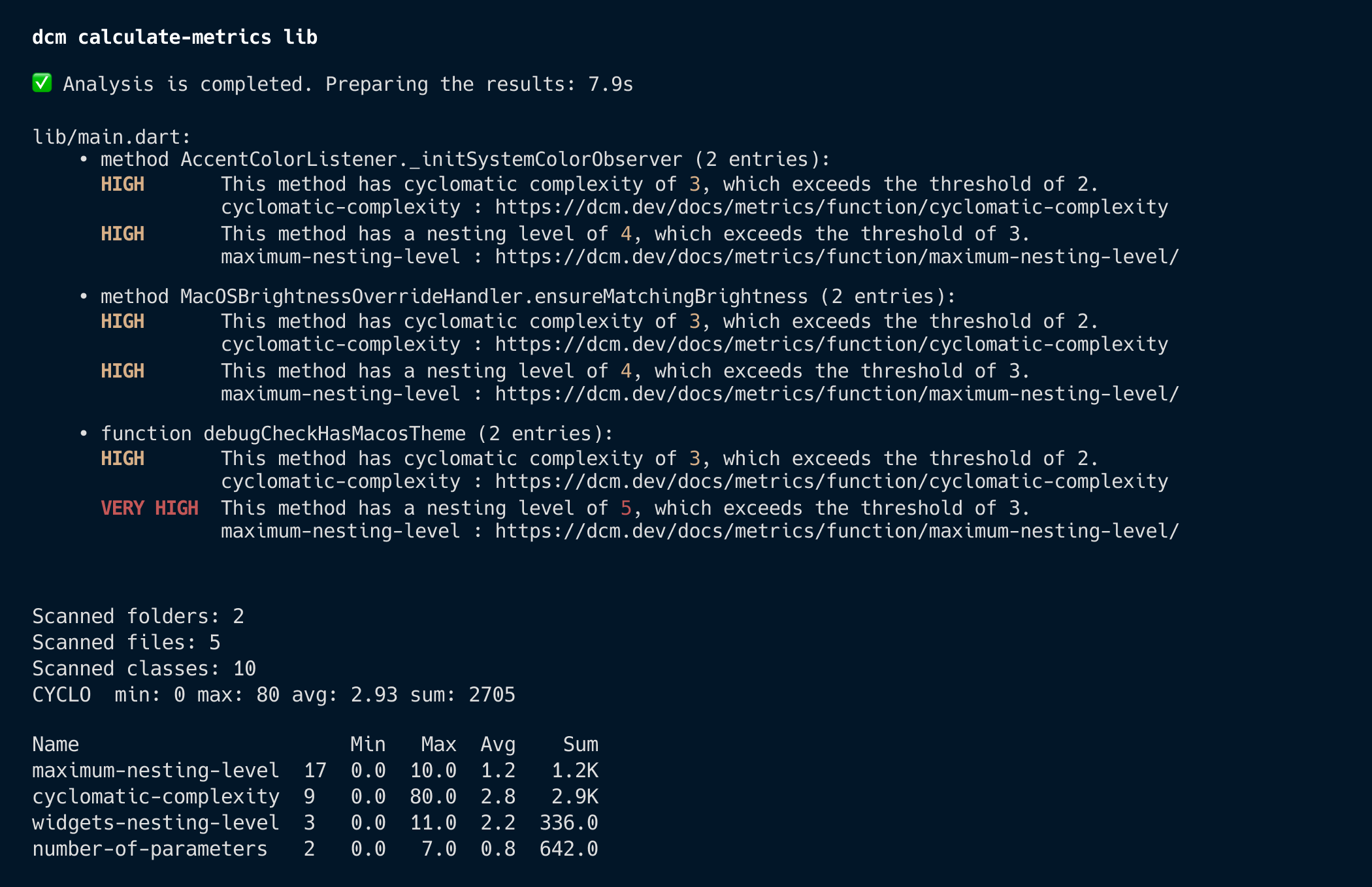
Console (default)
Use --reporter=console to get output in console format.
HTML
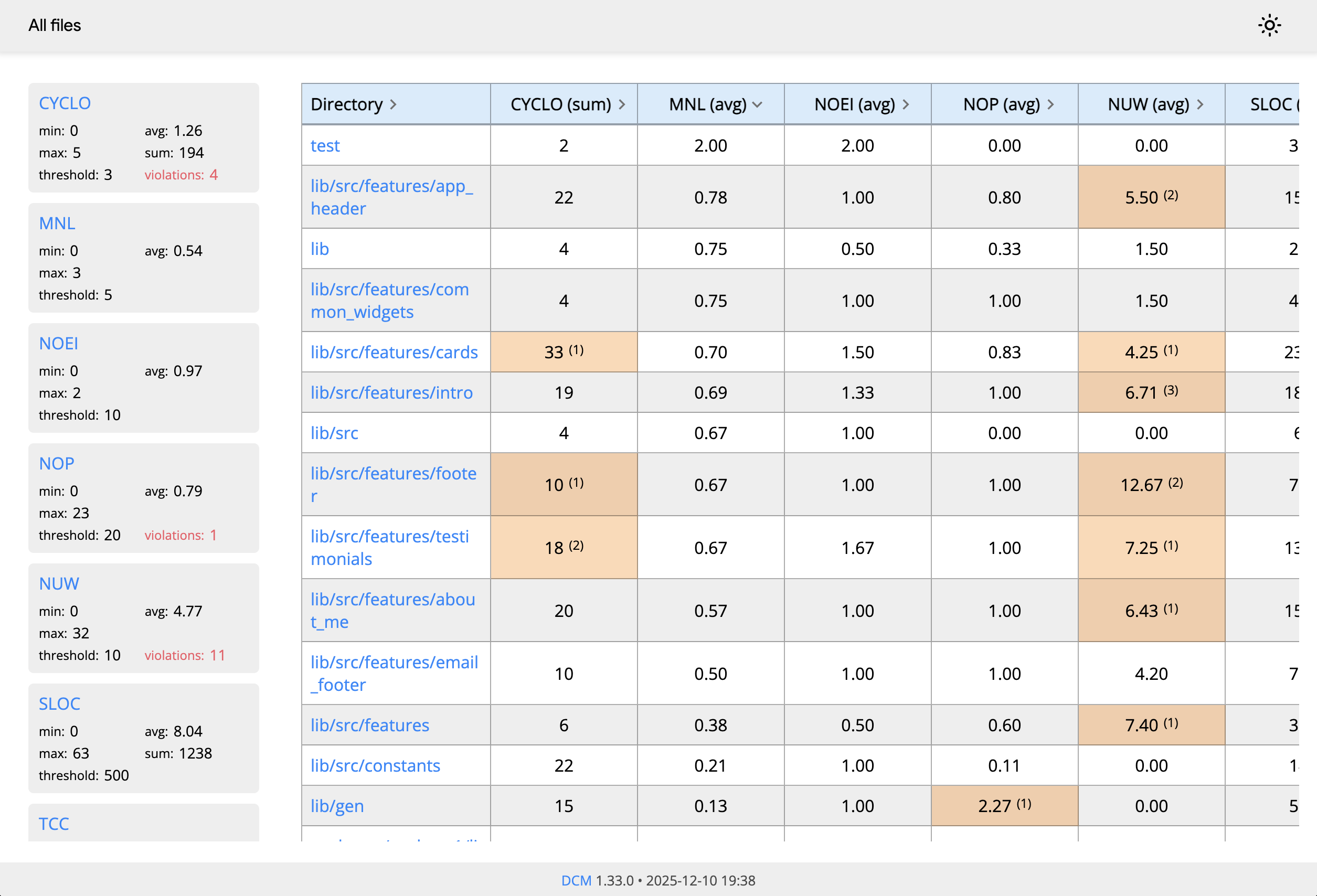
Use --reporter=html to get output in HTML format.
To generate a report only for files, use the --flat CLI flag.
HTML Report Overview
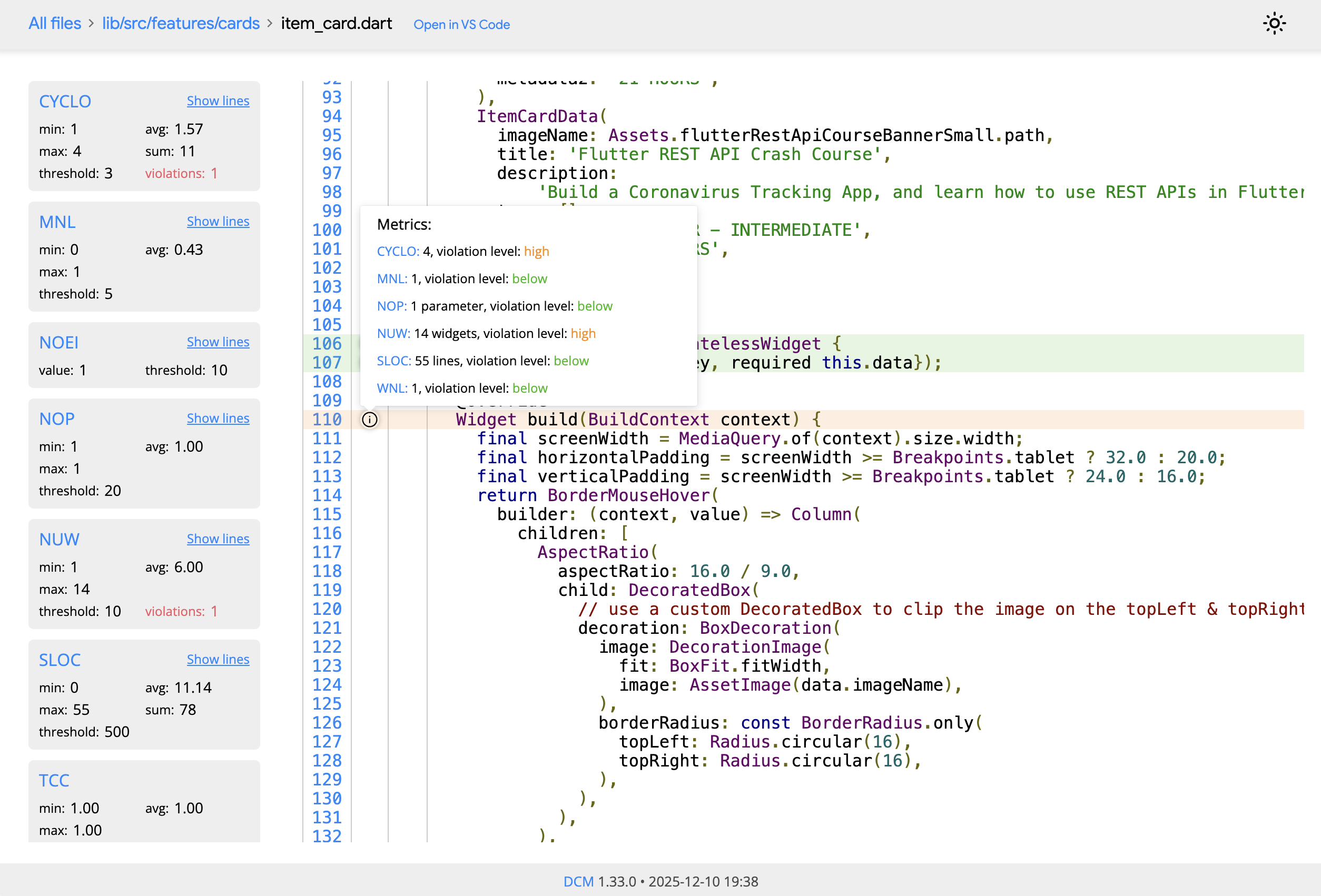
HTML Single File Report
PDF Report
To generate a PDF file from the HTML report page, use the browser ctrl+P/cmd+P menu and save the page as PDF.
JSON
Use --reporter=json to get output as a single JSON object containing metadata and the list of metric violations.
Format specification
The root object fields are
formatVersion- an integer representing the format version (will be incremented each time the serialization format changes)timestamp- a creation time of the report in YYYY-MM-DD HH:MM:SS formatmetricResults- an array of objectssummary- an array of objects
{
  "formatVersion": 10,
  "timestamp": "2021-04-11 14:44:42",
  "metricResults": [
    {
      ...
    },
    {
      ...
    },
    {
      ...
    }
  ],
  "summary": [
    {
      ...
    },
    {
      ...
    }
  ]
}
The result object fields are
path- a relative path to the target fileissues- an array of metric issues
{
  "path": "lib/src/metrics/metric_computation_result.dart",
  "issues": {
    ...
  }
}
The issue object fields are
id- metric idmessage- the associated messagelocation- the location associated with the issueeffortInMinutes- an estimated effort to fix the issue (in minutes)level- a level of the value computed by the metricthreshold- the configured metric thresholdvalue- an actual value computed by the metricunitType- a human readable unit type (optional)declarationName- the name of the declaration (optional)ignorable- a boolean flag indicating if a metric is ignorable or not (only present whenignorableis set tofalse)
{
  "id": "cyclomatic-complexity",
  "message": "This method has a cyclomatic complexity of 4, which exceeds the maximum of 3 allowed.",
  "location": {
    ...
  },
  "effortInMinutes": 15,
  "level": "high",
  "threshold": 5,
  "value": 4,
  "declarationName": "name",
  "ignorable": false
}
The location object fields are
startColumn- the start column of the entitystartLine- the start line of the entityendColumn- the end column of the entityendLine- the end line of the entitystartOffset- the offset of the entity
{
  "endColumn": 2,
  "endLine": 90,
  "startColumn": 1,
  "startLine": 48,
  "startOffset": 1638
}
The summary-record object fields are
title- a message with information about the recordvalue- an actual value of this record (can be an array or a single value)violations- the number of violations of a metric associated with this record
{
  "title": "Scanned files",
  "value": 30
},
{
  "title": "Scanned classes",
  "value": 71
},
{
  "title": "CYCLO",
  "value": 0,
  "avg": 10,
  "min": 0,
  "max": 5,
  "sum": 207
},
GitLab
Use --reporter=gitlab to get output in a GitLab-compatible format. To learn how to integrate DCM with GitLab, refer to this guide.
Code Climate
Use --reporter=codeclimate to get output in Code Climate format.
Output example
{"type":"issue","check_name":"widgets-nesting-level","description":"Build method has widgets nesting level of 7, which exceeds the maximum of 6 allowed.","categories":["Complexity"],"location":{"path":"lib/src/selectors/color_well.dart","positions":{"begin":{"column":3,"line":106},"end":{"column":4,"line":153}}},"severity":"info","fingerprint":"af5c0190fa59005295c7b3c6feb05547"}
{"type":"issue","check_name":"maximum-nesting-level","description":"This method has a nesting level of 2, which exceeds the maximum of 1 allowed.","categories":["Complexity"],"location":{"path":"lib/src/selectors/graphical_time_picker_painter.dart","positions":{"begin":{"column":3,"line":129},"end":{"column":4,"line":159}}},"severity":"info","fingerprint":"8b7d6bf9360ef83fe9657312127e2693"}
Checkstyle
Use --reporter=checkstyle to get output in Checkstyle format.
Output example
<?xml version="1.0"?>
<checkstyle version="10.0">
  <file name="../abstract_class.dart">
    <error line="0" message="metric comment" severity="warning" source="file-metric-id"/>
    <error line="0" severity="error" message="metric comment" source="id"/>
  </file>
  <file name="../class_with_factory_constructors.dart">
    <error line="0" severity="warning" message="metric comment" source="id"/>
  </file>
</checkstyle>
Checkstyle format is supported by Bitbucket. To learn how to integrate DCM with Bitbucket, refer to this guide.
Sonar
Use --reporter=sonar to get output in SonarQube's generic format for external issues.
Output example
{
  "rules": [
    {
      "cleanCodeAttribute": "CLEAR",
      "description": "To learn more, visit the documentation https://dcm.dev/docs/metrics/function/cyclomatic-complexity",
      "engineId": "dcm",
      "id": "cyclomatic-complexity",
      "impacts": [
        {
          "severity": "MEDIUM",
          "softwareQuality": "MAINTAINABILITY"
        }
      ],
      "name": "cyclomatic-complexity"
    },
    {
      "cleanCodeAttribute": "CLEAR",
      "description": "To learn more, visit the documentation https://dcm.dev/docs/metrics/function/maximum-nesting-level",
      "engineId": "dcm",
      "id": "maximum-nesting-level",
      "impacts": [
        {
          "severity": "MEDIUM",
          "softwareQuality": "MAINTAINABILITY"
        }
      ],
      "name": "maximum-nesting-level"
    }
  ],
  "issues": [
    {
      "primaryLocation": {
        "filePath": "lib/src/sheets/macos_sheet.dart",
        "message": "This method has a cyclomatic complexity of 4, which exceeds the maximum of 2 allowed.",
        "textRange": {
          "endColumn": 4,
          "endLine": 101,
          "startColumn": 3,
          "startLine": 52
        }
      },
      "ruleId": "cyclomatic-complexity"
    },
    {
      "effortMinutes": 10,
      "primaryLocation": {
        "filePath": "lib/src/sheets/macos_sheet.dart",
        "message": "This method has a nesting level of 2, which exceeds the maximum of 1 allowed.",
        "textRange": {
          "endColumn": 4,
          "endLine": 210,
          "startColumn": 3,
          "startLine": 182
        }
      },
      "ruleId": "maximum-nesting-level"
    }
  ]
}