Best Dart Features to Highlight in 2025


2025 was a milestone year for the Dart programming language. Between February and November, the Dart team shipped four stable releases (3.7 through 3.10), and each one quietly changed how thousands of us write code every day.
The cool part? These weren't just incremental tweaks. They were thoughtful additions that addressed real pain points, from reducing boilerplate in Flutter widget trees to making web development feel as smooth as mobile, to giving AI assistants actual knowledge of your project structure.
In this article, I'll walk you through the features that actually matter in 2025, with the context of why they were needed and what they mean for your workflow.
Here’s what we’ll cover in this article:
- Dot Shorthands
- Null-Aware Collection Elements
- New Analyzer Plugin API
- Dart & Flutter MCP Server
- Build Hooks for Native Code Integration
- Granular Deprecation Annotations
- Documentation Imports with
@docImport - Wildcard Variables with
_ - Other Noteworthy Improvements
- Further Reading and References
Let's get started.
Dot Shorthands
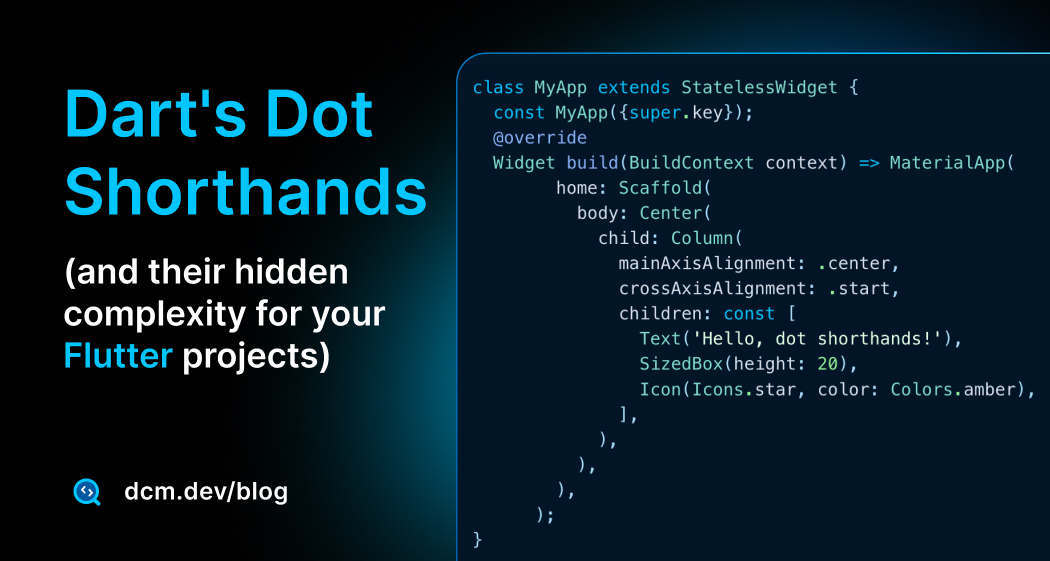
If you've worked with Flutter at all, you know the pain. Enum after enum, you type MainAxisAlignment.center, CrossAxisAlignment.end, LogLevel.warning. It's not a huge deal on its own, but across a codebase of thousands of lines, it becomes visual noise.
Dart 3.10 introduced dot shorthands, a feature that sounds simple but genuinely changes how your code feels when you're writing it.
The first time I refactored a widget tree to use them, my eyes actually felt less tired. The repetition was gone. The intent was clearer. But and this is important, this feature carries hidden complexity that catches teams off guard if they're not careful.
I've written a deeper dive into dot shorthands that explores the hidden complexity, edge cases, and practical guidelines for teams, definitely worth reading if you want to understand this feature thoroughly.
How Dot Shorthands Works
Dart has a straightforward rule here: it looks at the expected type from context and infers the shorthand from that. That's it.
Instead of writing:
enum LogLevel { info, warning, error, debug }
LogLevel level = LogLevel.info;
You can now write:
LogLevel level = .info; // Dart knows you mean LogLevel.info
The compiler doesn't guess. It doesn't search around. It simply takes the expected type (LogLevel from the variable declaration) and resolves the shorthand.
Context is everything.
This works in four main places in your code:
1. Enums Where the biggest wins happen:
// Before
Column(mainAxisAlignment: MainAxisAlignment.center)

// After
Column(mainAxisAlignment: .center)
In a typical build method, this feels dramatically easier to read. You're no longer repeating type names; you're just picking the value.
2. Static Methods & Fields:
Duration timeout = .zero;  // Instead of Duration.zero
int port = .parse('8080');  // Instead of int.parse('8080')
This one is contentious. Some developers love the conciseness; others find it confusing because .parse doesn't visually connect to int. Use your team's best judgment.
3. Named Constructors:
Point p = .fromList([1, 2]); // Instead of Point.fromList([1, 2])
This surprised me how much better it reads. Rewriting a file with these changes made the code feel more consistent.
4. Default Constructors (.new):
class _State extends State<Page> {
  late final AnimationController _ac = .new(vsync: this);
  final ScrollController _sc = .new();
  final GlobalKey<ScaffoldMessengerState> messengerKey = .new();
}
This is where shorthands truly shine in Flutter state classes. The boilerplate drops significantly.
5. Generics:
One of my favorite discoveries was how well this works with generics. I genuinely thought this wouldn't compile:
// The context is the *entire* generic type.
Map<String, List<int>> matrix = .from({});
There are important limitations though, let's not go deeper and instead read my deep dive article a deeper dive into dot shorthands to understand more.
However, let's point out some complexities.
Where It Gets Tricky (The Hidden Complexity)
This is where you need to be cautious. After using shorthands in real projects, here are the pitfalls:
Nested shorthands are a readability nightmare. Avoid this at all costs:
class Version {
  final String name;
  const Version(this.name);
}

class WidgetConfig {
  final Version version;
  const WidgetConfig({required this.version});
}

class CustomWidget {
  final WidgetConfig config;
  const CustomWidget(this.config);
}

// ⛔️ DON'T DO THIS
final CustomWidget x = .new(.new(version: .new('val')));
This isn't clever. This is a puzzle. The cognitive load is extreme, no visual type anchors, the nesting depth becomes invisible, and debugging requires constantly checking type definitions.
Fortunately, DCM provides the avoid-nested-shorthands rule to flag this automatically.
Expression statements can't start with a dot. This will fail:
// ❌ ERROR: No context
.log('Hello');  // Dart doesn't know what type .log refers to
But this works:
// ✅ OK: Variable type provides context
Logger log = .log('Hello');
Equality comparisons are asymmetric. Shorthands only work on the right side of ==:
Color myColor = Color.red;

// ✅ This is allowed:
if (myColor == .green) { /* ... */ }
if (myColor != .blue) { }  // OK

// ⛔️ This is not allowed:
// ERROR: Shorthand must be on right side
if (.red == myColor) { }

// ERROR: Cannot use complex expressions on right side
if (myColor == (condition ? .green : .blue)) { }

// ERROR: Type context lost by casting
if ((myColor as Object) == .green) { }
Teams will naturally disagree. Some developers love the conciseness. Others find it hides information. New team members might struggle inferring the types.
This is why lint rules become essential.
To enforce consistency across your team, DCM provides rules like:
- prefer-shorthands-with-enums
- prefer-shorthands-with-constructors
- prefer-shorthands-with-static-fields
- prefer-returning-shorthands
- avoid-nested-shorthands
Use them to guide your team toward consistency, not as a hammer.
DCM is a code quality tool that helps your team move faster by reducing the time spent on code reviews, finding tricky bugs, identifying complex code, and unifying code style.
Null-Aware Collection Elements
Dart 3.8 introduced null-aware collection elements, a convenient way to conditionally include items in a collection literal only if they are non-null. By prefixing an element with ? inside a list, set, or map literal, Dart will automatically include that element only if it’s not null.
?<expression>

// key is a null-aware element
?<key_expression>: <value_expression>

// value is a null-aware element
<key_expression>: ?<value_expression>

// key and value are null-aware elements
?<key_expression>: ?<value_expression>
This feature eliminates the need for verbose if checks when building collections of potentially null values.
For example, suppose you have two variables that might be null and you want to add them to a list if they are non-null:
String? item1 = getItem1OrNull();
String? item2 = getItem2OrNull();

// Before null-aware elements:
List<String> values = [];
if (item1 != null) values.add(item1);
if (item2 != null) values.add(item2);

// Using null-aware collection elements (Dart 3.8+):
List<String> values = [
  ?item1,
  ?item2,
];
In the Dart 3.8+ version, the list literal [...] will include item1 and item2 only when they are not null, making the code more concise.
This works in List, Set, and Map literals.
String? presentKey = 'Apple';
String? absentKey = null;

int? presentValue = 3;
int? absentValue = null;

var itemsA = {presentKey: absentValue}; // {Apple: null}
var itemsB = {presentKey: ?absentValue}; // {}

var itemsC = {absentKey: presentValue}; // {null: 3}
var itemsD = {?absentKey: presentValue}; // {}

var itemsE = {absentKey: absentValue}; // {null: null}
var itemsF = {?absentKey: ?absentValue}; // {}
As with dot shorthands, teams often end up with mixed styles here (some people prefer the explicit if (x != null) ..., others prefer the concise ?x form). This is a great place to let lint rules enforce consistency.
To keep this style consistent across a codebase, DCM provides:
- prefer-null-aware-elements to encourage using
?elementinstead ofif (x != null) ... - avoid-unnecessary-null-aware-elements to catch redundant
?elements (for example?null)
Read more about Null-aware elements on Dart's official documentation.
New Analyzer Plugin API
Dart 3.10 introduced a new native API for analyzer plugins. Now you can write custom static analysis rules and integrate them directly into the Dart analyzer, with rules running in your IDE just like built-in lints.
import 'package:analysis_server_plugin/plugin.dart';
import 'package:analysis_server_plugin/registry.dart';
// Top-level plugin instance required for analyzer to load
final plugin = AvoidPrintPlugin();
class AvoidPrintPlugin extends Plugin {
String get name => 'Avoid Print Plugin';
void register(PluginRegistry registry) {
registry.registerWarningRule(AvoidPrintRule());
registry.registerFixForRule(
AvoidPrintRule.code,
ReplacePrintWithDebugPrint.new,
);
}
}
This is a big topic! Let's not explore it here; instead, for a deeper dive into building custom lints with this new API, subscribe to our blog as we are going to release soon a comprehensive blog post about the new API.
Enjoying this article?
Subscribe to get our latest articles and product updates by email.
Dart & Flutter MCP Server
Dart 3.9 introduced the Dart & Flutter MCP Server, a bridge between your IDE, CLI, codebase, and AI assistants. As official documentation mentioned:
The Dart and Flutter MCP server exposes Dart and Flutter development tool actions to compatible AI-assistant clients. MCP (model context protocol) is a protocol that enables communication between development tools and AI assistants, allowing the assistants to understand the context of the code and perform actions on behalf of the developer.
For a deeper exploration of how this works and why it matters for code quality automation, check out Agentic Code Quality with Dart and DCM MCP Servers.
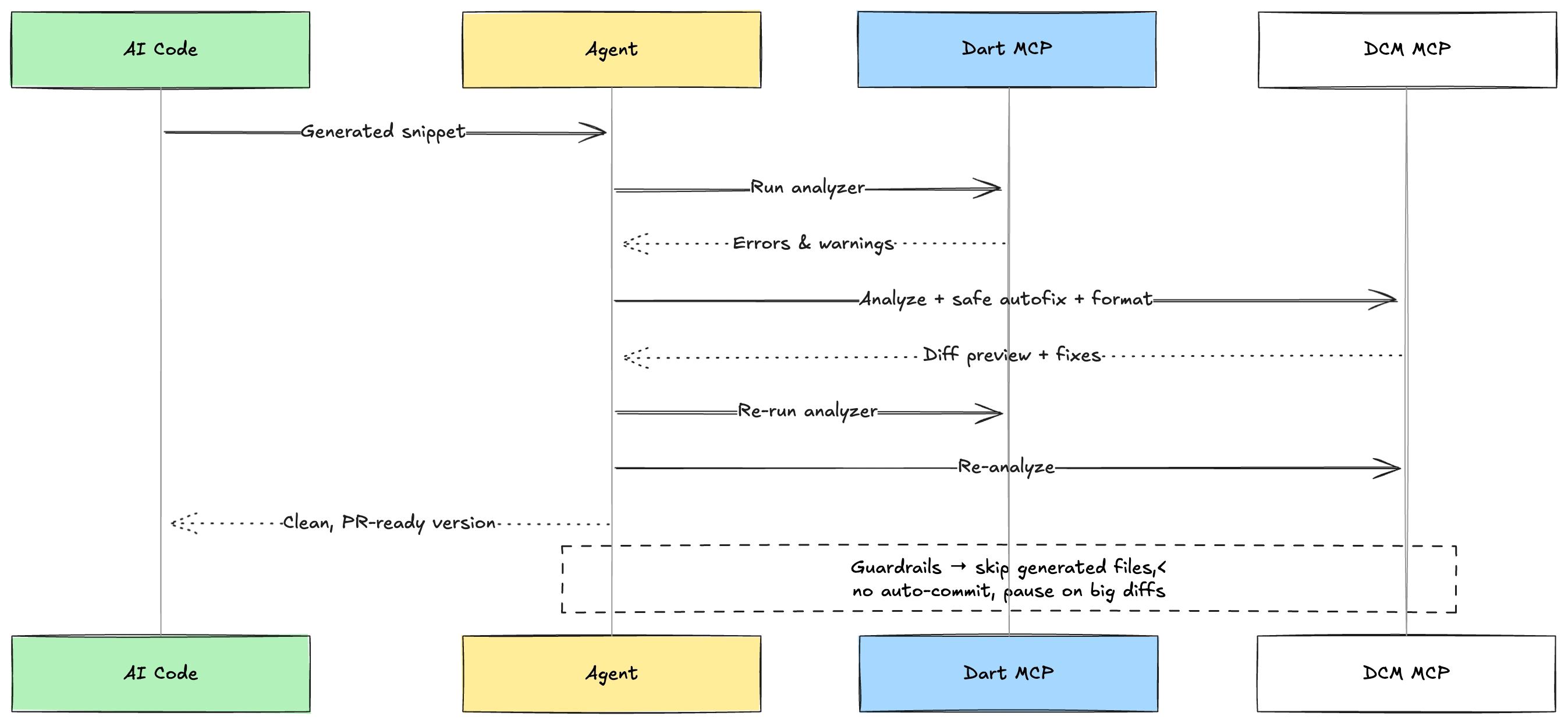
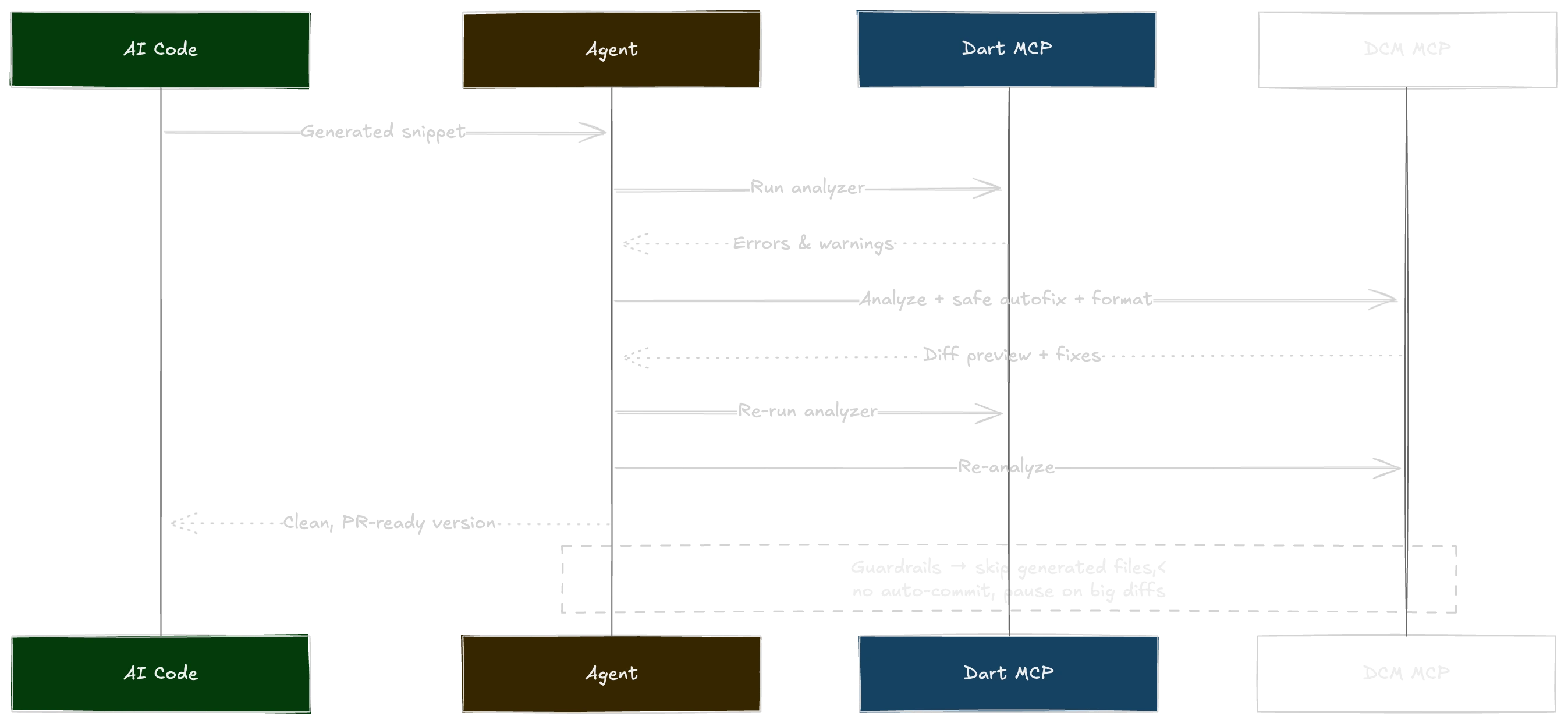
You can also explore DCM's MCP Server integration for setup and usage details.
Build Hooks for Native Code Integration
Dart 3.10 stabilized build hooks, a game-changer for packages that need to compile or bundle native code (C, C++, Rust, Go) alongside Dart.
You create a hook/build.dart script in your package, and the Dart SDK automatically runs it during build, test, or run operations. The hook can compile native libraries, download prebuilt binaries, or generate code assets, all transparently integrated into your package's build process.
Instead of every package inventing custom platform-specific build scripts, you use the standardized hooks and code_assets packages.
Here's a minimal example compiling C code:
// hook/build.dart
import 'package:hooks/hooks.dart';
import 'package:logging/logging.dart';
import 'package:native_toolchain_c/native_toolchain_c.dart';

void main(List<String> args) async {
  await build(args, (input, output) async {
    final packageName = input.packageName;
    final cBuilder = CBuilder.library(
      name: packageName,
      assetName: '$packageName.dart',
      sources: ['src/$packageName.c'],
    );
    await cBuilder.run(
      input: input,
      output: output,
      logger: Logger('')
        ..level = Level.ALL
        ..onRecord.listen((record) => print(record.message)),
    );
  });
}
Then you can call the native function from Dart with FFI's @Native annotation:
import 'dart:ffi';
<Int32 Function(Int32, Int32)>()
external int add(int a, int b);
The SDK bundles the compiled library automatically. No manual setup. No platform-specific complexity.
For complete setup instructions and real-world examples (including SQLite, audio players, and image libraries), see the official Build Hooks documentation.
Granular Deprecation Annotations
Dart 3.10 introduced a powerful enhancement to the @Deprecated annotation; you can now deprecate specific usages of a class without marking the entire class deprecated.
Before Dart 3.10, if you wanted to prevent extending a class, you had two options: deprecate the whole class (which flags all usage) or let people extend it freely. Neither was ideal for library authors trying to communicate breaking changes gradually.
Now you have six specialized constructors:
@Deprecated.extend(): Deprecates extending a class@Deprecated.implement(): Deprecates implementing a class or mixin@Deprecated.instantiate(): Deprecates instantiating a class@Deprecated.mixin(): Deprecates mixing in a class@Deprecated.subclass(): Deprecates both extending and implementing@Deprecated.optional(): Indicates a parameter will become required in the future
Here's a practical example:
// Only allow using the class, not extending it
.extend('Use composition instead of inheritance')
class LegacyWidget {
void render() { /* ... */ }
}
// Normal usage is fine
final widget = LegacyWidget(); // ✅ OK
// But extending triggers a deprecation warning
class MyWidget extends LegacyWidget { // ⚠️ Warning
// ...
}
Another useful pattern, warning about parameters becoming required:
class ApiClient {
void request({
required String url,
.optional('This will be required in v2.0')
String? apiKey,
}) {
// ...
}
}
// Current code without apiKey gets a warning
client.request(url: '/data'); // ⚠️ Warning: apiKey will be required
This lets library maintainers communicate upcoming breaking changes clearly through the analyzer, giving users time to migrate before the change becomes breaking.
For full details on all constructors and usage patterns, see the Deprecated class documentation.
Documentation Imports with @docImport
Dart 3.8 introduced @docImport, a feature that solves a frustrating problem:
how do you reference external APIs in your documentation comments without polluting your actual imports?
Before @docImport, if you wanted to mention Future or Stream in your docs, you had two bad options:
import dart:async(even though your code doesn't use it)- or write plain text without IDE support (no code completion, no refactoring, broken links).
Now you can use @docImport in a library-level doc comment:
/// @docImport 'dart:async';
library;

/// Returns data asynchronously.
///
/// Similar to [Future.value], but with caching.
/// For streaming data, consider using [Stream] instead.
class DataLoader {
  // No actual import of dart:async needed here
}
The IDE treats these references like real imports: you get code completion inside [...], rename refactoring works, and dart doc generates proper links. But your runtime code stays clean, no unnecessary dependencies.
This works with all import URI styles:
/// @docImport 'dart:async';
/// @docImport 'package:flutter/material.dart';
/// @docImport '../models/user.dart';
library;

/// A widget that loads [User] data asynchronously.
///
/// Uses [Future] for one-time loads and [Stream] for real-time updates.
/// Displays a [CircularProgressIndicator] while loading.
class UserWidget {
  // Clean implementation without doc-only imports
}
This is especially valuable for package authors writing extensive API documentation. Your docs can reference Flutter widgets, async types, or other packages without forcing those as actual dependencies.
For complete details on doc comment references and IDE features, see the Documentation References guide.
Wildcard Variables with _
Dart 3.7 changed how _ works for local variables and parameters, making it a true wildcard that doesn't create an actual variable.
Before Dart 3.7, it was common to use _ for callback parameters you didn't need:
void announceCompletion(Future<void> future) {
  future.then((_) {
    print('Complete!');
  });
}
But if a callback had multiple unused parameters, you'd end up with awkward naming like _, __, ___ to avoid name collisions. Now in Dart 3.7, parameters and local variables named _ don't actually create a variable, so there's no possibility of collision. You can use _ for multiple parameters:
void announceFailure(Future<void> future) {
  future.onError((_, _) {  // ✅ Both wildcards allowed
    print('Error!');
  });
}
This makes the language more consistent with how _ already worked in patterns:
var [_, _, third, _, _] = [1, 2, 3, 4, 5];
print(third); // Prints "3"
Now parameters and local variables behave the same way _ is a placeholder that declares no actual variable.
Breaking change: If you have code that declares a parameter or variable named _ and then references it, that code will no longer work:
var result = [1, 2, 3].map((_) {
  return _.toString();  // ❌ Error: Reference to unknown variable
});
You'll need to rename the parameter to something meaningful. This change only applies to parameters and local variables (not top-level variables or members), so you can rename without breaking your library's public API.
In general, DCM provides several lint rules to ensure general usage and proper usage of wildcard, there are some of them:
- avoid-misused-wildcard-pattern — Warns when wildcard patterns are used incorrectly (e.g., in contexts where they have no effect)
- prefer-wildcard-pattern — Suggests using wildcard patterns instead of
dynamicorObjecttypes when matching unknown values - avoid-keywords-in-wildcard-pattern — Warns when wildcard patterns have unnecessary declaration keywords
- avoid-wildcard-cases-with-enums — Warns against using wildcard cases in enum switches (prefer exhaustive matching)
DCM is a code quality tool that helps your team move faster by reducing the time spent on code reviews, finding tricky bugs, identifying complex code, and unifying code style.
Other Noteworthy Improvements
A few more quick wins from 2025 worth knowing:
-
Cross-Compilation (Dart 3.8+): Dart can now compile to native Linux binaries from macOS, Windows, and Linux development machines using
dart compile exeordart compile aot-snapshotwith--target-osand--target-arch.This is especially useful if you’re building for ARM Linux (for example, a Raspberry Pi) and want to compile on your faster dev machine (we do this on macOS to produce
linux/arm64artifacts).# Cross compilation example for an exe
dart compile exe --target-os=linux --target-arch=arm64 bin/main.dart
# Cross compilation example for an aot-snapshot
dart compile aot-snapshot --target-os=linux --target-arch=arm64 bin/main.dartPractical use cases:
- Quicker compiles for embedded devices on a fast laptop.
- Quicker compiles for a Linux-based backend from a non-Linux dev machine.
Read more in the official docs (Cross compilation) and the Dart 3.8 announcement (Dart 3.8).
-
Formatter Updates (Dart 3.7): Dart shipped a largely rewritten formatter (new "tall" style), and Dart 3.8 polished it further based on real feedback: bug fixes, more consistent output, and a few style tweaks that make formatted code read better.
In older releases, a trailing comma would force the surrounding construct to split. The updated formatter now decides whether a construct should split and then adds or removes the trailing comma as needed.
// Before formatter
TabBar(tabs: [Tab(text: 'A'), Tab(text: 'B')], labelColor: Colors.white70);

// After formatter
TabBar(
  tabs: [
    Tab(text: 'A'),
    Tab(text: 'B'),
  ],
  labelColor: Colors.white70,
);
Dart 3.8 also tightened some formatting around expressions. For example:
// Previously released formatter (functions)
function(
  name:
      (param) => another(
        argument1,
        argument2,
      ),
);

// Dart 3.8 formatter (functions)
function(
  name: (param) => another(
    argument1,
    argument2,
  ),
);

// Previously released formatter (variables)
variable =
    target.property
        .method()
        .another();

// Dart 3.8 formatter (variables)
variable = target.property
    .method()
.another(); -
Faster CLI Tools (Dart 3.9): The analysis server is now AOT-compiled.
dart analyzeruns ~50% faster, and short commands likedart formatcomplete in a fraction of the time.
Further Reading and References
For more details on the above features and updates, check out the official Dart announcements and resources from 2025:
- Dart 3.7 Release Announcement (Feb 2025)
- Dart 3.8 Release Announcement (May 2025)
- Dart 3.9 Release Announcement (Aug 2025)
- Dart 3.10 Release Announcement (Nov 2025)
- Dart SDK Changelog
- Flutter 3.32 Release Notes (for Hot Reload on Web)
Each of these resources provides deeper technical context and additional examples.
It’s an exciting time to be a Dart developer, and these features, both stable and upcoming, pave the way for even more productivity and fun in building apps with Dart and Flutter!
If you want us to write more details about any of the features above, send us an email.
Happy coding!
Enjoying this article?
Subscribe to get our latest articles and product updates by email.

 Dmitry Zhifarsky