What’s new in DCM 1.38.0


Today we’re excited to announce the release of DCM 1.38.0!
This release includes 14 new rules; new config option to disable fixes for a particular rule; new single-line per-violation output format for Console reporter; global version constraint configuration via DCM Teams Console; support for converting fields to private named parameters for "dcm fix --type=unnecessarily-public-code" (only for Dart 3.12+); and other improvements! 🚀
Let’s go through the highlights of this release (and the full list of changes is in our changelog)!
Global Version Constraint
While there are several options to keep the installed DCM version in sync (for example, by introducing a global configuration file with the constraint), it still remains one of the challenging parts.
That's why this release adds a new way to configure the global version constrain via the DCM Console:
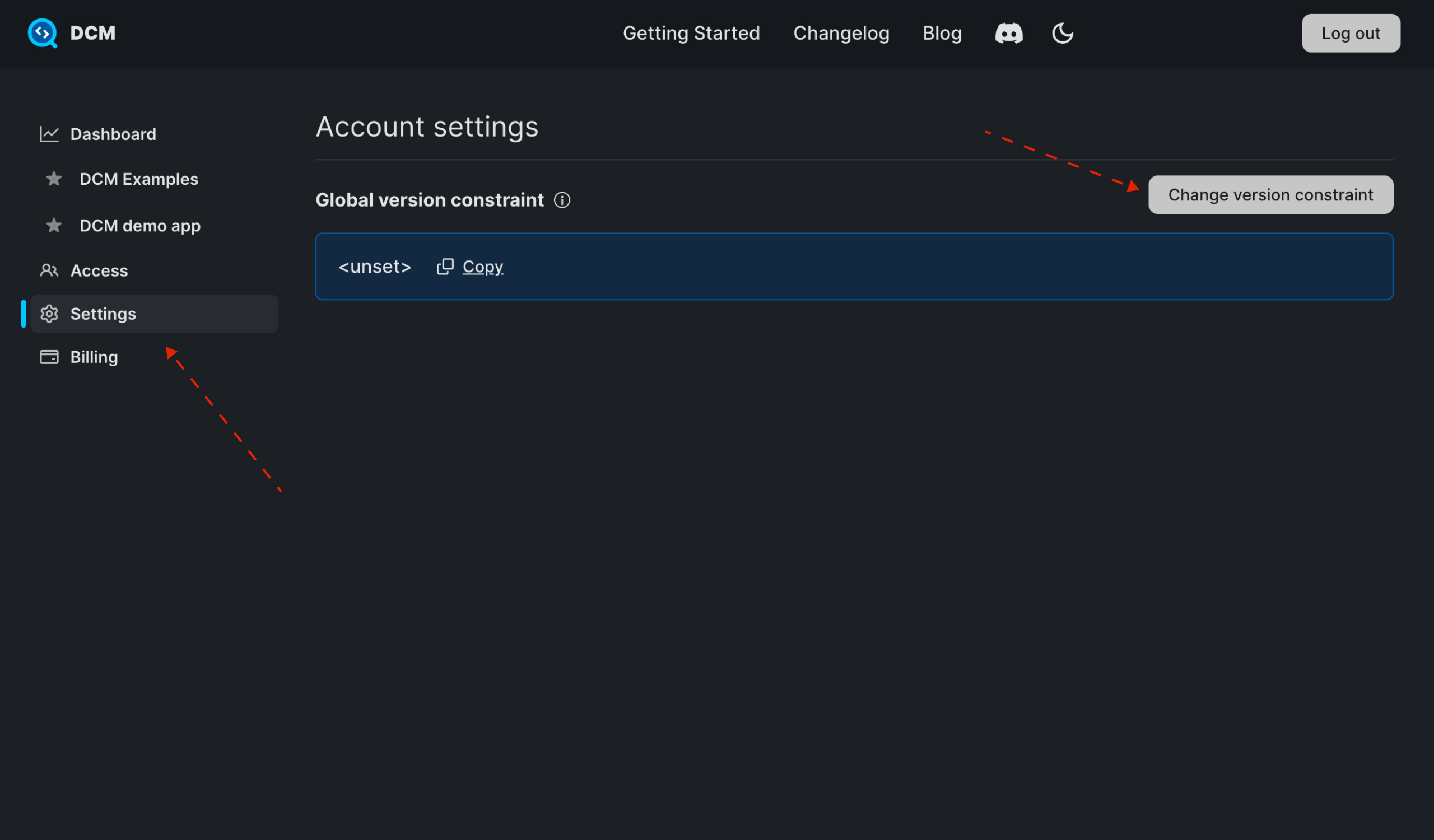
This version constraint is different from the one configured via dcm_global.yaml (which needs to be configured for each project separately) and it applies to all users. If both dcm_global.yaml and this constraint are present, the latter gets the priority.
Global version constraint is available only for DCM 1.38.0+.
Dashboards Improvements
Persistent Selected Intervals and Groups
To help you keep the charts exactly as you left them, selected intervals and groups are now remembered after a page reload:
Persistent Selected Metric Segments
And the same for selected metric segments:
Hiding Selected Categories from Charts
To make it easier to filter out information when working with charts, charts with multiple groups/categories now support hiding selected categories by clicking on the category name:
And the same can be done with the overview pie chart:
Concise Console Output Format
As we are continuing to improve the user experience, we are excited to introduce a new simplified output format for Console reporter!
While the old format provides all necessary information (including severity, location, description, rule name and a link to the docs), its primary downside is it makes harder to work with many issues as each console entry takes a lot of space (plus, if you are feeding the output to LLMs, it's kinda verbose).
To address that, the new concise output includes only the location and the description:
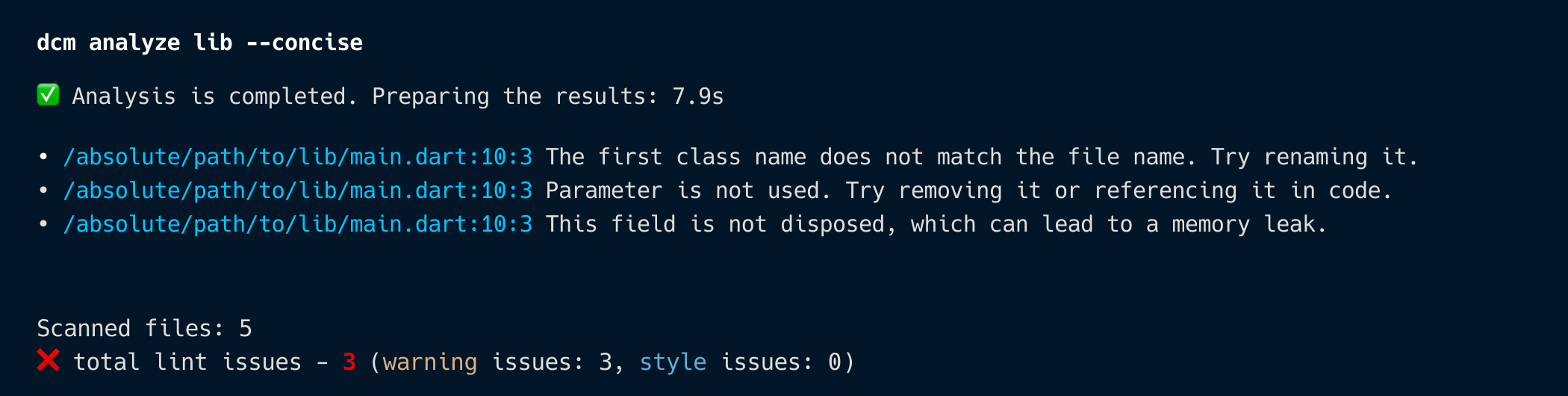
To try it out, pass --concise (or just -c) when calling any command.
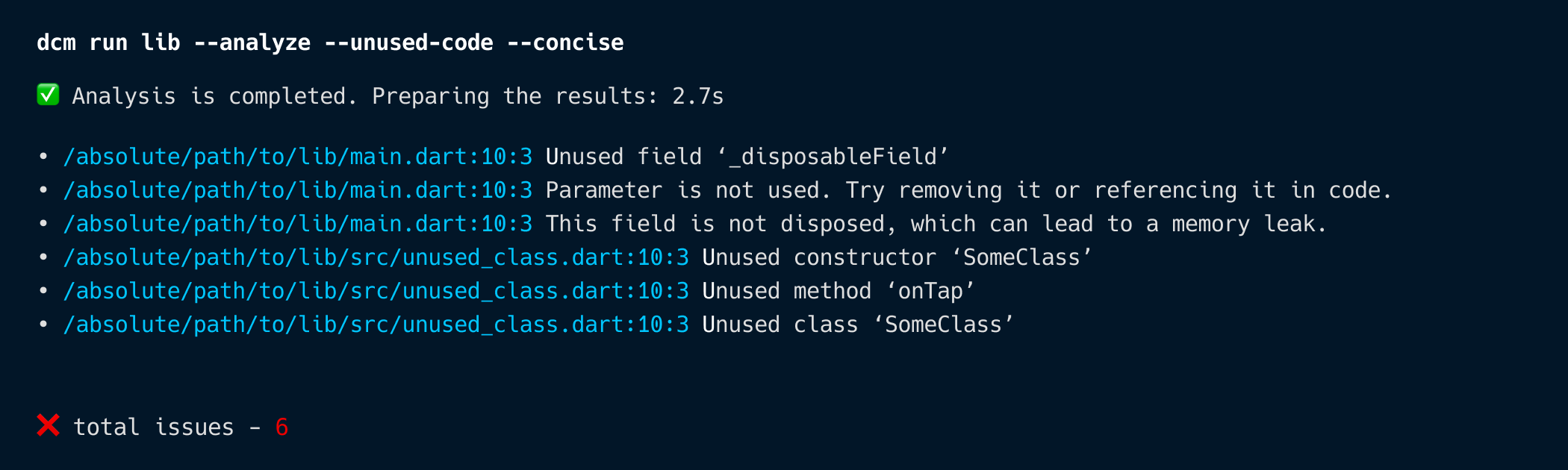
Additionally, when passed to dcm run, there will be no separate sections for each command passed (e.g. Analyze results:, Unused code results:), but instead all issues will be in one sorted list:
New Config to Disabled Fixes
To make the usage of IDE and CLI fixes even more flexible, with this release all rules now support a new config entry suggest-fixes that allows you to disable fixes on a per-rule basis.
For example,
dcm:
  rules:
    - newline-before-return:
        suggest-fixes: false
will disable fixes for newline-before-return for both dcm fix and the IDE extensions.
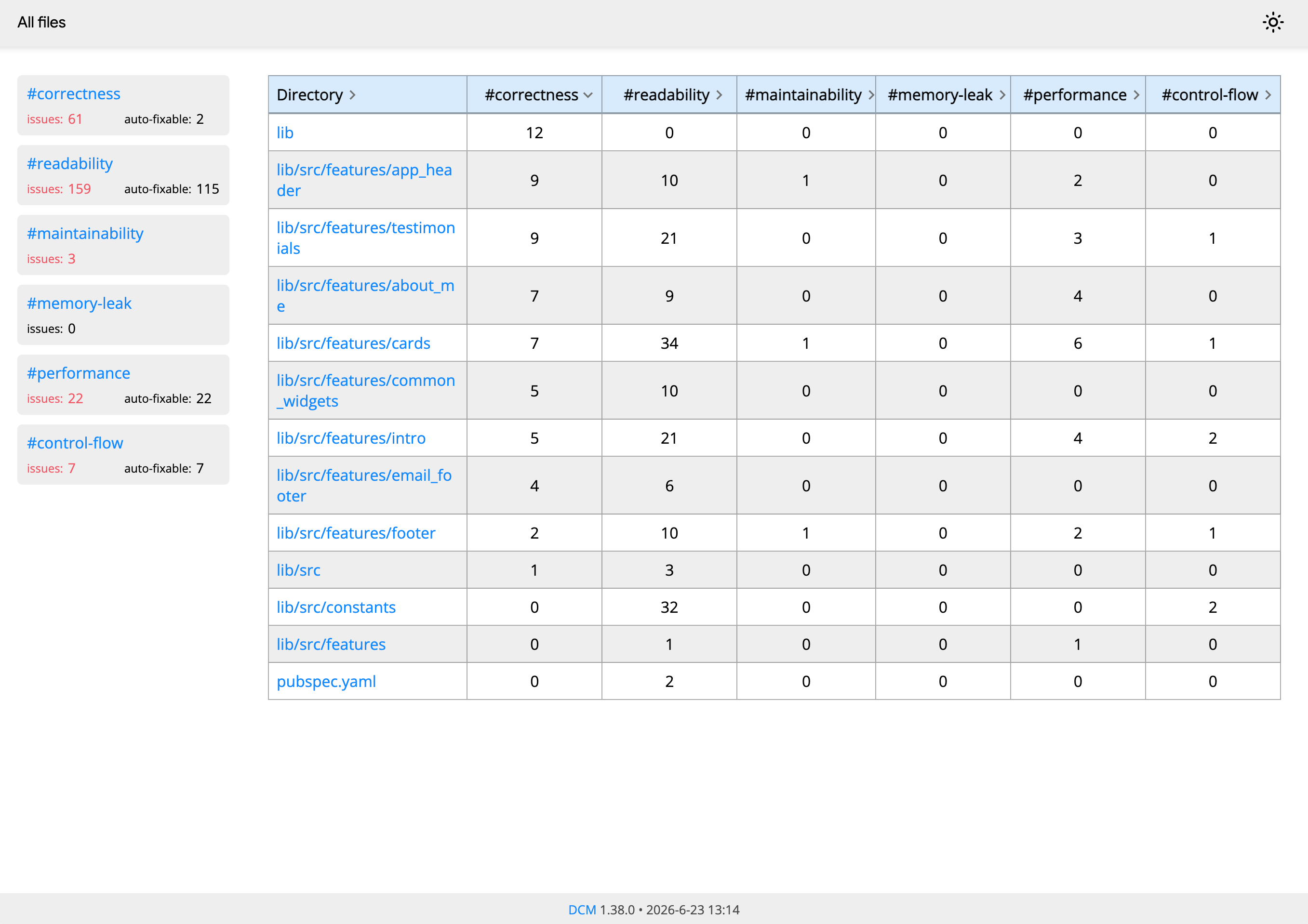
Auto-fixable Issues in the HTML Report
If you prefer working with HTML reports, in this release the HTML report for dcm analyze now also includes the number of auto-fixable issues to help you know how many issues can be quickly address with running dcm fix.
New Rules
Discovering and Adding Rules from New Releases
Each DCM release introduces new rules. To explore all available rules and filter by version, use the dcm init lints-preview command:
dcm init lints-preview lib --rule-version=1.38.0 # Show rules added in 1.38.0
This command displays:
- Rule names and their violations in your codebase
- Estimated effort to fix all violations of each rule
- Whether a rule supports automatic fixes
You can also generate the output in different formats.
avoid-duplicate-factories
Warns when a class has a factory constructor with the same implementation as another factory constructor.
This rule does not take into account parameter/factory names and other insignificant details.
For example,
class SomeClass {
  SomeClass(String data);

  factory SomeClass.fromString(String data) => SomeClass(data);
  // LINT: This factory constructor is a duplicate of SomeClass.fromString.
  //  Try removing this factory or adding unique functionality.
  factory SomeClass.parse(String data) => SomeClass(data);
}

class AnotherClass {
  AnotherClass();

  factory AnotherClass.empty() => AnotherClass();
  // LINT: This factory constructor is a duplicate of AnotherClass.empty.
  //  Try removing this factory or adding unique functionality.
  factory AnotherClass.withData(String data) => AnotherClass();
}
here, SomeClass.parse has exactly the same implementation as SomeClass.fromString and AnotherClass.withData has exactly the same implementation as AnotherClass.empty (even though the number of parameters differs, it does not affect the body of the factory constructor).
To fix the issue, try either removing the duplicate factory or changing the implementation to be unique.
This rule also comes with auto-fix.
avoid-unnecessary-factory
Suggests converting a factory constructor to a regular constructor.
For example,
class Point {
  final double x;
  final double y;

  Point._(this.x, this.y);

  // LINT: This factory constructor can be a regular constructor.
  //  Consider converting it to a regular constructor.
  factory Point(double x, double y) {
    return Point._(x, y);
  }

  // LINT: This factory constructor can be a regular constructor.
  //  Consider converting it to a regular constructor.
  factory Point.atOrigin() => Point._(0, 0);
}
in both cases, having a factory constructor is unnecessary and only adds more code.
To fix that, use a regular constructor instead:
class Point {
  final double x;
  final double y;

  Point(this.x, this.y);

  Point.atOrigin(): x = 0, y = 0;
}
avoid-unmodified-loop-condition
Warns when a loop condition is not modified within the loop.
For example,
void fn(String left, String right) {
  // LINT: None of the local variables in this condition are modified within the loop.
  //  Try checking for a potential mistake.
  while (left.isNotEmpty) {
    print(left);
  }
  left = '';

  // LINT: None of the local variables in this condition are modified within the loop.
  //  Try checking for a potential mistake.
  while (left != right) {
    print(left);
  }
}
here, none of the variables used in loop conditions are modified within the loop which results in an endless loop.
prefer-private-named-parameters
Suggests using private named parameters instead of assigning to a private class field manually.
For example,
class Point {
  final double _x;

  // LINT: Prefer using private named parameters instead of assigning to the private field manually.
  Point({required double x}) : _x = x;
}
should be rewritten to
class Point {
  final double _x;

  Point({required this._x});
}
This rule also comes with auto-fix.
prefer-initializing-formals
Suggests using initializing formal parameters when applicable.
For example,
class Some {
  final String value;
  final String another;

  const Some(String val, {required String named})
      // LINT: Use an initializing formal to assign a parameter to a field.
      //  Try using 'this.value' to initialize the field.
    : value = val,
      another = named;
}

class Another {
  final String _val;

  // LINT: Use an initializing formal to assign a parameter to a field.
  //  Try using 'this.value' to initialize the field.
  const Another(String _value) : _val = _value;
}
should be rewritten to
class Some {
  final String value;
  final String another;

  const Some(this.value, {required String named}) : another = named;
}

class Another {
  final String _val;

  const Another(this._value);
}
This rule also comes with auto-fix.
prefer-random-secure
Warns when Random is used in a security-sensitive context.
The output of Random is predictable and must not be used in security-sensitive contexts.
This rule also comes with auto-fix.
avoid-sensitive-query-params
Warns when a URL query string contains sensitive data.
URL query string could be saved in the browser's history, passed through Referers, stored in logs, or recorded in other sources. Try passing this data via the request headers instead.
For example,
void fn() {
  // LINT: URL query string could be saved in the browser's history, passed through Referers, stored in logs, or recorded in other sources.
  //  Try passing this data via the request headers.
  final url = Uri.https('api.example.com', '', {'token': 'hello'});

  // LINT: URL query string could be saved in the browser's history, passed through Referers, stored in logs, or recorded in other sources.
  //  Try passing this data via the request headers.
  final hardcoded = 'https://api.example.com/user?token=test';
}
here, both URLs will end up with sensitive query parameters.
To address this issue, consider passing sensitive data via request headers or body.
avoid-unrestricted-navigation
Warns when WebViews allow users to navigate to any URL by clicking links or through JavaScript.
Allowing unrestricted navigation within an app's WebView introduces serious security risks. For instance, malicious elements like ads can redirect users to deceptive phishing pages. Because WebViews lack standard browser safety cues (like a visible URL bar), users are more likely to trust these fake sites.
Additionally, if the WebView loads a page with a Cross-Site Scripting (XSS) vulnerability, unrestricted navigation can broaden the attack's impact. Ultimately, this loss of contextual security makes it much harder for users to spot and avoid malicious content.
For example,
void fn() {
  WebViewController()
    // LINT: Avoid unrestricted navigation as it expands the attack surface to cross-site scripting (XSS) vulnerabilities.
    //  Consider preventing navigation to arbitrary URLs.
    ..setNavigationDelegate(NavigationDelegate());

  // LINT: Avoid unrestricted navigation as it expands the attack surface to cross-site scripting (XSS) vulnerabilities.
  //  Consider preventing navigation to arbitrary URLs.
  InAppWebViewSettings();

  // LINT: Avoid unrestricted navigation as it expands the attack surface to cross-site scripting (XSS) vulnerabilities.
  //  Consider preventing navigation to arbitrary URLs.
  InAppWebViewSettings(useShouldOverrideUrlLoading: false);

  // LINT: Avoid unrestricted navigation as it expands the attack surface to cross-site scripting (XSS) vulnerabilities.
  //  Consider preventing navigation to arbitrary URLs.
  HeadlessInAppWebView(InAppWebViewSettings(useShouldOverrideUrlLoading: false));
}
should be rewritten to
void fn() {
  WebViewController()..setNavigationDelegate(
    NavigationDelegate(onNavigationRequest: () {
      ...
    })
  );

  InAppWebViewSettings(useShouldOverrideUrlLoading: true);

  HeadlessInAppWebView(InAppWebViewSettings(useShouldOverrideUrlLoading: true));
}
avoid-unrestricted-javascript
Warns when JavaScript execution is enabled for WebViews.
Mobile applications using WebViews face severe risks if they render untrusted code, making them highly vulnerable to Cross-Site Scripting (XSS). Within a WebView context, malicious JavaScript can exfiltrate sensitive local files from the device. Even more critically, it can interact with exposed native application functions, potentially leading to catastrophic flaws like remote code execution.
For example,
void fn() {
  WebViewController()
    // LINT: Avoid unrestricted JavaScript as it expands the attack surface to cross-site scripting (XSS) vulnerabilities.
    // Consider disabling JavaScript for WebViews.
    ..setJavaScriptMode(JavaScriptMode.unrestricted);

  // LINT: Avoid unrestricted JavaScript as it expands the attack surface to cross-site scripting (XSS) vulnerabilities.
  // Consider disabling JavaScript for WebViews.
  InAppWebViewSettings();

  // LINT: Avoid unrestricted JavaScript as it expands the attack surface to cross-site scripting (XSS) vulnerabilities.
  // Consider disabling JavaScript for WebViews.
  InAppWebViewSettings(javaScriptEnabled: true);

  // LINT: Avoid unrestricted JavaScript as it expands the attack surface to cross-site scripting (XSS) vulnerabilities.
  // Consider disabling JavaScript for WebViews.
  HeadlessInAppWebView(InAppWebViewSettings(javaScriptEnabled: true));
}
should be rewritten to
void fn() {
  WebViewController()
    ..setJavaScriptMode(JavaScriptMode.disabled);

  InAppWebViewSettings(javaScriptEnabled: false);

  HeadlessInAppWebView(InAppWebViewSettings(javaScriptEnabled: false));
}
prefer-single-notifier-per-file
Suggests keeping only one Notifier per file.
For example,
class Some extends Notifier<int> {
final int field = 0;
int build() => 0;
}
// LINT: Prefer only one Notifier per file. Try moving this Notifier to a separate file.
class Another extends Notifier<int> {
int get state;
int build() => 0;
}
should be rewritten to
class Some extends Notifier<int> {
final int field = 0;
int build() => 0;
}
class Another extends Notifier<int> {
int get state;
int build() => 0;
}
prefer-correct-provider-file-name
Suggests ending file names with _provider.dart for files that contain a single Provider declaration.
For example,
// LINT: File name with Providers must end with '_provider.dart'.
//  Try renaming the file.
final firstProvider = Provider((ref) {
  final instance = DisposableService();

  ref.onCancel(instance.dispose);

  return instance;
});
should be rewritten to
final firstProvider = Provider((ref) {
  final instance = DisposableService();

  ref.onCancel(instance.dispose);

  return instance;
});
prefer-riverpod-provider-suffix
Suggests ending Provider variable names with the Provider suffix.
For example,
// LINT: The name of this provider variable should end with Provider.
//  Try renaming this variable.
final first = Provider((ref) {
  final instance = DisposableService();

  ref.onCancel(instance.dispose);

  return instance;
});

// LINT: The name of this provider variable ends with one of the banned suffixes.
//  Try renaming this variable.
final firstNotifierProvider = Provider((ref) {
  final instance = DisposableService();

  ref.onCancel(instance.dispose);

  return instance;
});
should be rewritten to
final firstProvider = Provider((ref) {
  final instance = DisposableService();

  ref.onCancel(instance.dispose);

  return instance;
});

final secondProvider = Provider((ref) {
  final instance = DisposableService();

  ref.onCancel(instance.dispose);

  return instance;
});
prefer-riverpod-notifier-suffix
Suggests ending Notifier class names with the Notifier suffix.
For example,
// LINT: The name of this notifier class should end with Notifier.
//  Try renaming this class.
class Counter extends Notifier<int> {}

// LINT: The name of this notifier class ends with one of the banned suffixes.
//  Try renaming this class.
class CounterProviderNotifier extends Notifier<int> {}
should be rewritten to
class CounterNotifier extends Notifier<int> {}

class AnotherNotifier extends Notifier<int> {}
prefer-correct-notifier-file-name
Suggests ending file names with _notifier.dart for files with Notifiers.
For example,
// LINT: File name of Notifier classes must end with '_notifier.dart'.
//  Try renaming the file.
class SomeNotifier extends Notifier<int> {}
should be rewritten to
class SomeNotifier extends Notifier<int> {}
What’s next
To learn more about upcoming features, keep an eye on our public roadmap.
And to learn more about our upcoming videos and "Rules of the Week" content, subscribe to our Youtube Channel.
Sharing your feedback
If there is something you miss from DCM right now, want us to make something better, or have any general feedback — join our Discord server! We’d love to hear from you.




 Majid Hajian