What’s new in DCM 1.39.0


Today we’re excited to announce the release of DCM 1.39.0!
This release includes 22 new rules; full Primary constructors support for all rules, metrics and commands; new command to find mutable fields and top-level variables that are never reassigned and can be declared final (also, with a CLI fix!); unused code detection improvements; several improved metrics; new @mutated annotation; and other improvements! 🚀
❗️ With the next release we plan to discontinue all DCM versions prior to 1.30.0. If you're still using one of those, consider upgrading to a newer version.
Let’s go through the highlights of this release (and the full list of changes is in our changelog)!
New Command for Unnecessarily Mutable Fields and Top-level Variables
With this release, we are excited to present yet another command to help you with maintaining your codebase! This one is for detecting fields and top-level variables that declared as mutable (with var or type, e.g. String), but are actually never reassigned and can be instead declared as final.
This commands aims to help with 2 different issues: quickly identify mutable fields and variables that were supposed to be reassigned, but are actually not, and find fields and variables that can be made final so future readers of the code can safely assume that those fields and variables are not changed from any other place.
For example,
class SomeClass {
  String? anotherValue;

  SomeClass(this.anotherValue);
}

int? globalVariable = 0;

void fn() {
  final instance = SomeClass('value');
}
here, both anotherValue and globalVariable are never reassigned and can be declared as final.
The example above is a simplified example where all code usages are within one file. The command analyzes cross-file usage before highlighting any issues. That applies to both public and private declarations.
To execute the command, run:
$ dcm check-unnecessarily-mutable-fields lib # or dcm umf lib
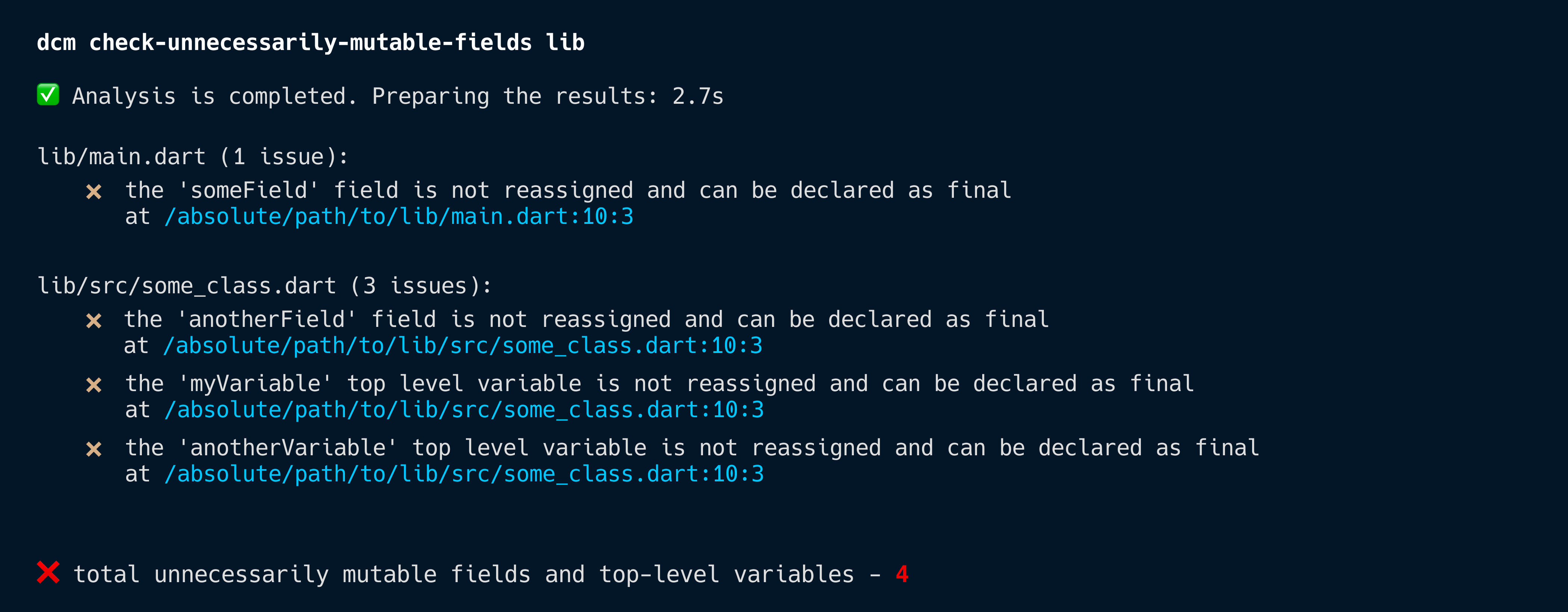
Furthermore, you can automatically fix issues reported by this command via dcm fix reducing time to addresses them to just few minutes.
To do so, set the --type option to unnecessarily-mutable-fields --type=unnecessarily-mutable-fields:
$ dcm fix --type=unnecessarily-mutable-fields lib
By the way, this release includes aliases for all fix types, so no more unnecessarily-public-code or unnecessarily-mutable-fields, you can just pass --type=upc or --type=umf!
Check dcm fix -h for the full list of aliases.
Metric Updates
maximum-nesting-level
With this release, no longer triggers for functions and methods with empty body (or with pseudo-empty body).
For example,
void first() {
  return;
}

void second() {
  throw Exception();
}

void third() => throw Exception();
all the above are now skipped to reduce noise.
cyclomatic-complexity and maintainability-index
Were previously only skipping function and methods with empty body, but now exclude more cases for pseudo-empty body as well (similar to maximum-nesting-level).
Rule Updates
While this release includes Primary constructors support for all rules, metrics and commands, we didn't not include any new rules for primary constructors and want to take more time for proper implementation.
Meanwhile, there are several rules in the Dart analyzer (use_declaring_parameters, initialize_in_field_declaration, empty_container_bodies and for some reason undocumented use_primary_constructors) that cover basic cases and all have auto-fixes for fast migration.
❗️ avoid-missing-image-alt
This rule was renamed to provide-image-semantic-label to maintain consistency with newly introduced accessibility rules.
If you have avoid-missing-image-alt in your configuration, you need to manually rename it to provide-image-semantic-label when upgrading to 1.39.0+.
parameters-ordering
This release includes a new config option called discard-underscores to exclude underscores (_) from parameter names when doing the comparison.
For example,
class WithPrivate {
  final String _value;
  final int _age;
  final String? surname;

  WithPrivate.correct({
    required this._age,
    required this.surname,
    required this._value,
  });
}
without the config option, the rule highlights WithPrivate.correct and expects the order of the parameters to be surname -> _age -> _value (which is the correct alphabetical order, given some of the have the _).
However, if you want to sort parameters regardless of them being public or private, setting discard-underscores: true will give you that.
With that option enabled, the expected order matches what the constructor already has (_age -> surname -> _value) and the rule will not show an issue.
@mutated annotation
With this release we are adding a new @mutated annotation to the dart-code-metrics-annotations package.
The idea behind this annotation is to clearly indicate which parameters are being mutated within the function/method body for both future readers and some of our lint rules that check for mutable parameters.
For example,
void first( Set<String?> targets) {
...
targets.add(null);
}
void second(Set<String?> targets) {
...
print(targets);
}
here, adding @mutated to the targets parameter clearly indicates that the number of elements in that set changes somewhere within the function body removing the need to read through that body (regardless of its size) to understand that.
We've also added a new rule prefer-correct-mutated that highlights all cases where adding @mutated is necessary (and all cases where it is redundant and can be removed) so no manual work is required. That rule also has an auto-fix.
Additionally, avoid-collection-mutating-methods, avoid-mutating-parameters and avoid-not-assignable-collection-types pick up that annotation to show (or in some cases, hide) their issues. For more details, please refer to the docs for each of those rules.
New Rules
Discovering and Adding Rules from New Releases
Each DCM release introduces new rules. To explore all available rules and filter by version, use the dcm init lints-preview command:
dcm init lints-preview lib --rule-version=1.39.0 # Show rules added in 1.39.0
This command displays:
- Rule names and their violations in your codebase
- Estimated effort to fix all violations of each rule
- Whether a rule supports automatic fixes
You can also generate the output in different formats.
add-static-field
Warns when a class that mixes in, extends or implements a configured other class is missing a required static field.
This rule requires configuration in order to highlight any issues.
For example,
dcm:
  rules:
    - add-static-field:
        entries:
          - type: with
            name: MyMixin
            fields: ['id', 'value']
          - type: implements
            name: MyInterface
            fields: ['anotherField']
          - type: extends
            name: MySuperclass
            fields: ['someField']
// LINT: This class mixes in MyMixin and is expected to have static fields: id, value.
//  Try adding these fields.
class MixinTarget with MyMixin {}

// LINT: This class implements MyInterface and is expected to have static fields: anotherField.
//  Try adding these fields.
class InterfaceTarget implements MyInterface {}

// LINT: This class extends MySuperclass and is expected to have static fields: someField.
//  Try adding these fields.
class ParentTarget extends MySuperclass {}
with the configuration above, the rule will highlight all three class declarations as missing static fields.
class MixinTarget with MyMixin {
  static final id = 0;
  static final value = 1;
}

class InterfaceTarget implements MyInterface {
  static final anotherField = 2;
}

class ParentTarget extends MySuperclass {
  static final someField = 3;
}
avoid-not-assignable-collection-types
Warns when a collection with non-nullable elements is passed to a parameter that accepts a collection with nullable elements and which is mutated within the function/method body.
Adding an element to such a parameter will throw a runtime exception if the element is equal null.
To address this issue, try changing the collection to accept nullable values or make the parameter type to accept only non-nullable elements.
By default triggers on the following methods: add, addAll, addEntries, insert, insertAll, fillRange, putIfAbsent, replaceRange, setAll, setRange, update, updateAll.
This rule also supports the @mutated annotation and triggers for any annotated parameter of public functions/methods that has a type mismatch.
To use the @mutated annotation, install the dart-code-metrics-annotations package.
For example,
void fn() {
  final conditionTargets = <String, String>{};
  // LINT: Passing a collection with non-nullable elements can lead to a runtime exception if the collection is updated with a null value inside the invocation.
  //  Try changing the collection to accept nullable values or make the parameter type to accept only non-nullable elements.
  _extractConditionTargetsMap(conditionTargets);

  final conditionTargets = <String>{};
  // LINT: Passing a collection with non-nullable elements can lead to a runtime exception if the collection is updated with a null value inside the invocation.
  //  Try changing the collection to accept nullable values or make the parameter type to accept only non-nullable elements.
  _extractConditionTargets(conditionTargets);
}

void _extractConditionTargetsMap(Map<String?, String?> targets) {
  targets['hello'] = null;
}

void _extractConditionTargets(Set<String?> targets) {
  targets.add(null);
}
should be rewritten to
void fn() {
  final conditionTargets = <String, String>{};
  _extractConditionTargetsMap(conditionTargets);

  final conditionTargets = <String?>{}; // Now nullable
  _extractConditionTargets(conditionTargets);

  final conditionTargets = <String>{};
  _notMutated(conditionTargets); // Not mutated within the body of the function
}

// Now accepts only non-nullable values
void _extractConditionTargetsMap(Map<String, String> targets) {
  targets['hello'] = 'there';
}

void _extractConditionTargets(Set<String?> targets) {
  targets.add(null);
}

void _notMutated(Set<String?> target) {
  if (targets.contains('value')) {
    ...
  }
}
avoid-mutating-constant-collections
Warns when a constant collection is being mutated.
Trying to add/remove elements to a constant collection will throw a runtime exception.
For example,
const global = [1, 2, 3];

class SomeClass {
  static const set = {1, 2, 3};

  final list = const [1, 2, 3];

  void fn() {
    // LINT: Avoid mutating constant collections.
    //  This invocation will throw a runtime exception.
    list.add(1);
    // LINT: Avoid mutating constant collections.
    //  This invocation will throw a runtime exception.
    global.add(2);
    // LINT: Avoid mutating constant collections.
    //  This invocation will throw a runtime exception.
    set.add(3);
  }
}
should be rewritten to
class SomeClass {
  static final set = {1, 2, 3}; // now mutable

  final list = [1, 2, 3]; // now mutable

  void fn() {
    list.add(1);
    set.add(3);
  }
}
avoid-always-null-variables
Warns when a variable is always null in the current code branch.
For example,
void fn(String? value, String another) {
  if (value == null) {
    // LINT: This variable is always null in the current code branch.
    //  Try replacing it with a different variable or a null literal.
    print(value);
  }

  if (value == null) {
    // LINT: This variable is always null in the current code branch.
    //  Try replacing it with a different variable or a null literal.
    print(value ?? another);
  }

  if (value != null) {
    ...
  } else {
    // LINT: This variable is always null in the current code branch.
    //  Try replacing it with a different variable or a null literal.
    print(value);
  }
}
should be rewritten to
void fn(String? value, String another) {
  if (value == null) {
    print(null);
  }

  if (value == null) {
    print(another);
  }

  if (value != null) {
    ...
  }
}
avoid-duplicate-field-initializers
Warns when a final field has the same initializer as another field in scope.
Fields with duplicate initializers are either the result of a typo or are redundant and can be simply removed.
For example,
class Some {
  final value = 'hello';
  // LINT: This field has the same initializer as 'value'.
  //  Try changing the initializer or reusing the existing field.
  final another = 'hello';
}

class Primary(String val) {
  final another = val;
  // LINT: This field has the same initializer as 'another'.
  //  Try changing the initializer or reusing the existing field.
  final third = val;

  final computed = val + val;
  // LINT: This field has the same initializer as 'computed'.
  //  Try changing the initializer or reusing the existing field.
  final anotherComputed = val + val;
}
should be rewritten to
class Some {
  final value = 'hello';
  final another = 'world';
}

class Primary(String val) {
  final another = val;

  final computed = val + val;
}
prefer-unmodifiable-of
Suggests using .unmodifiableOf() instead of .unmodifiable().
.unmodifiableOf() constructors have slightly better typings and accept a generic type instead of dynamic.
For example,
const array = [1, 2, 3, 4, 5, 6, 7, 8, 9];

// LINT: Prefer '.unmodifiableOf' instead of 'unmodifiable'.
final copy = List<int>.unmodifiable(array);
// LINT: Prefer '.unmodifiableOf' instead of 'unmodifiable'.
final numList = List<num>.unmodifiable(array);

const map = {"hi": 1};

// LINT: Prefer '.unmodifiableOf' instead of 'unmodifiable'.
final copy = Map<String, int>.unmodifiable(map);
// LINT: Prefer '.unmodifiableOf' instead of 'unmodifiable'.
final numMap = Map<String, num>.unmodifiable(map);
should be rewritten to
const array = [1, 2, 3, 4, 5, 6, 7, 8, 9];

final copy = List<int>.unmodifiableOf(array);
final numList = List<num>.unmodifiableOf(array);

const map = {"hi": 1};

final copy = Map<String, int>.unmodifiableOf(map);
final numMap = Map<String, num>.unmodifiableOf(map);
This rule also comes with auto-fix.
prefer-correct-mutated
Warns when a parameter of the collection type (e.g. List or Set) is missing or has an unnecessary @mutated annotation.
@mutated is used to indicated parameters that are being mutated within the function/method body (e.g. .add(element)).
To use the @mutated annotation, install the dart-code-metrics-annotations package.
This annotation is used by avoid-mutating-parameters, avoid-collection-mutating-methods and avoid-not-assignable-collection-types rules.
For example,
// LINT: This parameter is mutated, but is not annotated with @mutated.
// Try adding the annotation.
void _extractConditionTargetsMap(Map<String?, String?> targets) {
targets['23'] = null;
}
// LINT: This parameter is mutated, but is not annotated with @mutated.
// Try adding the annotation.
void _extractConditionTargets(Set<String?> targets) {
targets.add(null);
}
// LINT: This parameter is annotated with @mutated, but is not mutated or passed to a @mutated argument.
// Try removing the annotation.
void _withAnnotation( Set<String?> targets) {
print(targets);
}
should be rewritten to
void _extractConditionTargetsMap( Map<String?, String?> targets) {
targets['23'] = null;
}
void _extractConditionTargets( Set<String?> targets) {
targets.add(null);
}
void _withAnnotation(Set<String?> targets) {
print(targets);
}
This rule also comes with auto-fix.
use-existing-widget
Warns when the sequence of widgets matches one of the configured sequences and should be replaced with another existing widget.
This rule requires configuration in order to highlight any issues.
For example,
dcm:
  rules:
    - use-existing-widget:
        entries:
          - sequence: 'MyWidget > AnotherWidget > title: ThirdWidget'
            replacement: 'SomeOtherWidget'
          - sequence: 'MyWidget > any: AnotherWidget'
            replacement: 'SomeWidget'
          - sequence: 'MyWidget > OtherWidget'
            replacement: 'SomeWidget'
// LINT: This sequence of widgets (MyWidget > child: AnotherWidget > title: ThirdWidget) can be replaced with a single 'SomeOtherWidget' widget.
MyWidget(
  child: AnotherWidget(title: ThirdWidget(another: Text())),
);
should be rewritten to
SomeOtherWidget(child: Text());
prefer-icon-button-tooltip
Warns when IconButton does not pass the tooltip argument.
Without a tooltip, screen readers like VoiceOver or TalkBack announce only "Button" or read out an unhelpful internal icon glyph code (e.g. "e14c, button").
This violates WCAG SC 4.1.2 because the control lacks an accessible name, rendering the button unusable for blind or low-vision users.
For example,
// LINT: Tooltip is not specified.
//  Try adding it or wrapping this widget into 'ExcludeSemantics'.
IconButton();
// LINT: Tooltip is not specified.
//  Try adding it or wrapping this widget into 'ExcludeSemantics'.
IconButton(tooltip: '');
should be rewritten to
IconButton(tooltip: 'some tooltip');
ExcludeSemantics(child: IconButton());
This rule also comes with auto-fix.
avoid-redundant-semantics-wrapper
Warns when the child widget of Semantics already registers its own semantic node.
Standard Material widgets (ElevatedButton, TextButton, OutlinedButton, IconButton) natively register their own semantics nodes and button role flags.
Wrapping them in an outer Semantics(button: true, label: ...) duplicates accessibility metadata, generating double announcements or conflicting focus nodes.
For example,
// LINT: The child widget already registers its own semantic node, adding 'Semantics' will cause duplicate announcements.
//  Try removing this widget.
Semantics(child: ElevatedButton());

// LINT: The child widget already registers its own semantic node, adding 'Semantics' will cause duplicate announcements.
//  Try removing this widget.
Semantics(child: flag ? ElevatedButton() : ElevatedButton());

// LINT: The child widget already registers its own semantic node, adding 'Semantics' will cause duplicate announcements.
//  Try removing this widget.
Semantics(child: nullable ?? ElevatedButton());
should be rewritten to
ElevatedButton();
Semantics(child: WidgetWithoutItsSemantics());
This rule also comes with auto-fix.
prefer-localized-semantic-labels
Warns when a string literal is passed to accessibility-related parameters (label:, tooltip:, semanticLabel:, etc.).
By default checks only standard Flutter widgets (icons, images, buttons, progress indicators and Semantics).
Modern mobile apps support multiple locales and languages. When developers hardcode string literals for accessibility properties (e.g., Semantics(label: 'Close dialog') or IconButton(tooltip: 'Delete')), non-English users using localized interfaces will hear accessibility labels read out in English.
Furthermore, screen reader text-to-speech engines assigned to foreign languages (e.g. Polish or Spanish) will attempt to pronounce English words phonetically, producing unintelligible, distorted voice output for blind users.
For example,
// LINT: Provide a localized semantic label.
Semantics(label: '');

// LINT: Provide a localized semantic label.
Semantics(label: 'Cancel');
should be rewritten to
Semantics(label: someString); // will be highlighted if `ignore-identifiers` is `false`
Semantics(label: context.l10n.value);
Semantics(label: AppLocalizations.of(context).label);
provide-progress-indicator-semantics
Warns when a progress indicator does not have a semantics label.
Standard Flutter loading indicators (CircularProgressIndicator, LinearProgressIndicator, RefreshIndicator) communicate progress or active background processing visually.
Without a semanticsLabel, the indicator is completely excluded from the semantics tree on iOS, rendering the loading state completely invisible to VoiceOver.
For example,
// LINT: Provide a non-empty semantics label to progress indicators.
CircularProgressIndicator();

// LINT: Provide a non-empty semantics label to progress indicators.
LinearProgressIndicator();
should be rewritten to
CircularProgressIndicator(semanticsLabel: 'some label');
LinearProgressIndicator(semanticsLabel: 'some label');
This rule also comes with auto-fix.
avoid-focusable-offstage
Warns when the child of Offstage widget is focusable.
Offstage is a widget that lays the child out as if it was in the tree, but without painting anything, without making the child available for hit testing, and without taking any room in the parent.
However, Offstage children are still active: they can receive focus and have keyboard input directed to them.
To avoid the child to be focusable, wrap it with the ExcludeFocus widget.
For example,
// LINT: The child widget can still receive focus even if it is not visible.
//  Try wrapping the child widget with 'ExcludeFocus'.
Offstage(child: TextFormField());
should be rewritten to
Offstage(child: ExcludeFocus(child: TextFormField()));
provide-input-field-label
Warns when TextField, TextFormField, or CupertinoTextField do not provide a decoration: InputDecoration(labelText: ...), a label widget, or have a Semantics wrapper with the label.
Text input fields in Flutter frequently use hintText or inline placeholder text without specifying a permanent labelText or wrapping in a Semantics(label: ...) widget.
When input fields lose focus or contain user-entered text, VoiceOver and TalkBack may read only the entered text without announcing the field's purpose.
For example,
// LINT: Provide a label to input fields.
//  Try passing 'labelText' or 'label' or wrapping this widget with 'Semantics'.
TextField();

// LINT: Provide a label to input fields.
//  Try passing 'labelText' or 'label' or wrapping this widget with 'Semantics'.
TextField(decoration: InputDecoration());

// LINT: Provide a label to input fields.
//  Try passing 'labelText' or 'label' or wrapping this widget with 'Semantics'.
TextFormField();
should be rewritten to
TextField(decoration: InputDecoration(label: Text('some label')));
TextField(decoration: InputDecoration(labelText: 'some label'));
Semantics(label: 'some label', child: TextField());
avoid-merge-semantics-list-tile
Warns when MergeSemantics has a ListTile or CheckboxListTile that defines a non-null trailing or leading argument.
Wrapping a ListTile inside MergeSemantics when the tile contains independent trailing/leading action buttons (e.g. a favorite button or delete icon button) collapses the entire tile into a single static text block.
This renders the secondary action buttons completely unclickable for screen reader users.
For example,
// LINT: Wrapping 'ListTile' inside 'MergeSemantics' makes action buttons completely unaccessible for screen reader users.
//  Try removing this widget.
MergeSemantics(child: ListTile(leading: IconButton()));

// LINT: Wrapping 'ListTile' inside 'MergeSemantics' makes action buttons completely unaccessible for screen reader users.
//  Try removing this widget.
MergeSemantics(child: ListTile(trailing: IconButton()));
should be rewritten to
ListTile(leading: IconButton());
ListTile(trailing: IconButton());
This rule also comes with auto-fix.
provide-slider-semantic-formatter
Warns when a slider widget does not pass the semanticFormatterCallback argument.
Standard Flutter Slider controls operate on numeric double values. When a slider represents a non-percentage value (like a dollar amount), Flutter’s default semantic formatter announces it as a percentage (e.g. "50%").
This default percentage announcement is highly misleading for screen reader users when adjusting values meant to represent prices, volume, or specific counts.
For example,
// LINT: Prefer providing a semantic formatter callback to ensure correct announcement.
Slider(value: 1000.0);

// LINT: Prefer providing a semantic formatter callback to ensure correct announcement.
RangeSlider(value: 1000.0);
should be rewritten to
Slider(
  value: 1000.0,
  semanticFormatterCallback: (val) => '$${val.round()} dollars',
);
This rule also comes with auto-fix.
provide-icon-semantic-label
Warns when Icon does not have a semanticLabel.
When developers use standalone Icon widgets (e.g. Icon(Icons.star)) as visual indicators without text, omitting the semanticLabel causes Flutter to exclude the icon from the semantics tree entirely.
This renders meaningful visual icons completely invisible to screen readers like VoiceOver.
For example,
// LINT: Provide a semantic label to icons.
Icon();

// LINT: Provide a semantic label to icons.
ImageIcon();
should be rewritten to
Icon(semanticLabel: 'some label');
ExcludeSemantics(child: Icon());
This rule also comes with auto-fix.
provide-autofill-hints
Warns when TextField, TextFormField or CupertinoTextField does not pass the autofillHints argument.
Omitting autofillHints in Flutter prevents password managers and assistive system autofill tools from assisting users with motor or cognitive disabilities.
WCAG 2.1 Criterion 1.3.5 requires identifying input purpose programmatically for personal data inputs (email, password, phone, postal address).
For example,
// LINT: Autofill hints are not specified. Try passing them.
TextField();

// LINT: Autofill hints are not specified. Try passing them.
TextFormField();
should be rewritten to
TextField(autofillHints: const []); // correct, does not need a hint
TextField(autofillHints: const [AutofillHints.email]);
This rule also comes with auto-fix.
prefer-semantics-header
Warns when the AppBar title is not wrapped into Semantics widget.
Screen reader users frequently navigate mobile applications by heading landmarks (swiping up/down with rotor/heading gesture).
In Flutter, standard Text widgets—even when styled as large titles (Theme.of(context).textTheme.headlineLarge)—are not marked as headings in the Accessibility Tree unless explicitly wrapped in Semantics(header: true).
Without header metadata, users cannot skip past navigation elements to jump directly to page content.
For example,
// LINT: Prefer adding header semantics to top-level screen titles.
//  Try wrapping this widget with 'Semantics'.
AppBar(title: const Text('Account Settings'));

// LINT: Prefer adding header semantics to top-level screen titles.
//  Try wrapping this widget with 'Semantics'.
AppBar(title: nullable ?? Text('Account Settings'));

// LINT: Prefer adding header semantics to top-level screen titles.
//  Try wrapping this widget with 'Semantics'.
AppBar(title: title);
should be rewritten to
AppBar(title: Semantics(header: true, child: const Text('Account Settings')));
AppBar(title: Semantics(header: true, child: title));
This rule also comes with auto-fix.
avoid-nested-interactive-semantics
Warns when an interactive widget is a descendant of another interactive widget. By default checks only standard Flutter widgets.
Nesting interactive controls inside each other (e.g. an IconButton inside an InkWell card) produces conflicting accessibility nodes in VoiceOver and TalkBack.
Screen readers cannot determine which tap action target should take priority, causing screen readers to skip secondary buttons or trigger unexpected taps.
For example,
// LINT: Avoid nesting interactive widgets inside each other.
//  Try moving this widget out.
IconButton(child: Checkbox());

// LINT: Avoid nesting interactive widgets inside each other.
//  Try moving this widget out.
Checkbox(child: IconButton());
should be rewritten to
Checkbox();
IconButton();
prefer-haptic-feedback-on-interaction
Warns when a GestureDetector or InkWell onTap callback does not invoke HapticFeedback.
For blind, low-vision, or neurodivergent users, physical tactile response (vibration/haptics) provides essential non-visual confirmation that a touch gesture or button press was successfully registered by the OS.
Custom gesture targets (GestureDetector, InkWell) often omit HapticFeedback.vibrate() or HapticFeedback.selectionClick() calls in their callback blocks.
For example,
class MyWidget extends StatelessWidget {
final void Function() callback;
const MyWidget(this.callback);
Widget build(BuildContext context) {
// LINT: Prefer calling one of HapticFeedback methods to provide non-visual confirmation that a tap was successfully registered by the OS.
GestureDetector(onTap: callback);
GestureDetector(
// LINT: Prefer calling one of HapticFeedback methods to provide non-visual confirmation that a tap was successfully registered by the OS.
onTap: () {
callback();
},
);
}
}
should be rewritten to
class MyWidget extends StatelessWidget {
final void Function() callback;
const MyWidget(this.callback);
Widget build(BuildContext context) {
GestureDetector(
onTap: () {
HapticFeedback.vibrate();
callback();
},
);
GestureDetector(onTap: () => _withHaptic());
}
void _withHaptic() {
HapticFeedback.vibrate();
...
}
}
specify-unknown-enum-value
Warns when a field of the Enum type does not specify unknownEnumValue.
Specifying unknownEnumValue ensures backward compatibility if the enum values change. Not providing it can lead to runtime exceptions for older app versions if it relies on the same API.
For example,
()
class MyEntity {
// LINT: Fields of the Enum type must specify 'unknownEnumValue' to simplify backward compatibility.
// Try adding '@JsonKey' with 'unknownEnumValue'.
final MyEnum myEnum;
}
()
class MyEntity {
// LINT: Fields of the Enum type must specify 'unknownEnumValue' to simplify backward compatibility.
// Try adding '@JsonKey' with 'unknownEnumValue'.
()
final MyEnum myEnum;
}
should be rewritten to
()
class MyEntity {
(unknownEnumValue: MyEnum.a)
final MyEnum myEnum;
}
()
class MyEntity {
(unknownEnumValue: JsonKey.nullForUndefinedEnumValue)
final MyEnum? myEnum;
}
What’s next
To learn more about upcoming features, keep an eye on our public roadmap.
And to learn more about our upcoming videos and "Rules of the Week" content, subscribe to our Youtube Channel.
Sharing your feedback
If there is something you miss from DCM right now, want us to make something better, or have any general feedback — join our Discord server! We’d love to hear from you.




 Majid Hajian